
Full notes
Full Inotia 4 update
Read the full published notes in a cleaner layout. The original post stays linked below.
What changed
1 fix0 additions2 changes0 removals
- Compatibility
changedNavigate to the “Compatibility” tab.
changedCheck “Force the use of a specific Steam Play compatibility tool.”
fixedFrom the dropdown list, select “Proton Hotfix” or “Proton Experimental.”
Inotia 4 changes
changedNavigate to the “Compatibility” tab.
changedCheck “Force the use of a specific Steam Play compatibility tool.”
fixedFrom the dropdown list, select “Proton Hotfix” or “Proton Experimental.”
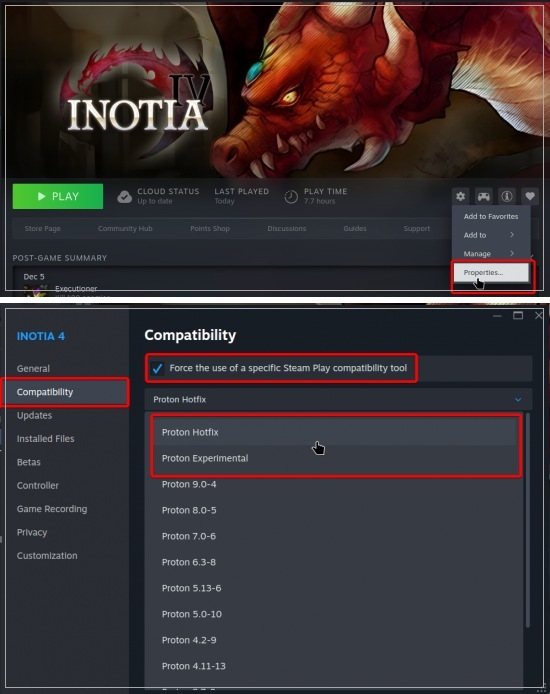
Right-click the game in your Steam Library and select “Properties…”
Navigate to the “Compatibility” tab.
Check “Force the use of a specific Steam Play compatibility tool.”
From the dropdown list, select “Proton Hotfix” or “Proton Experimental.”
Source
Changelog.gg summarizes and formats this update. How we read updates.