
HomeGamesUpdatesPricingMethodology
Steam News23 March 20263mo ago

MANY Accessibility Options NOW LIVE!

Please visit the NEW GUIDE available on our Steam page for the FULL LIST of Accessibility Options and settings. [dynamiclink href="https://steamcommunity.com/sharedfiles/filedetails/?

In this update1

Full notes

Full Ink Inside update

Read the full published notes in a cleaner layout. The original post stays linked below.

What changed

0 fixes0 additions7 changes0 removals
  • UI and audio
changedPlease visit the NEW GUIDE available on our Steam page for the FULL LIST of Accessibility Options and settings.[dynamiclink href=" https://steamcommunity.com/sharedfiles/filedetails/?id=3691023974 "]Highlights include:
changedPlease visit the NEW GUIDE available on our Steam page for the FULL LIST of Accessibility Options and settings.The game's color space design, including the main characters, is optimized for a black-and-white color space (luminance contrast). This means all key visuals for the characters and game use colors that avoid conflicts for any form of color blindness. So to that end they do not have a colorblind option because the game's color design already accommodates players who may need it.
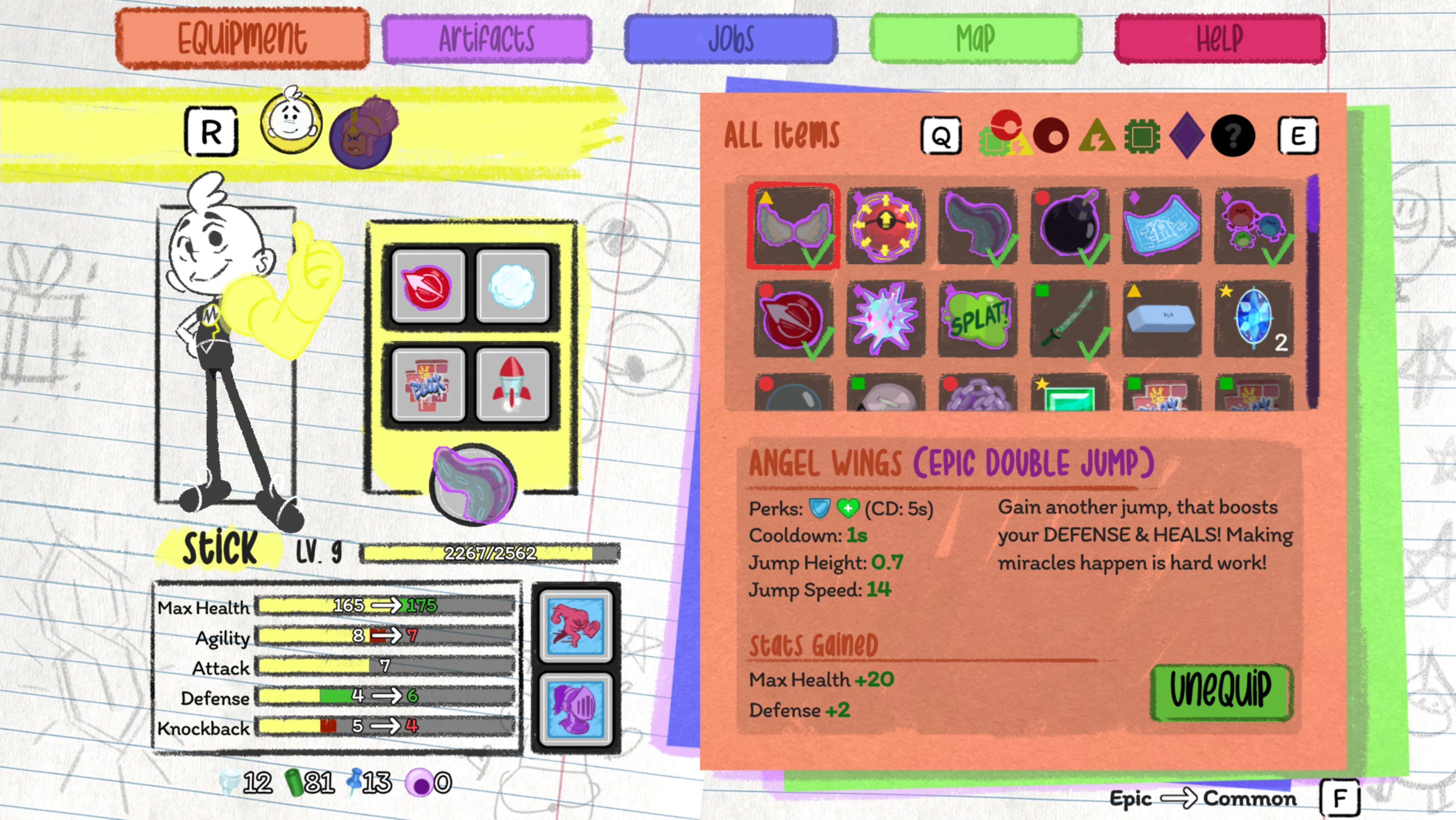
changedPlease visit the NEW GUIDE available on our Steam page for the FULL LIST of Accessibility Options and settings.Additionally, all in-game items feature shape and color indicators in their top left corner so players can recognize them from a distance based on the equipment slot they fill. The slots themselves are designed with the same shapes, and appear at the top of the players inventory; - Circle (Red) for cores, Triangle (Yellow) for agility items, Square (Green) for tech items, Diamond (Purple) for special moves, and a Question Mark (White w/ Black BG) for quest items.
changedPlease visit the NEW GUIDE available on our Steam page for the FULL LIST of Accessibility Options and settings.We offer a "Custom Options" setting that lets you adjust nearly anything in the game including Player Health, Enemy Health, Enemy Speed, Enemy respawn, Core + Ability recharge rates, and more - all on a sliding scale that adjusts the ingame scaling rate of that option. So changing your health on this setting simply scales it up or down, still letting you level up, and obtain items that increase your total health above that scale. Nearly every part of the game is adjustable this way via the "Custom Options" setting.
changedPlease visit the NEW GUIDE available on our Steam page for the FULL LIST of Accessibility Options and settings.There is support for nearly any controller recognizable by Windows, including common console controllers like PS4/5, Xbox, and Switch. (With auto detection when you plug one in). The Xbox adaptive accessibility controller works very well. Use the "Controller Selection" button to select which player is using which remote.
changedPlease visit the NEW GUIDE available on our Steam page for the FULL LIST of Accessibility Options and settings.Any controller can be locally adapted to have a different deadzone for directional input. (Adjusted through a "Deadzone" slider.)

Ink Inside changes

changed[dynamiclink href=" https://steamcommunity.com/sharedfiles/filedetails/?id=3691023974 "]Highlights include:
changedThe game's color space design, including the main characters, is optimized for a black-and-white color space (luminance contrast). This means all key visuals for the characters and game use colors that avoid conflicts for any form of color blindness. So to that end they do not have a colorblind option because the game's color design already accommodates players who may need it.
changedAdditionally, all in-game items feature shape and color indicators in their top left corner so players can recognize them from a distance based on the equipment slot they fill. The slots themselves are designed with the same shapes, and appear at the top of the players inventory; - Circle (Red) for cores, Triangle (Yellow) for agility items, Square (Green) for tech items, Diamond (Purple) for special moves, and a Question Mark (White w/ Black BG) for quest items.
changedWe offer a "Custom Options" setting that lets you adjust nearly anything in the game including Player Health, Enemy Health, Enemy Speed, Enemy respawn, Core + Ability recharge rates, and more - all on a sliding scale that adjusts the ingame scaling rate of that option. So changing your health on this setting simply scales it up or down, still letting you level up, and obtain items that increase your total health above that scale. Nearly every part of the game is adjustable this way via the "Custom Options" setting.
changedThere is support for nearly any controller recognizable by Windows, including common console controllers like PS4/5, Xbox, and Switch. (With auto detection when you plug one in). The Xbox adaptive accessibility controller works very well. Use the "Controller Selection" button to select which player is using which remote.

Please visit the NEW GUIDE available on our Steam page for the FULL LIST of Accessibility Options and settings.

[dynamiclink href="https://steamcommunity.com/sharedfiles/filedetails/?id=3691023974"]Highlights include:

  • The game's color space design, including the main characters, is optimized for a black-and-white color space (luminance contrast). This means all key visuals for the characters and game use colors that avoid conflicts for any form of color blindness. So to that end they do not have a colorblind option because the game's color design already accommodates players who may need it.

  • Additionally, all in-game items feature shape and color indicators in their top left corner so players can recognize them from a distance based on the equipment slot they fill. The slots themselves are designed with the same shapes, and appear at the top of the players inventory; - Circle (Red) for cores, Triangle (Yellow) for agility items, Square (Green) for tech items, Diamond (Purple) for special moves, and a Question Mark (White w/ Black BG) for quest items.

  • We offer a "Custom Options" setting that lets you adjust nearly anything in the game including Player Health, Enemy Health, Enemy Speed, Enemy respawn, Core + Ability recharge rates, and more - all on a sliding scale that adjusts the ingame scaling rate of that option. So changing your health on this setting simply scales it up or down, still letting you level up, and obtain items that increase your total health above that scale. Nearly every part of the game is adjustable this way via the "Custom Options" setting.

  • There is support for nearly any controller recognizable by Windows, including common console controllers like PS4/5, Xbox, and Switch. (With auto detection when you plug one in). The Xbox adaptive accessibility controller works very well. Use the "Controller Selection" button to select which player is using which remote.

  • Any controller can be locally adapted to have a different deadzone for directional input. (Adjusted through a "Deadzone" slider.)

  • Aiming can also be smoothed out through an "Aim smoothing" slider that adjusts the sensitivity of any directional input recieved.

Source

Steam News / 23 March 2026

Open original post

Changelog.gg summarizes and formats this update. How we read updates.