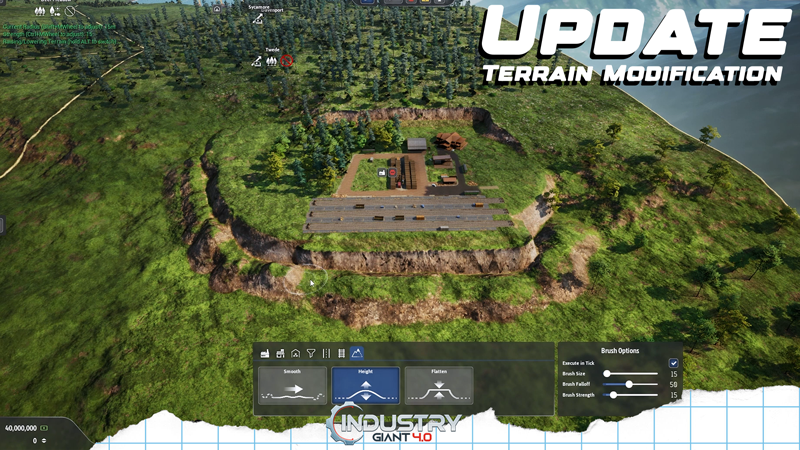
Greetings, dear Industry Giants! Today's update brings the long-awaited terrain modification tool! This tool offers you the opportunity to customise the landscapes on the maps!
In this update1
Full notes
Full Industry Giant 4.0 update
Read the full published notes in a cleaner layout. The original post stays linked below.
What changed
0 fixes0 additions7 changes0 removals
Maps
changedToday's update brings the long-awaited terrain modification tool! This tool offers you the opportunity to customise the landscapes on the maps!
changedThe functions of the terrain modification tool summarised again:Form hills, mountains and valleys.
changedThe functions of the terrain modification tool summarised again:Use the ‘Raise’ and ‘Lower’ functions to create high ground or deep canyons and valleys. Adjust the size and intensity of your tools to make precise or large-scale changes.
changedThe functions of the terrain modification tool summarised again:Smooth and level surfaces.
changedThe functions of the terrain modification tool summarised again:Use the Smooth tool to even out uneven terrain and create a harmonious playing environment. Perfect for preparing building sites for buildings and industries or traffic routes.
changedThe functions of the terrain modification tool summarised again:Use the tool to design your maps the way you want!
Industry Giant 4.0 changes
changedToday's update brings the long-awaited terrain modification tool! This tool offers you the opportunity to customise the landscapes on the maps!
changedForm hills, mountains and valleys.
changedUse the ‘Raise’ and ‘Lower’ functions to create high ground or deep canyons and valleys. Adjust the size and intensity of your tools to make precise or large-scale changes.
changedSmooth and level surfaces.
changedUse the Smooth tool to even out uneven terrain and create a harmonious playing environment. Perfect for preparing building sites for buildings and industries or traffic routes.
Greetings, dear Industry Giants!
Today's update brings the long-awaited terrain modification tool! This tool offers you the opportunity to customise the landscapes on the maps!
The functions of the terrain modification tool summarised again:
Form hills, mountains and valleys.
Use the ‘Raise’ and ‘Lower’ functions to create high ground or deep canyons and valleys. Adjust the size and intensity of your tools to make precise or large-scale changes.
Smooth and level surfaces.
Use the Smooth tool to even out uneven terrain and create a harmonious playing environment. Perfect for preparing building sites for buildings and industries or traffic routes.
Use the tool to design your maps the way you want!