
Full notes
Full Hibera, Requiem for the Forgotten update
Read the full published notes in a cleaner layout. The original post stays linked below.
Repeated intro
Hello! Back again for another Hibera update. It has been an absolutely wild month. First we had A MAZE, then GamerFest, both of which were exhausting but so much fun. Since then I have been doing a lot of project planning: the tedious business of deciding exactly what you’re going to make and when. It’s a lot of doc writing and not very fun to talk about or show off in updates. So I was pleasantly surprised when I looked at my git history for this month’s changelog!
What changed
- Gameplay
- UI and audio
- Fixes
Hibera, Requiem for the Forgotten changes
Main Menu Animations
Lots of Animations added, all playable units now fully animated
Camera pan to mission objective at the start of battle
Snappier cursor movement
Added in-world XP bars for units
Doors, Chests and other interactables highlight on hover
Font readability improvements
Demo Diagnostics and Feedback System
Action Sentence UI
Removed a lot of noisy logging
Added new high-res portraits for characters.
Fixed a bug where the level up rose particles were not playing at the right time
New SFX drop
Renamed Utility Items (Support Equipment)
Added Level 2 tutorial
Buffed Maebh’s starting stats, growth rates, and gear
Fixed a bug where rescued units were losing their XP and level ups
Fixed a bug where the movement arrow changed size depending on screen size.
Fixed a bug where some 8BitDo controller dpads were registering inverted input.
None of these are super beefy features like we’ve had in the past but a lot of good work this month anyway.
Steam post image The first group of features are a reaction to some good playtesting feedback I got at A MAZE, and that includes the Animations, the camera pan, the cursor movement, highlights for interactive objects, in-world XP bars, and font readability improvements. Really good feedback overall. I think my favorite from this group was the in-world XP bars because the player was confusing the XP gain sound plus the fact that enemies poof when they die that enemies must all have lit grenades on them at all times! So Raf made some edits to the sound and I added the XP bar under the player’s unit to help with the messaging. Steam post image
The next feature I want to talk about is what I’m calling the Action Sentence UI. So as you’re playing the game, there’s a specific flow you will do to make your units do things. You select the unit, select a movement destination, select an action, select an item, select a target, confirm. And we allow you to go back and forth through this flow as much as you want before confirming, but occasionally you can be in a gamestate where it’s a little unclear which step you’re on. So I added a new state to the GameLogUI where it helps to track which step you’re on, like you’re building the sentence that eventually gets logged. I think it works pretty well and hopefully will help players sort out those infrequent but confusing states. Steam post image
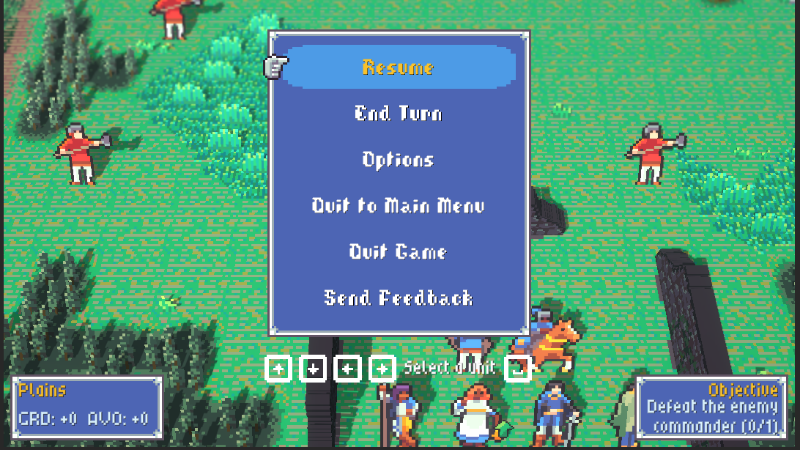
The last feature to talk about is the demo diagnostic and feedback system. This was proposed to me by a fellow gamedev while we were booth neighbors at GamerFest. Basically the feature is a Send Feedback button that’s now on the main menu and in the pause menu as well. This links you to a Google Form so you can tell me directly how much fun you’re having or if, God forbid you encountered a bug. Also with the form your game will dispatch a special diagnostic report which contains a bit of your save game, your most recent error logs, and a snapshot of the gamestate (all scrubbed of any identifying information of course) so if you encounter a bug I stand a pretty good chance of understanding what you saw. Steam post image Speaking of which, the demo is nearly ready! I’ve had a few members of the press take it for a spin and send me some feedback or post the feedback publicly as is their wont. I am hoping to be able to get it into your hands this summer to stay tuned! If you wishlist the game you’ll get an email when the demo is available. Until then!
Source
Changelog.gg summarizes and formats this update. How we read updates.