
Full notes
Full Herogrinder: Tactical Combat Arenas update
Read the full published notes in a cleaner layout. The original post stays linked below.
What changed
- Maps
- Performance
Herogrinder: Tactical Combat Arenas changes
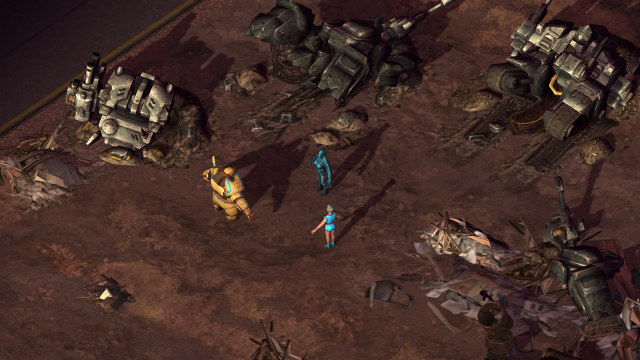
The most challenging part of designing the Wasteland Environment was how to make irregular and organic open environments on a constrained grid.
After a few renders, it soon became clear that rocks, decals, and prop models are not enough, we have to improve the ground as well.
The Herogrinder Map Editor’s floor layer was originally designed for interiors: you can place small floor tiles onto to the grid.
One problem with the original workflow is the texture tiling size - interiors with repeating patterns look great, but for terrains, the current dense repeating pattern looks like a carpet, and not natural at all.
Another problem was the lack of blending between different textures. This wasn’t a problem for floor tiles in rooms but blending would be crucial outdoors for painting soil or dirt, mixing pebbles to road edges, and so on.
Fixing the texture tiling issue was actually quite simple, due to the original workflow we developed for rendering the floor:
The complete floor is one simple quad geometry, the tile textures stored in a Tex2DArray, and a point filtered controlmap tells the shader which pattern should be visible on the floor: one channel is used as a switch to tell if a cell is occupied with a floor texture, and another channel stores the index of that texture from the texture array. By using this texture mixing approach, the tiling of the floor tile textures is actually independent from the grid. Initially we simply just scaled the tiling of the tex2DArray to match the grid, but we have the freedom to set any tiling scale to them.
As we didn’t want to change the original floor workflow, we introduced a second ground layer: the Terrain. We set the tiling from 1x1 (this is what we use in the Floor layer) to a size of 4x4 grid tiles. For this terrain layer, we also designed a different set of textures.
To blend terrain textures together, we have to use a different controlmap workflow: one channel used for each tile texture (0 - not visible at all and blending to 1 - completely visible), and we set the controlmap’s filtering to trilinear.
This method enables us to use up to 5 terrain textures per level (an RGBA controlmap can hold up 4 textures, plus we can have one default texture, which is only visible if all channels are 0) - which is more than enough for our Wasteland theme and per arena.
The last problem to resolve, is how to blend the floor layer and terrain layer together. This is still under development, and the most challenging part is achieving smooth, blended transitions, as well as sharp non-blending changes between the floor and terrain, together in one level.
One possible workaround to this problem is to keep hard edges between the floor and terrain, and to have a special set of decals: we call them terrain mask decals. Placing these decals in the right places, we can easily cover up the edge between floor and terrain. Terrain mask decals look exactly the same as the underlying terrain, but they cover the floor, and their mask acts as transparency, to make a nice looking transition between the terrain texture and the floor.
Having these great new features in our map editor makes it possible to design and develop Wasteland levels for Herogrinder with an organic feel and will allow us to use them on other themes as well.
Source
Changelog.gg summarizes and formats this update. How we read updates.