
In this update7
Full notes
Full Hardspace: Shipbreaker update
Read the full published notes in a cleaner layout. The original post stays linked below.
Repeated intro
Greetings Shipbreakers,
What changed
- Gameplay
- Store
- Security
- UI and audio
- Server
- Balance
Hardspace: Shipbreaker changes
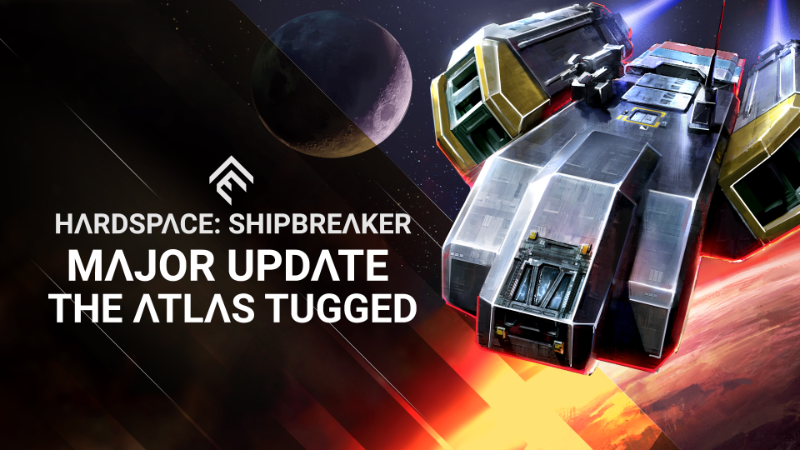
The Atlas Tugged Update (0.7.0) is LIVE!
While the star of the show is certainly the new Atlas-class of starship to salvage, there are a huge variety of other improvements and changes to get excited about, such as an overhaul of the Ship Catalog screen, and improvements to the elemental systems found in ships.
Atlas-Class
A true workhorse line of ships, the Atlas-Class is purpose-built for a variety of industrial roles, and has been in service across the colonies for decades. We’ve designed this class to bridge the difficulty and complexity gap between Mackerels and Javelins. The Atlas greatly improves the variety of ships early in the game, bringing a few new challenges of its own to Players, such as a two-floor layout, which challenges Shipbreakers to think as much vertically as horizontally. As well, their manufacturer Starleap Heavy Industries outfits them with its proprietary Quasar Thrusters, which are so massive that Shipbreakers have to crawl inside them to access the fuel system and to separate the thruster shell. Take note that accessing the interior via the thruster nozzle will cause the fuel lines to become unstable, so act quickly to reach the fuel flush switch at the back!
Shipbreakers will unlock the first model of Atlas, the Scout, at Rank 4. With an incredible top-speed, high maneuverability, and enough interior space for living quarters or small cargo, the Scout is popular with government patrols, search and rescue, private security, asteroid prospecting or small-scale research. Shipbreakers should be aware of high amounts of electrical hazards, in addition to the two Quasar Thrusters that give this ship it’s oomph.
At Rank 6, Shipbreakers gain access to the Nomad, a long-haul cargo ship. With ample interior cargo space, and a modular exterior cargo rack, the Nomad and it’s three Quasar Thrusters move cargo quickly! In interplanetary terms, that can still be a heck of a long time, and so the Nomad is also outfitted with a fully-equipped sleeper cabin; a hauler’s home-away-from-home.
Rank 8 brings the final Atlas ship model: the Roustabout tug. Quad Quasar Thrusters make this the most powerful model in the Atlas line, and an essential vehicle for everything from asteroid felling and station construction, to demolition and towing salvage. This many thrusters requires a lot of power and fuel, so beware of the Roustabout’s large amount of fuel and electrical hazards.
Each Atlas model also has a variety of new Data Drives that Shipbreakers can collect and decrypt to further expand on the world outside Morrigan Station.
Ship Catalog Revamp
Every Shipbreakers knows that one of the first things you do each day is visit the Ship Catalog to see what salvage is on offer. In 0.7.0, this interface has been revamped, with a focus on simplicity and clarity, as well as to improve the variety of ships available. The most important information related to claiming a ship has been brought front-and-center, and extraneous information has been minimized or removed. In addition, all ship classes are always represented, guaranteeing that you’ll have access to the newest ships as they become available. Lastly, the LYNX Marketing Department has seen fit to rebrand this interface as the Job Board.
Elemental System Improvements
As we continue to try and create interesting and dynamic challenges in ships, and mitigate run-away catastrophic meltdowns that wipe a ship’s value thanks to a tiny accident, we’ve made some changes to the behaviour of elemental objects.
Here are the major changes:
Fuel Pipes no longer explode when damaged or cut. Instead, when hit by the cutter beam, touched by fire or zapped with electricity, the fuel inside the pipe ignites, which then begins to spread down the pipe network. This gives Players time to find a way to neutralize the fire or flush the fuel entirely, before the flames reach the Fuel Tank (which will explode!).
A fix to how impacts are calculated means that objects like Fuel Tanks and Terminals no longer die immediately when taking impact damage. You will now be far more likely to see leaking Fuel or Coolant tanks, or sparking Terminals.
Coolant no longer affects the exterior Nanocarbon Hull or Structural Beams of a ship. Many ships still have exterior Aluminum panels that can be frozen and shattered, but the threat of coolant is now much more focused on the valuable interior components of a ship.
We’ll be monitoring these changes to see how they affect the gameplay for everyone, and will continue to tweak elemental behaviors to try and create the most interesting and dynamic experience possible.
Alongside the exciting features of this update, we’ve also continued the usual bug fixing and stabilizing of the game, crushing 120+ issues.
We’re looking forward to seeing everyone’s reaction to the new ships, and to see the kinds of strategies you all develop to salvage them! We’re positive that some innovative Shipbreakers are going to find a variety of creative ways to salvage the Quasar Thrusters.
As usual, let us know what you think! Join us in our Discord to share your thoughts and feedback.
Cheers,
The Shipbreaker Dev Team
Patch Notes
Changes & Updates
Atlas-Class Ships Added
Scout Patrol Craft - Unlocks at Rank 4
Nomad Cargo Hauler - Unlocks at Rank 6
Roustabout Tug - Unlocks at Rank 8
10 new Data Drives added that spawn in Atlas ships
Ship Catalog Revamp
Ship Catalog Interface has been completely overhauled
Focus on simplicity and clarity
All unlocked ship classes are always available
Ship selection refreshes after every shift
Removed the ability to navigate to lower hazard levels (however, a few ships from lower levels are always available to select)
Elemental System Improvements
Fuel Pipes no longer explode when cut or damaged
Fuel Pipes are now flammable and will ignite when touching fire, electricity or the beam of the cutter
Fuel Pipes are no longer cuttable
Fuel Pipe “Cutpoint” added to all ships, enabling Fuel Pipes to be removed
Fire travels down pipe networks
The chance of fuel leaks appearing on a damaged pipe have been made consistent across all fuel pipe lengths
Coolant no longer freezes Nanocarbon Panels or Structural Beams
Coolant no longer freezes small objects like chip bags or space truck parts
Objects no longer take damage by default when “yanked” by the grapple; only electrical objects take damage if yanked while still connected to their power source.
Other
Bunny Character ‘D’ Movie Poster added (Fan-art contest winner, congrats Chant National!)
Interior ship lighting range and brightness improved
- Video OptionsDynamic Light Range added
- Video OptionsDynamic Light Shadows added
Machine God Speech Processing Improved
Radio Squelches and Background Static improved for all characters
Door and Airlock Consoles now display “Unpowered” in the interaction prompt when disabled
UI: Locked state of unlocked scan modes now more apparent in the HUD
Language Options: Language selector now shows the full-name for every language
Javelins have a new type of cutpoint (Wishbone Cutpoint) in their crawlspaces
Space Truck: Notification now appears when collecting a part that completes a Space Truck objective
Bay Lighting optimized (less shadow casters, leverages more baked lighting)
Bug Fixes
HAB Player Badge font too small
Ending a shift in Free Play sometimes softlocks the user on Shift Summary screen
Electric cable junctions have no salvage destination on the mackerel Exolab
Button "Prev" for the Posters' screen is not translated
The controller loses focus, when backing out from 'Messages' after rank 5
The player may be stuck in the free play mode after a long shift
Cutter's temperature is displayed on the HUD, when starting the shift with the grapple equipped
Cable junction cut points count as destroyed, losing overall value of the ship. Should be treated as cutpoints instead.
Cargo Gecko fuel pipe sometimes exploding on spawn
On Cargo Javelins, depressurized cockpit causes airlock decompression event when cutting the ceiling cutpoints
Untranslated text in the "Ship Catalog" section of the Messages menu
Untranslated text in the "Habitation" section of the Messages menu
Above Cut grade warning not translated
Out of range warning for missed cutter shots not translated
Demo Charge Capacity Limited to 5 Charges on Additional Shifts
First line of narrative sequence at Rank 17 can trigger in the HAB
Tiber has two logos on the commercial gecko
A thruster in the commercial gecko is getting a random decal
The main fuel pipe cannot be salvaged properly from the big fuel tank on Cargo Javelins
You can't leave the inventory with mouse because there is no 'Back' button
In the in-game options, the cursor remains stuck on the roll sensitivity option if highlighted
Unexpected pressurized pocket on the front of some Gecko Stargazer
Cannot "Continue Shift" after ranking up from Rank 2 to 3
Lou’s Portrait appears on wrong side in the scene at Rank 9
Emissive on Intercom was green, even though the light was orange, while in call-waiting state
Deedee's portrait switches sides while she's talking during some scenes
Charged Push can be stalled/stored when moving the reticle over a space truck salvageable component
Subtitle doesn't match VO on some scenes
Weaver Portrait missing during some scenes
Some characters didn’t use their helmet portraits when speaking in the Bay
Weaver’s radio distortion is more prominent than any other character VO
Alternate portraits for talking heads have a white background
Weaver's VO 'head on over to your workbench' doesn't match the subtitles
The Union News Call to Action message is missing
Furnace start-up SFX not triggering
Intense breathing when skipping tutorial in first shift
You can hear the squeaky bunny when leaving the comms terminal before you have acquired the squeaky bunny
The aerobridge console on Heavy Cargo javelins still pressurizes the airlock, after the aerobridge was detached from the ship
The volume of VO coming from the HAB radio is low when using the Workbench Terminal
Furnace + Processor turned off after their startup animation completed when continuing shift
Object mode for the Scanner makes the tutorial tooltip blurry
Scanner can show up on breaker fuse box handles outside scan mode
SFX play each time you navigate to a new camera position in the HAB
Gecko Station Hopper Unlock Message is never given to the Player
Lou’s Union Signup Message triggers again in the next HAB after it has already been played before.
Lou's chatter speaks of ice cream but subtitles say "frozen yoghurt"
Game's language can be changed, when the user only selects the language, then resets to defaults/saves another tab
If you fail the tutorial then complete it after the death animation, you won't be able to enter the HAB and get stuck in the bay
Character Portraits appear over top of the Death Screen
The cockpits on geckos cannot be detached, unless detaching certain storage bins and computer terminals inside the cockpit
The FX from the other salvage bays in the skybox are visible in scan mode
Subtitle/Talking Heads no longer appear layered overtop of Scanner post-fx
Using mouse to back out of ship select will show HAB UI on the ship catalog screen
Some small monitors still appear powered when yanking battery from terminal
Quitting the game after waking up post night shift will take the player back to the post-shift conversation when starting Career mode again
Cutting the unpressurized aerobridge on cargo javelins triggers a violent decompression in the airlock
Weaver's Tethers VO will repeat itself, each time when accessing the Equipment menu, until the user buys the tethers
If fuses are destroyed by the player, it does not complete or fail the fuse task of the power generator tutorial
The user can no longer properly continue the tutorial, after quitting the game in Rank 2 and reloading
You can't click the 'Answer Intercom' button with the mouse to move, during a post-shift call
Message 'LYNX_OFFSITE_BU0104' is empty in almost all localizations
Cannot change a bed or suit poster using a mouse
When navigating in the HAB with mouse, you can't click on [Living Space] button when it's at the bottom of the screen
Cannot use the mouse to navigate through the "bed" part of the HAB
You can't click with the mouse to wake up after a shift
Equipment upgrade for Laser Cutter showing wrong LT
Softlock when dying from a demo-charge blast
High hazard Tankers can have the radiation filter spawning on top of the Power Generator's fuses
Power Cell spawned under heatsink in Heavy Cargo Javelin
No longer possible to navigate between the 3 posters, after placing a sticker and then exiting the terminal
The menus in the Equipment terminal lose focus, after placing a sticker and exiting the sticker menu
The controller loses focus in the Ship Catalog, after placing a sticker and exiting the Equipment terminal
"WOM" SFX plays twice when entering HAB
Post-Processing FX immediately turn on after dying
Accessing the kiosk does not currently show the HUD
'Mom & Pop to Mega-Corp' message stays in the Unread Section after being opened
Aggressive LOD on javelin rings prevent them from being seen from the HAB
The HAB marker guiding the player, stays on the screen, after accessing the Workbench terminal at Rank 4
Space truck pick ups can be collected through walls
The collider for the bottom of the barge doesn't turn on until the Barge animation finishes
The user receives a Rank 10 sticker too early
Moving the camera during a shift call fading out, will make the HAB button prompts to appear on the 'Wake up' screen
“Certification Read” tutorial VO should not play if tutorial is skipped
The first snagged data drive does not appear in the data miner, after Lou's message
Nearby cutter stations missing from HAB window view
Dirty air sfx is loud while navigating in a ship
End Shift prompt is missing text
No tutorial after quitting a profile to start a new one in the same play session
MP Bar in pause menu is updating incorrectly and not displaying the accurate amount required to rank up
Bunny Character D doesn't catch fire and burn away when cut with the Splitsaw or Scalpel
Airlocks with destroyed doors attempt to repressurize
If the player moves around a sticker on a tool and returns to the same ship, the sticker will be duplicated on the tool
Several decompression pockets found in the Thruster Room of geckos
Pausing during a decompression event will cause the force to stack over time, causing a massively disproportionate force after unpausing
Room volumes exposed to each other still cause decompression events when using an atmosphere regulator
Weaver's says 'Nice job cleaning all that soft metal scraps', when using Grapple Reel after salvaging only one scrap
Wrong translated text during the tutorial for the objective 'Use Grapple Push'
Cutting the exterior airlock door and interacting with the interior airlock console will cause a decompression event every time the console is used
Hydroponics chambers do not stop illuminating after they lose power
No SFX plays, when the user presses the YES/NO buttons to enter the HAB
After abandoning the pressurization tutorial, the objective and tooltip appear in all game modes
Demo Charges are purchasable from the kiosk before intended when skipping training
Alert message when you try to set a key already used is too long and doesn't fit in some languages
If user is grabbing a surface while they trigger a popup, the hands will remain stuck in place
Subtitles are not cleared in cases when audio is stopped, such as death VO
The message displayed when you can rank up by entering the Hab is out of screen in most languages
The ECU wall creates a cryo explosion when cut
Javelins have phantom room connections, and separated segments decompress together
In Italian, Sign Out and Exit buttons have the same translation
When you cut a radiation filter, each half will spawn its own radioactive cloud
The validation button's text is oddly cut in some languages on the loading screen
Some UIs are overlapping on smaller resolutions
Multiple ambient music tracks play in the same time, after the user destroys the last AI node
Ranking up to 14 while in the first Rank 13 shift will repeatedly trigger the following post-shift narrative scene
No grapple push after using the kiosk
A decal is z-fighting on the wall of the left Furnace
HUD distortion is too prominent, when starting a shift on Ghost Ships
The text for the "Close" button on the HAB greeting terminal is displayed on 2 lines in several languages
Can't Buy Tethers on Additional Shifts unless your current tether count is less than 10
Backing from the message menu too quickly gets you out with the screen still zoomed in
Source
Changelog.gg summarizes and formats this update. How we read updates.