
In this update14
Full notes
Full Hand2Hand update
Read the full published notes in a cleaner layout. The original post stays linked below.
Repeated intro
Greetings bored mortals. I am happy to share with you today an improved version in the back end. The menu can now manage controllers for a smoother transition from keyboard only. However, combat might feel different than previously, notably because of the several changes in physics and feedback signs. I can say Hand2Hand finished its copper age and entered a bronze age. The base is still crude but all of the polishing is starting to pay off !
What changed
- Gameplay
- UI and audio
- Balance
- Fixes
Hand2Hand changes
UI and UX
☼ Screenshots can be taken in battle with Shift+F, they cannot be taken elsewhere that way yet. ☼ Deleted old loading remnants, especially from unloading screens. ☼ Game version in battle gets a darker color if on top of a bright HUD. ☼ Inputs are no longer detected if the window is not active. ☼ Game ready to start text glows like in other menus. ☼ Controls last only one frame instead of several. ☼ Return and Escape are no longer available player keys in control settings. ☼ Player 2 can no longer navigate in menu, except for its own class selection.
Controller
☼ They can be used to navigate in menus. ► Attack to select ► Heavy to cancel ► Jump to escape
HUD
☼ Quickly fades to the hurt color instead of snapping into when taking damage. ☼ If the player color is too bright, the HUD glows into red instead of white ☼ If the player color is green, the HP bars are by default of its player color (orange for right, blue for left).
☼ If the player color is yellow, the back transition HP bar is orange. ☼ Player class icon covers a bit better its area ☼ Player class icon has a dark gray background in battle (galleries unchanged) ☼ Player class icon also shakes when damaged, but is still anchored to the HUD and with a lower power. ☼ The HUD piling up no longer depends on who’s attacking, it is based on the player number instead.
Player color
☼ Right player (orange) has a yellow alternate color if the opponent is either red or orange ☼ Left player (blue) has a white alternate color if the opponent is either blue or lightblue ☼ Player 2 will switch to an alternate color if the player 1 has a close one instead of an exact one. This would make sure both player have different colors as much as possible. ☼ Player shadows are slightly tinted by its color
Wind effects
☼ On too bright backgrounds wind effects have a more intense color
☼ Affected terrains are College and Boardgame club.
Debug commands
The previous system needed to press shift and release another key. Now it is when the key is just pressed.
Class gallery
☼ Selected class switches randomly within its idle animations, like in battle. ☼ Class icons in lists and grids are bigger when selected. ☼ Unreleased classes icon has a transparent and orange background.
☼ Player selection in 1vBot can be canceled by the heavy attack command, and left with jump.
Combat
Recovery
Instead of being grayed out, the player flickers between 3 colors : dark gray, gray and grayed player color. This makes already gray players able to see if they are recovering or not.
Pushes
When a player is stunned, received pushes are a bit stronger in the horizontal axis.
Chopstick
Side - Side - Side
☼ The second and third sides are now reworked. ☼ The second side has more movement amplitude. ☼ Third side : ► Duration reduced from 25 to 24 frames ► No longer has combo shortcut ► Slightly moves downwards at the end so the combo finishes on the ground and doesn’t waste few frames of landing while the had could not attack before.
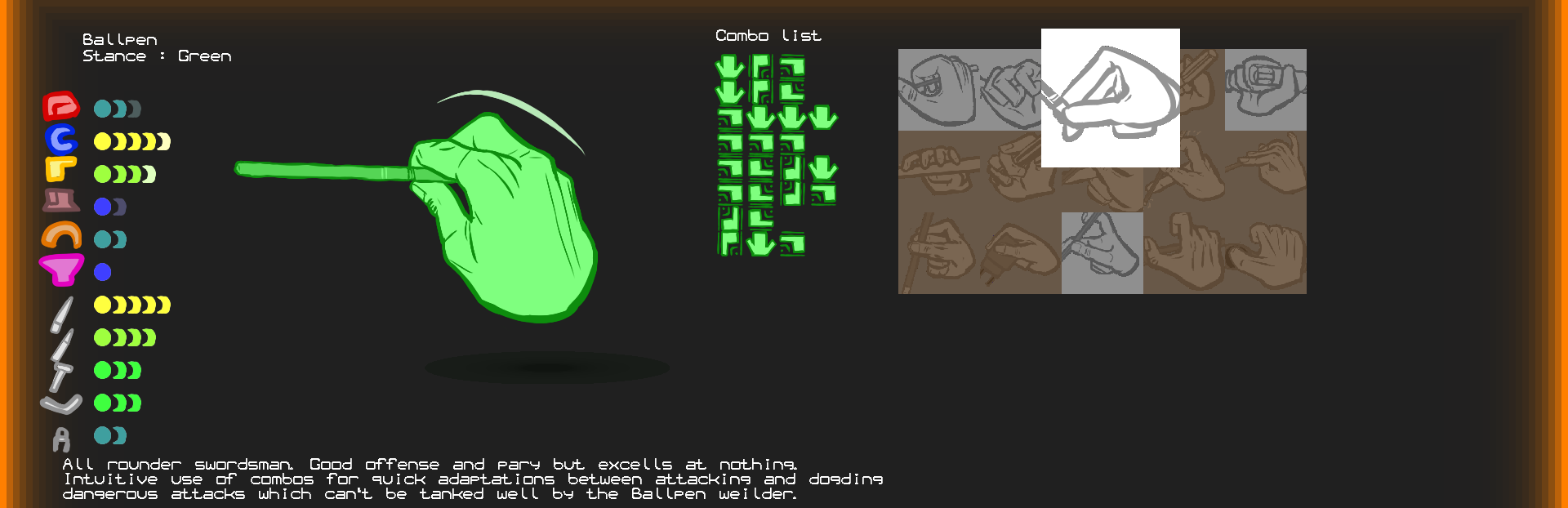
Ballpen
☼ New swish sounds for large swings ☼ Black stance (default) has an even more intense color.
Side - Back - Up - Side
☼ Second side added ☼ Back and up both recovery increased from 10 to 20
Side - Back - Up - [Neutral]
☼ Fixed wind effect positions at animation frame 3
Down [Neutral]
☼ Reduced push
Heavy
☼ Damage reduced from 15 to 12 ☼ Recovery reduced from 100 to 50 frames This attack had too much risk for a poor DPS, since the ballpen doesn’t have a combo yet here. Now the attack can be repeated more frequently with a slightly lower gain to compensate.
Unarmed
Heavy - Neutral - Side
☼ The Heavy pushes less towards the air, light enemies might no longer absurdly fly above the battle area ☼ The side pushes more towards the front
Gluestick
☼ Move front reworked. ☼ Hit reworked.
Side
☼ Reworked. ☼ Movement increased from -70 (-90 max) to -150 (fix) ☼ Damage at frame 6 reduced from 7 to 6 ☼ Duration reduced from 53 to 43
Side [Side]
Ground hitting sound now coherent with newer gluestick hit sounds. Neutral [Neutral] Ground hitting sound now coherent with newer gluestick hit sounds.
Hexkey
☼ Steel stance (default) has a black alternate color. ☼ Aluminum stance has a yellow alternate color. ☼ Added a second idle animation
Back
☼ Duration reduced from 83 to 68 frames ☼ Recovery reduced from 50 to 30 frames This increases its reactivity and reduces its overall risk. The DPS is increased as the animation can be spammed more frequently.
Down - Up
Down
☼ Stuns during frame 4 and 5 for 20 and 10 frames. ☼ The hitbox of the ground shockwave has been raised by 40 pixels to allow better hitting, but the pushing power is lower to compensate.
Up
☼ Stuns during all of its active frames for 20 and 10 frames. ☼ Pushes upwards in diagonal
Heavy - Heavy
Added. The hexkey has now all minimal animations !
Behind the scenes
☼ Frames and animations are now indexed as well for optimisation improvements.
Bug fixes
☼ [Demo ?] Heal command (shift+2) heals both player at base max HP but not their class & stance max HP Fixed. ☼ [0.1.?] Debug command only activates only after doing it then releasing shift again Fixed. ☼ [0.1.?] Cannot Alt+F4 if not in debug mode enabled in battle Fixed. ☼ [0.1.0.3] Player color intensity is not applied to its HUD color Fixed ☼ [0.1.0.3] Player color intensity picked the default stance’s no matter the selected stance Fixed. ☼ [0.1.0.4c] Leaving the 1v1 selection screen with escape starts the return sound each frame while pressed Fixed. ☼ [0.1.0.5] When two players grab each other, they become both stuck until the game is aborted Partially fixed : when both grabbed they continue their animations, and thus their eventual forced movements. Expect some funky behaviors ! ☼ [0.1.0.5] Gluestick Side [Side] Does not play its sound percussion sound Fixed. ☼ [0.1.0.5] Gluestick Neutral [Neutral] Does not play its sound percussion sound Fixed. ☼ [0.1.0.5] Left player neutral and heavy combo icons in battle were flipped to the wrong location when both player uses them Fixed. ☼ [0.1.0.5a] When a player switches to another animation, the movement of the very first frame could not go underground Fixed. ☼ [0.1.0.5b] Slomo does not slow down the displayed timer Fixed, it will also go 5x slower as intended.
Known issues
☼ [Demo] Credit text are cut in smaller windows ☼ [Demo] Gravity kicks in only when a movement attack ends ☼ [0.1] Controllers are only detected at game start ☼ [0.1.0.3] It is difficult to go back to the game window after switching to another ☼ [0.1.0.3] Cannot move the window in windowed mode, or at least it is very difficult ☼ [0.1.0.4b] Picking 50FPS or bellow could break a bit the physics ☼ [0.1.0.4b] When the game lags the physics breaks a bit ☼ [0.1.0.4c] Cannot select exclusive stance from random/mirror class in bot selection ☼ [0.1.0.5] x86 version unavailable until further notice
Source
Changelog.gg summarizes and formats this update. How we read updates.