
HomeGamesUpdatesPricingMethodology
Steam News26 March 20206y ago

Update of v2.684

Update of v2.684 < singleplayer > ##Please note: it is compatible with archives after v2.655, but the archive location of steam players has been changed. You need to follow the steps below. We are so sorry for this!

Full notes

Full 汉匈决战/Han Xiongnu Wars update

Read the full published notes in a cleaner layout. The original post stays linked below.

What changed

0 fixes0 additions2 changes0 removals
  • Gameplay
changed##Please note: it is compatible with archives after v2.655, but the archive location of steam players has been changed. You need to follow the steps below. We are so sorry for this!
changedThe name of single playermod folder is changed from "gloriasinica Han Xiongnu wars v2.655" to "gloriasinica Han Xiongnu wars". After the update, players will not find your archive in the game. Please follow the steps below to change the archive folder name accordingly. We are so sorry for the inconvenience.

汉匈决战/Han Xiongnu Wars changes

changed##Please note: it is compatible with archives after v2.655, but the archive location of steam players has been changed. You need to follow the steps below. We are so sorry for this!
changedThe name of single playermod folder is changed from "gloriasinica Han Xiongnu wars v2.655" to "gloriasinica Han Xiongnu wars". After the update, players will not find your archive in the game. Please follow the steps below to change the archive folder name accordingly. We are so sorry for the inconvenience.

Update of v2.684

< singleplayer >

##Please note: it is compatible with archives after v2.655, but the archive location of steam players has been changed. You need to follow the steps below. We are so sorry for this!

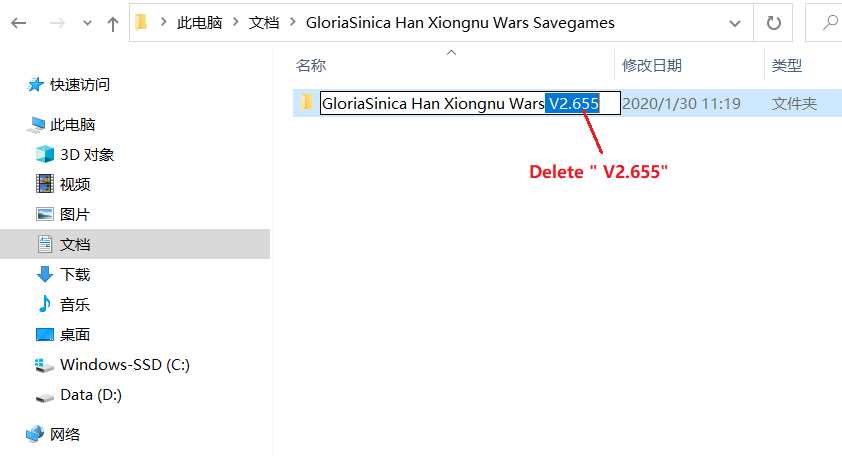
The name of single playermod folder is changed from "gloriasinica Han Xiongnu wars v2.655" to "gloriasinica Han Xiongnu wars". After the update, players will not find your archive in the game. Please follow the steps below to change the archive folder name accordingly. We are so sorry for the inconvenience.

  1. Turn on my computer. Find "documents" (win10) on the left side of the window, or "documents" (win7) under the "library" folder.

  2. Click to open "document". Locate and open the gloriasinica Han Xiongnu wars savenames folder. You will find the "gloriasinica Han Xiongnu wars v2.655" folder.

  3. Change the folder name from "gloriasinica Han Xiongnu wars v2.655" to "gloriasinica Han Xiongnu wars".

By completing the above steps, you can find your previous archive in the game again.

Source

Steam News / 26 March 2020

Open original post

Changelog.gg summarizes and formats this update. How we read updates.