
In this update8
Full notes
Full Gunner, HEAT, PC! update
Read the full published notes in a cleaner layout. The original post stays linked below.
What changed
- Server
- Balance
- Gameplay
- Fixes
- Performance
- Events
Gunner, HEAT, PC! changes
GHPC Early Access has been updated to version 20260507. As always, you can get additional info on this and future updates by visiting our Discord server and YouTube channel. Links are on the GHPC website.
NEW FEATURE: IMPACT MARKS
Another item from GHPC roadmap phase 7 arrives today: visible impacts from projectiles on armor. Most projectiles will now leave a mark where they hit, with the appearance based on the projectile type, incident angle, and whether it penetrated or failed to penetrate.
This feature combines well with one of the game's previously added systems: the flammable item simulation and compartment setups in the vehicles. In GHPC's fire system, penetrated compartments will leak smoke and sometimes flames through the entry holes, depending on the pressure involved and what other outlets (such as opened hatches) exist. Until now, the entry holes were invisible, despite being fully simulated and emitting smoke or sucking in oxygen. With the current update, you will now see the actual holes, and the effect is complete!
It's worth mentioning that this initial release of the impact marks system is bound to have a few teething issues. There are some cases where the marks can fail to appear or look odd when they do. If you run across examples of this, especially consistently reproducible ones, please let us know in the dedicated bug reporting forums: our github issues page or the #feedback board on our Discord server.
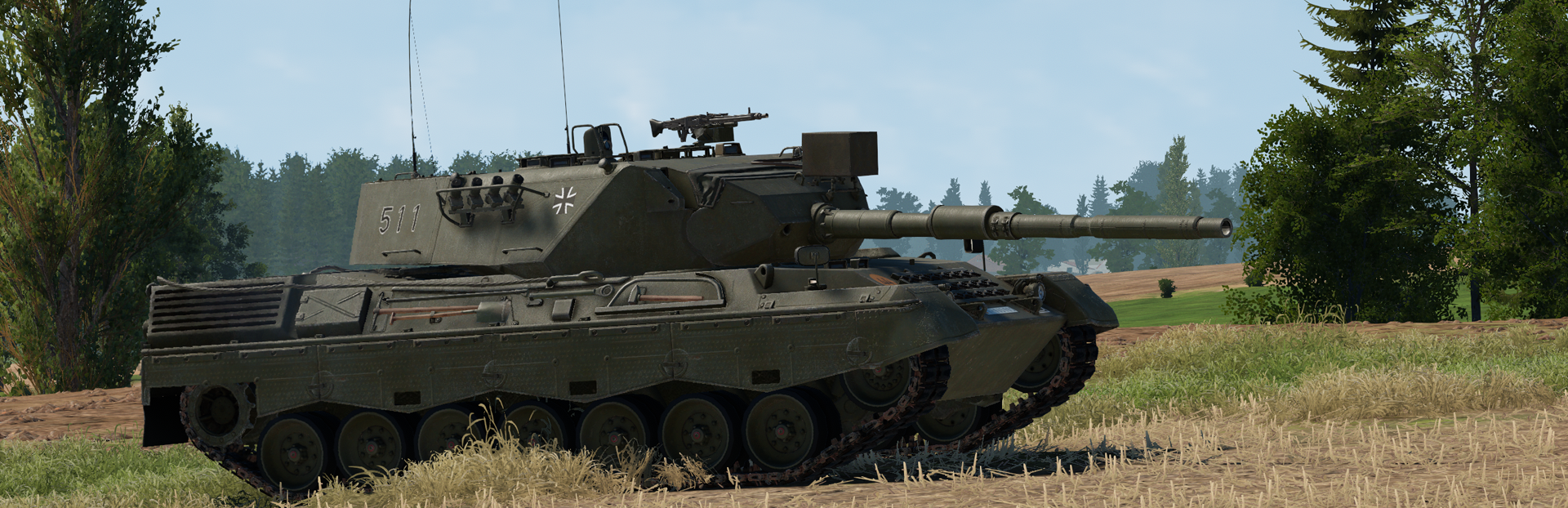
LEOPARD 1A4
It may look mostly like a Leopard 1A3 at first glance, but this last iteration of the Leopard 1 family in GHPC brings in a new feature: manual lead compensation! Much like many of the more advanced tanks in the game, the Leopard 1A4 can adjust its sight picture to help you hit a moving target. But unlike any tank in the game so far, it also waits for you to manually engage the lead feature with a separate control. It does not activate on rangefinding like the Abrams and M60A3, nor is it always-on like the T-64B and T-80B. You will need to use the new manual lead controls to pick exactly when to engage and dump the offset.
To use lead compensation in the Leopard 1A4 you will need to perform these steps:
Good Range: Get a good range reading of your target using the usual stereoscopic rangefinder view (default: tap E). Incorrect ranges will cause the lead to be too far left or right.
- Good TrackOnce you have the right number dialed in, you'll next need to get a perfect track of the target - stick the reticle to it on a fixed point, moving at the exact same speed, so it looks like it's glued on. Don't let the reticle "sweep" across the target and fire when it's overlapping; you will miss if you do this. In this way, the Leopard 1A4 is exactly like the Abrams, M60A3, T-64B, and T-80B.
- Manually Engage LeadAt this point, you can use the manual lead control. This can be done in two ways based on your preference. Either press and hold the rangefinder key (default: hold E) or press and hold the new manual lead key (default: hold Caps Lock) . This will shift the gunsight and reticle once, much like the M60A3, and you will be ready to fire and hit the target. To reset ("dump") the lead, let go of the lead control.
Some of you may find it interesting that this manual lead control will not end up being for only one tank. In the future, the final Bundeswehr tank to be added to the game will also feature this separate control, but paired with a laser rangefinder and thermal sights as well. More on that another time!
There are some other unique aspects of the Leopard 1A4 besides the lead system: an additional zoom level on the gunner's sight, a range scale that turns red when the gun is ready to fire, and a night sight view through the commander's PERI R12 independent panoramic viewer, which is fixed in the forward position when acting in a gunnery role. The vehicle represents the pinnacle of the Leopard 1 in German service by 1985. As usual, we find it fascinating to see this evolution represented in the game, and we hope you will too.
TURRET INERTIA
One small authenticity detail we've wanted to add since the start of early access is the "overrun" or "momentum" effect that happens if you get a heavy turret rotating quickly and then tell it to stop. As a first test of this feature, we've added it to the Abrams. The M1 and M1IP will now take a moment to halt their turret motion when you dump the palm switches during high traverse rates. This should combine nicely with the grinding noise of the turret brake kicking in and forcing the assembly to a halt.
Of course, the Abrams isn't the only tank with a heavy turret. As we get time in the future, we'll likely go through and add this feature to other tanks in varying intensity levels.
OPTIMIZATIONS
Our parallel quest to make the game run more efficiently has produced more results for this update. Multiple game systems have been further optimized, which should cause a small bump in frame rates depending on your system's hardware and which aspects were bottlenecked when running the game.
A notable side effect of the optimization effort is that the track marks left by tanks are now much more persistent, despite being more efficient to render. Rather than disappearing after a few seconds, they will remain permanently until your view leaves the area. If you perform tactical moves like "jockeying" on the back of a berm during an exchange of shells, you'll be able to see the aftermath of all your maneuvering carved into the ground!
CHANGE LOG
With all that said, it's time to list the full change set for the update.
NEW CONTENT
Added impact decals system to show most types of hits and penetrations on armor
Added Leopard 1A4
FEATURES AND ADJUSTMENTS
Added manual lead feature: hold rangefinder key or press separate lead key to activate on relevant vehicles (just Leopard 1A4 so far)
Added rotational inertia to Abrams turret
Optimized physics system to reduce impact of moving vehicles on frame rate
Optimized track marks system to improve performance and remove time-based fadeout
Optimized several textures to reduce VRAM usage
Game preferences and mission completion data are now stored in the My Games folder rather than the registry
FIXES
Fixed Abrams primary sight not being damaged by scripted events and direct impacts
Fixed Abrams fire control system not taking damage
Fixed Leopard 1 B171 night sight vertical aim mismatch
Fixed deflector on T-54/55 glacis behaving like metal armor
Fixed MG3 trigger on Leopard 1A3 being the wrong color
Fixed some issues with audio settings
EDIT: The build was updated on 2026-05-08 to fix issues with analog controller input axes and grass settings.
Source
Changelog.gg summarizes and formats this update. How we read updates.