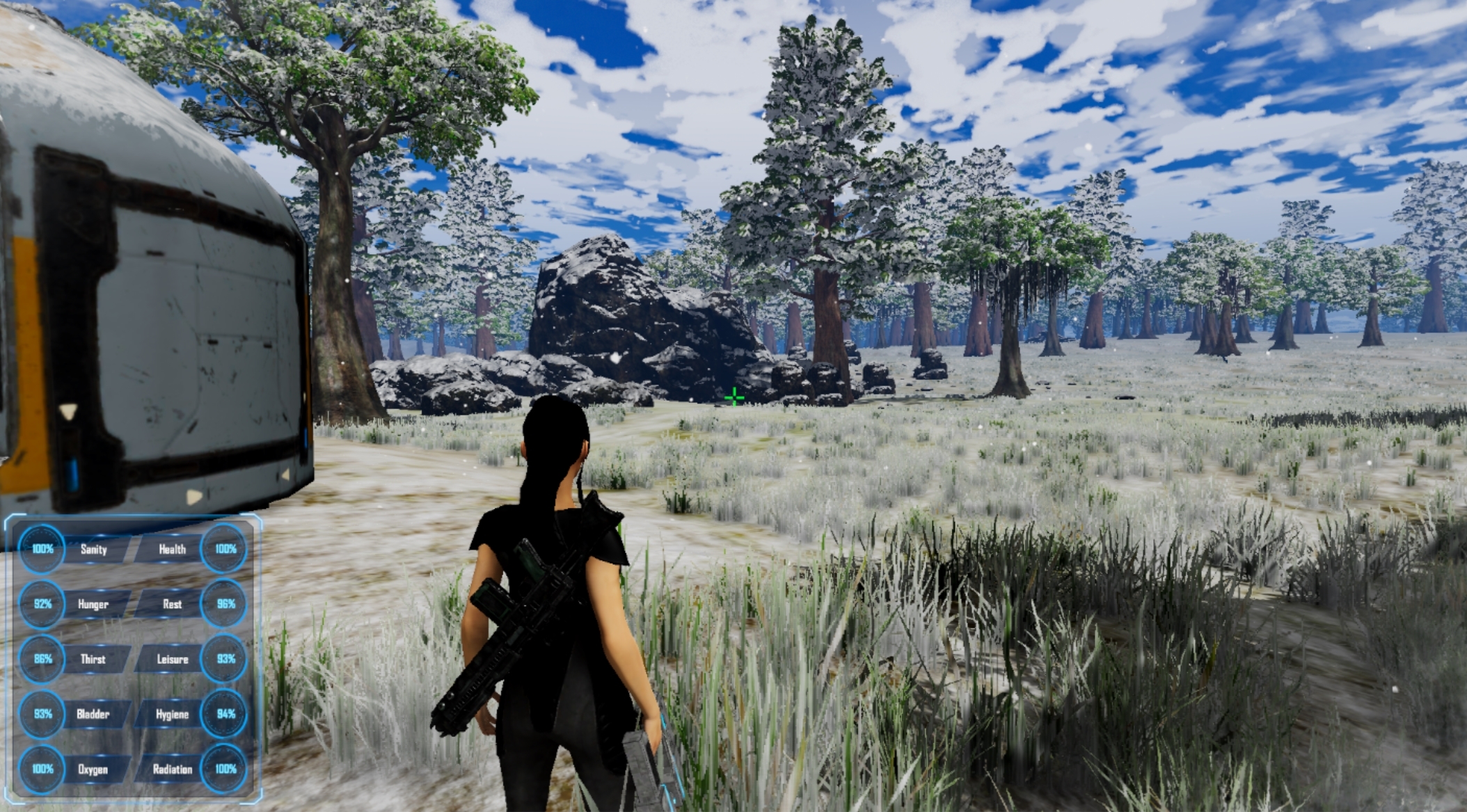
Hello, welcome to this week's dev blog! As per the last blog, I've managed to implement dynamic seasonal changes.
Full notes
Full Gaia update
Read the full published notes in a cleaner layout. The original post stays linked below.
What changed
0 fixes0 additions2 changes0 removals
UI and audio
changedHello, welcome to this week's dev blog! As per the last blog, I've managed to implement dynamic seasonal changes. In the current version of the game, you can see the current in game date in your PDA on the bottom left side. That has been replaced by the current season's name. Each season lasts 5 days, which should equate to about an hour and 40 minutes of gameplay time if you choose not to sleep in a bed. However, I might have to change these numbers later on so this is not final! There are now seasonal objects, which are so far limited to trees but could be extended to other type of flora. Tree leaves will now change their color based on the season slowly. Trees are also just simple objects now, which means that they don't necessarily have to be static unmovable objects anymore, opening up the possibility of tree chopping and other cool stuff related to wood. I've also redesigned the main menu section where you start a new game. Basically now there are 3 steps you need to go through before you start a new game. First when you press on 'New Game', you'll be prompted with a small screen where you choose the difficulty, story teller and enter the save file name. Players will also be forced to choose whether to enable ironman or not before proceeding to a new screen. Why? Because there have been quite a few reports of people not knowing what ironman is and then complain that they can't save on a new file. I don't blame them, the previous 'new game' screen was filled with a dozen options and not everyone has the time of hovering over every option to tell them what it means. Once ironman mode has been confirmed, you'll be able to press on a 'Next' button where the character selection screen will appear. You can then customize your character if you want and press 'Next' again. This last screen will look something like this (Note it's still very much a work in progress):
changedThat's right, you can now choose where you want to land on the planet. The current 3 maps we have in game are now painted on a hexagon tiled planet which can be decorated. For example, I decorated with little mountains. Each map is at a specific latitude, which means that temperatures will vary greatly from -34.6*C in Winter to 30*C in Summer for the northern most map on the planet. You could also go closer to the equator, where temperatures range from 15*C in Winter to 40*C in summer, which means it will never snow but at least the growing period will be all year. Later on when we'll have different biomes, they will be painted on the map with different colors but for now we'll have to be happy with just 3 land masses of green hexagons on an otherwise blue planet. I still have a bit of work to do on this screen, such as using another background picture and decorating the planet a little bit more. Now, why am I doing this whole UI redesign? Well, lots of people have had trouble navigating the UI. A good example is the ironman stuff I just talked about. I've also received reports from people not knowing that you can customize controls or that they can't find the button, so I'll be moving the 'Controls' button on the left side panel instead of hidden among dozens of other options in the 'Options' panel. Also this week, someone left a negative review in an asian language saying that there is no tutorial in game (I used google translate) even though the button for the tutorial is just above the 'Start' button... So the tutorial will now be enabled by default for every new install of the game. Don't worry, it will be turned off by default after you've played at least 2 games! And this only applies to new players that download the game after Alpha 5. The alpha 5 update will be quite huge. I've went through every negative review, every suggestion and bug report on the Steam forums, Discord and my own website since the release of the game a few months ago and noted down everything in a todo list for alpha 5. There's also been a new negative review this week from someone who played 45 hours and said it's buggy and incomplete. While yes it's incomplete since it's in Early Access and I can't do anything about that... What I can do is to make the game bug free. I will not release Alpha 5 until I squish every single bug I've received or that I've found myself. There have been simply too many grievances and frustrations over bugs so they need to go! Okay that's about it, happy gaming guys!
Gaia changes
changedHello, welcome to this week's dev blog! As per the last blog, I've managed to implement dynamic seasonal changes. In the current version of the game, you can see the current in game date in your PDA on the bottom left side. That has been replaced by the current season's name. Each season lasts 5 days, which should equate to about an hour and 40 minutes of gameplay time if you choose not to sleep in a bed. However, I might have to change these numbers later on so this is not final! There are now seasonal objects, which are so far limited to trees but could be extended to other type of flora. Tree leaves will now change their color based on the season slowly. Trees are also just simple objects now, which means that they don't necessarily have to be static unmovable objects anymore, opening up the possibility of tree chopping and other cool stuff related to wood. I've also redesigned the main menu section where you start a new game. Basically now there are 3 steps you need to go through before you start a new game. First when you press on 'New Game', you'll be prompted with a small screen where you choose the difficulty, story teller and enter the save file name. Players will also be forced to choose whether to enable ironman or not before proceeding to a new screen. Why? Because there have been quite a few reports of people not knowing what ironman is and then complain that they can't save on a new file. I don't blame them, the previous 'new game' screen was filled with a dozen options and not everyone has the time of hovering over every option to tell them what it means. Once ironman mode has been confirmed, you'll be able to press on a 'Next' button where the character selection screen will appear. You can then customize your character if you want and press 'Next' again. This last screen will look something like this (Note it's still very much a work in progress):
changedThat's right, you can now choose where you want to land on the planet. The current 3 maps we have in game are now painted on a hexagon tiled planet which can be decorated. For example, I decorated with little mountains. Each map is at a specific latitude, which means that temperatures will vary greatly from -34.6*C in Winter to 30*C in Summer for the northern most map on the planet. You could also go closer to the equator, where temperatures range from 15*C in Winter to 40*C in summer, which means it will never snow but at least the growing period will be all year. Later on when we'll have different biomes, they will be painted on the map with different colors but for now we'll have to be happy with just 3 land masses of green hexagons on an otherwise blue planet. I still have a bit of work to do on this screen, such as using another background picture and decorating the planet a little bit more. Now, why am I doing this whole UI redesign? Well, lots of people have had trouble navigating the UI. A good example is the ironman stuff I just talked about. I've also received reports from people not knowing that you can customize controls or that they can't find the button, so I'll be moving the 'Controls' button on the left side panel instead of hidden among dozens of other options in the 'Options' panel. Also this week, someone left a negative review in an asian language saying that there is no tutorial in game (I used google translate) even though the button for the tutorial is just above the 'Start' button... So the tutorial will now be enabled by default for every new install of the game. Don't worry, it will be turned off by default after you've played at least 2 games! And this only applies to new players that download the game after Alpha 5. The alpha 5 update will be quite huge. I've went through every negative review, every suggestion and bug report on the Steam forums, Discord and my own website since the release of the game a few months ago and noted down everything in a todo list for alpha 5. There's also been a new negative review this week from someone who played 45 hours and said it's buggy and incomplete. While yes it's incomplete since it's in Early Access and I can't do anything about that... What I can do is to make the game bug free. I will not release Alpha 5 until I squish every single bug I've received or that I've found myself. There have been simply too many grievances and frustrations over bugs so they need to go! Okay that's about it, happy gaming guys!
Hello, welcome to this week's dev blog! As per the last blog, I've managed to implement dynamic seasonal changes. In the current version of the game, you can see the current in game date in your PDA on the bottom left side. That has been replaced by the current season's name. Each season lasts 5 days, which should equate to about an hour and 40 minutes of gameplay time if you choose not to sleep in a bed. However, I might have to change these numbers later on so this is not final! There are now seasonal objects, which are so far limited to trees but could be extended to other type of flora. Tree leaves will now change their color based on the season slowly. Trees are also just simple objects now, which means that they don't necessarily have to be static unmovable objects anymore, opening up the possibility of tree chopping and other cool stuff related to wood. I've also redesigned the main menu section where you start a new game. Basically now there are 3 steps you need to go through before you start a new game. First when you press on 'New Game', you'll be prompted with a small screen where you choose the difficulty, story teller and enter the save file name. Players will also be forced to choose whether to enable ironman or not before proceeding to a new screen. Why? Because there have been quite a few reports of people not knowing what ironman is and then complain that they can't save on a new file. I don't blame them, the previous 'new game' screen was filled with a dozen options and not everyone has the time of hovering over every option to tell them what it means. Once ironman mode has been confirmed, you'll be able to press on a 'Next' button where the character selection screen will appear. You can then customize your character if you want and press 'Next' again. This last screen will look something like this (Note it's still very much a work in progress):
That's right, you can now choose where you want to land on the planet. The current 3 maps we have in game are now painted on a hexagon tiled planet which can be decorated. For example, I decorated with little mountains. Each map is at a specific latitude, which means that temperatures will vary greatly from -34.6*C in Winter to 30*C in Summer for the northern most map on the planet. You could also go closer to the equator, where temperatures range from 15*C in Winter to 40*C in summer, which means it will never snow but at least the growing period will be all year. Later on when we'll have different biomes, they will be painted on the map with different colors but for now we'll have to be happy with just 3 land masses of green hexagons on an otherwise blue planet. I still have a bit of work to do on this screen, such as using another background picture and decorating the planet a little bit more. Now, why am I doing this whole UI redesign? Well, lots of people have had trouble navigating the UI. A good example is the ironman stuff I just talked about. I've also received reports from people not knowing that you can customize controls or that they can't find the button, so I'll be moving the 'Controls' button on the left side panel instead of hidden among dozens of other options in the 'Options' panel. Also this week, someone left a negative review in an asian language saying that there is no tutorial in game (I used google translate) even though the button for the tutorial is just above the 'Start' button... So the tutorial will now be enabled by default for every new install of the game. Don't worry, it will be turned off by default after you've played at least 2 games! And this only applies to new players that download the game after Alpha 5. The alpha 5 update will be quite huge. I've went through every negative review, every suggestion and bug report on the Steam forums, Discord and my own website since the release of the game a few months ago and noted down everything in a todo list for alpha 5. There's also been a new negative review this week from someone who played 45 hours and said it's buggy and incomplete. While yes it's incomplete since it's in Early Access and I can't do anything about that... What I can do is to make the game bug free. I will not release Alpha 5 until I squish every single bug I've received or that I've found myself. There have been simply too many grievances and frustrations over bugs so they need to go! Okay that's about it, happy gaming guys!