
In this update12
Full notes
Full Food Processing Simulator update
Read the full published notes in a cleaner layout. The original post stays linked below.
What changed
- Gameplay
- Fixes
- Store
- Balance
- UI and audio
Food Processing Simulator changes
Hi everyone, 😄
Thank you again for all your support and time in Food Processing Simulator. The amount of feedback, screenshots, and detailed explanations you have been sharing during Early Access has been incredibly helpful.
This update focuses on three big areas based on your feedbacks and suggestions:
Expanding progression with a higher tier cap and new packaging machines
Giving more control over projects and loading zones
Making starter production and loading operators more predictable and configurable
On top of that, we added several quality of life improvements and fixed a number of bugs that came from your reports.
Here is what is included in this update.
Main Updates
1. New Tier Limit, New Menus, and New Packaging Machines
Progression has been extended and packaging has become more complex and flexible. This will expand the journey for each player who already reach the limit Tier of the version before.
The maximum Tier has been increased to 30.
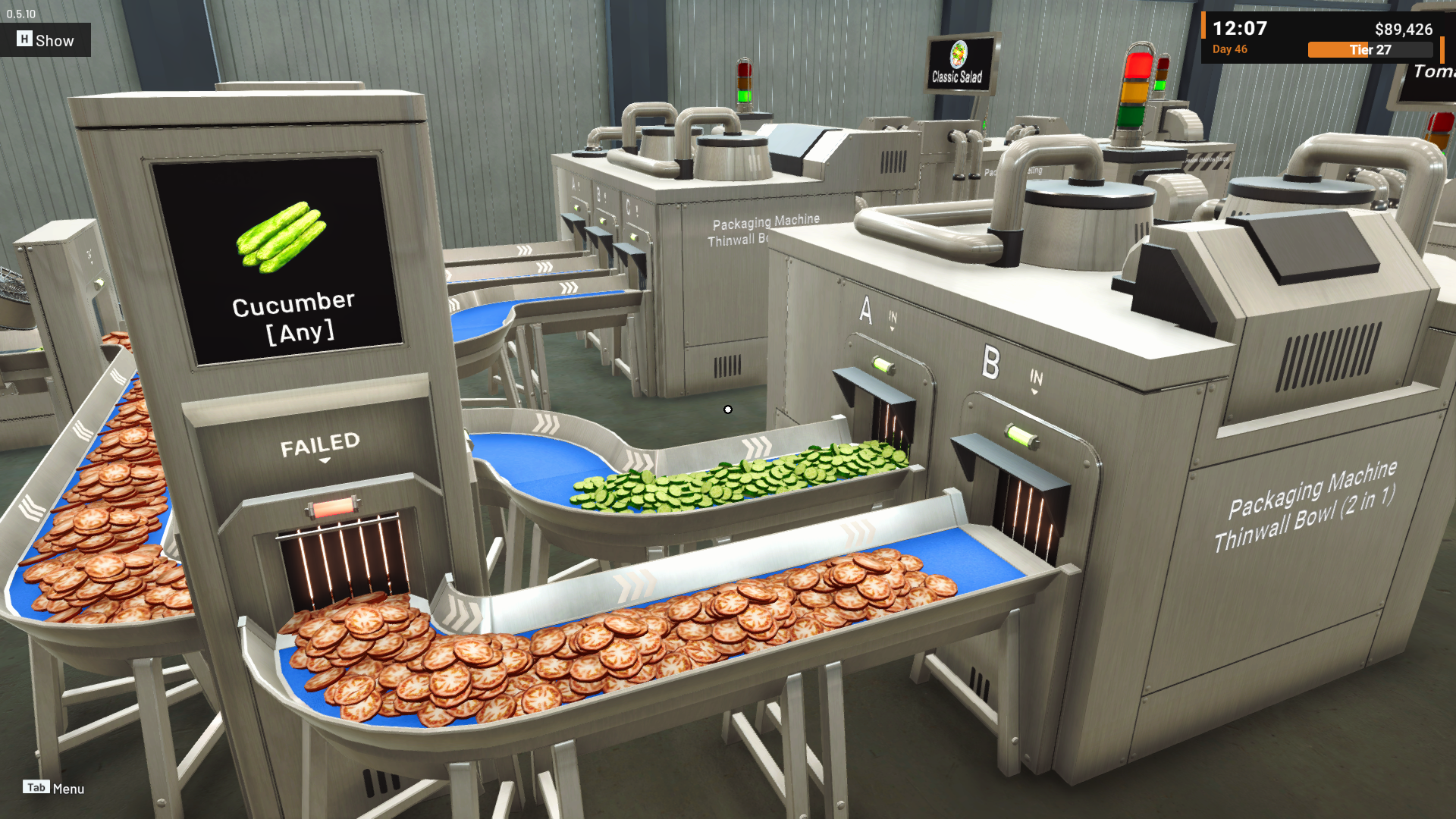
New bowl packaging machines are available in 3-in-1 and 2-in-1 variants.
These machines are used for new multi-ingredient menus that require combining several ingredients into one packaged product.
[carousel autoadvance="true"]
[/carousel]
[carousel autoadvance="true"]
[/carousel]
The new machines work as follows:
Each 3-in-1 or 2-in-1 packaging machine requires multiple ingredients to be supplied into each input in the machine.
The label and packaging combination will be rejected if the ingredients do not match the active menu that is assigned to that package labeling machine.
[carousel autoadvance="true"]
[/carousel]
This means players need to pay closer attention to the full flow of their line, from Starter Machine through to packaging and labelling, to make sure all ingredients and labels match correctly.
2. Invert Machines for Layout Flexibility
Many of you mentioned needing more ways to set up machines in different layouts, so this update adds new options to help you build the factory the way you want. You can now purchase inverted versions of certain machines to improve layout flexibility.
These machines are visually mirrored, allowing you to flip input and output directions compared to the original versions.
This gives more options when building compact or symmetrical lines, especially in tighter factory spaces.
[carousel autoadvance="true"]
[/carousel]
3. Project and Loading Zone Expansion
We’ve heard your feedback about the Loading Zone limit when calling trucks. As we continue expanding the factory experience, we want to make sure you can take on more projects at once. After reaching a Tier 15, you can expand your factory’s Loading Zone capacity.
The new gate can be unlocked to add additional Loading Zones. The gate located in the east side of the building.
With more Loading Zones, you can have more active projects at the same time.
There are several important changes that come with this:
When you accept a project, you must now choose which Loading Zone will be used for that project.
Employees still prioritize trucks based on arrival time, not based on which Loading Zone they are in.
The Project UI now shows the Loading Zone number, so you can quickly see where each project will be delivered.
This gives more control over how you distribute work between loading areas, while keeping truck priority logic simple.
[carousel autoadvance="true"][/carousel]
[carousel autoadvance="true"][/carousel]
4. Rush Pickup
If you can maintain strong production and have your products ready earlier than expected, you can ask the client to pick them up ahead of schedule, with a few tradeoffs to keep in mind. With the combined ideas and suggestion from the community, a new Rush Pickup feature has been added to Project management.
Rush Pickup lets you contact the client to request an earlier pickup than the originally scheduled day.
Because the client must change their plan and take on extra shelf-life and logistics risk, they will apply a reduction to your payment based on how many days earlier the pickup happens.
This creates a tradeoff: you can clear space and complete projects earlier, but at the cost of lower income for that project.
[carousel autoadvance="true"][/carousel]
5. Starter Machine Production Limit
We understand that having more control over production can really help you manage how Production Assistants support your workflow. That’s why Starter Machines now support production limit settings.
After you choose the selected commodity for a Starter Machine, a new variable becomes available in Machine Settings that controls the production limit.
By default the limit is Unlimited.
You can change it to a specific number, for example 48 units.
When a finite limit is set:
A counter will decrease as items are produced.
When the counter reaches 0, employees will stop supplying that Starter Machine.
The machine will wait until you manually change the limit again.
This helps prevent overproduction, especially when you only need a fixed amount of a particular item for a project.
Note:
Currently, the Production Assistant supplies boxes based on available stock and continues filling any boxes it has already provided. This can result in the total supplied amount exceeding the limit, but it will stop providing new boxes once the limit reaches 0.
[carousel autoadvance="true"][/carousel]
6. Improved Loading Operator Delivery Behavior
We’ve taken another step to refine how Loading Operators pick up and deliver boxes. Based on last week’s updates and your community feedback, we’ve made improvements to their delivery behavior.
Box selection priorities now follow this order:
Lowest valid grade first
Among boxes that meet the project’s grade requirement, Loading Operators prioritize the lowest valid grade.
This helps consume lower-grade inventory earlier and keeps higher-grade stock available for future projects.
Closest box size to remaining target
Next, they choose the box whose contents are closest to the remaining project target, reducing unnecessary overshooting with large boxes.
Location priority
Priority is given to items inside Cold Storage in this order:
Boxes outside racks but inside storage
Then boxes inside racks
Finally, boxes outside Cold Storage if needed
Other improvements:
Efficiency when pallets and forklifts are needed Delivery logic has been improved for projects that require using pallets and forklifts so that less time is wasted preparing or moving unnecessary boxes.
[carousel autoadvance="true"][/carousel]
Pallet Generator Employee Settings A new setting has been added to the Pallet Generator that lets you define a minimum threshold before employees start using pallets.
The default is more than 36 units (equivalent to 6 Small boxes).
You can adjust this value to control when employees begin palletizing goods based on your storage condition and playstyle.
Updated algorithm for returning excess boxes The logic that decides which excess boxes are returned from the truck has been updated so that the process is choosing the best box to returned.
7. Moveable Supply Drop Area
We’ve heard your feedback about the Supply Drop Area location needing to be closer to the center of production. Since every player’s factory layout is different, we’ve updated it so the Supply Drop Area is now moveable, letting you place it wherever you need.
You can reposition the Supply Drop Area according to your layout needs.
Future supply purchases and new machines will appear at the newly selected location.
This is especially helpful once your factory grows and the original drop location is no longer optimal.
[carousel autoadvance="true"][/carousel]
8. Improvement on Cold Storage Display
The Cold Storage display has gained new tools to make stock browsing easier based on community feedback.
Information now showing and calculating all product inside the cold storage including in the rack and in the cold storage floor.
You can filter the display by:
Name only, or
Name with grade visible
You can sort quantities in ascending or descending order.
This makes it easier to quickly find specific products and see which items are running low or are overstocked.
[carousel autoadvance="true"][/carousel]
9. Machine Screen Interaction Updates
Machine screens now offer more useful interactions and clearer information.
Merge and Filter Machines now show the number of items inside them.
The screens on Starter, Merge, and Filter Machines can be clicked to focus on viewing their item counts. So for player who can't see well with the little image information you can view them in more details.
Item lists on screens have been updated to a list style with scrollable function, improving readability when there are multiple entries.
[carousel autoadvance="true"][/carousel]
Improvements
Active Project HUD UI Added an Active Project HUD element that you can show or hide as needed. This allows you to keep project goals visible during gameplay without opening menus.
Updated Machine Appearances and Icons Several machines have received visual updates and new purchase icons to match the latest design in the game.
Improved Idle Animations Idle animations for characters when they are doing nothing have been updated to look more natural.
Pallet Item Count Display When a pallet contains items, the total item count now appears above the pallet, making it easier to see how much stock is loaded without walking to a monitor.
Extra Popup When Tutorial Ends Added an additional popup to clearly indicate when the tutorial phase is complete, so new players understand when they are fully free to experiment.
Flexible Save Option When Returning to Main Menu When going back to the main menu, you now choose whether to:
Save progress to the Auto Save slot, or
Return without saving This helps avoid accidental overwrites while still giving a quick way to save.
Repack Machine Information When repacking a machine, there is now a clearer indication of which items will fall out of the machine, so you can prepare before confirming the action.
Bug Fixes
Cannot Close Filter or Splitter Settings After Moving Machines Fixed an issue where the settings window for Filter or Splitter Machines could not be closed after moving those machines.
Box Disappearing in Hand When Looking at Monitors Fixed a bug where a box could disappear from the player’s hand if they picked up a box and then looked at a machine monitor.
Building Machines on Top of the Supply Drop Area Fixed a condition where it was possible to place machines on top of the Supply Drop Area, which should not be allowed.
Sold Box Generators Reappearing on Load Fixed an issue where Box Generators that had been sold would reappear when loading a save.
FOV Inconsistency on Monitors and Forklifts Fixed inconsistent Field of View values when looking at machine monitors or when driving the forklift so that FOV settings are now applied correctly.
We will continue to improve the game in future updates, especially around balancing-game economy, employee behaviors, supply management and more money generator or spending.
If you notice any new issues with the updates, please let us know through the in-game report tools or on Steam Discussions. Your feedback is still the main driver for how we prioritize changes.
Thank you again for playing Food Processing Simulator and helping us refine it step by step. See you in the next update! 🥗🚚
[dynamiclink href="https://store.steampowered.com/app/3928990/Food_Processing_Simulator/"]
Source
Changelog.gg summarizes and formats this update. How we read updates.