
In this update9
Full notes
Full Flyout update
Read the full published notes in a cleaner layout. The original post stays linked below.
What changed
- Gameplay
- Maps
- Performance
- UI and audio
- Fixes
Flyout changes
Flyout Munitions Update moves out of testing and into the main branch!
Steam post image Rafale model made by ATKA on the Flyout Discord
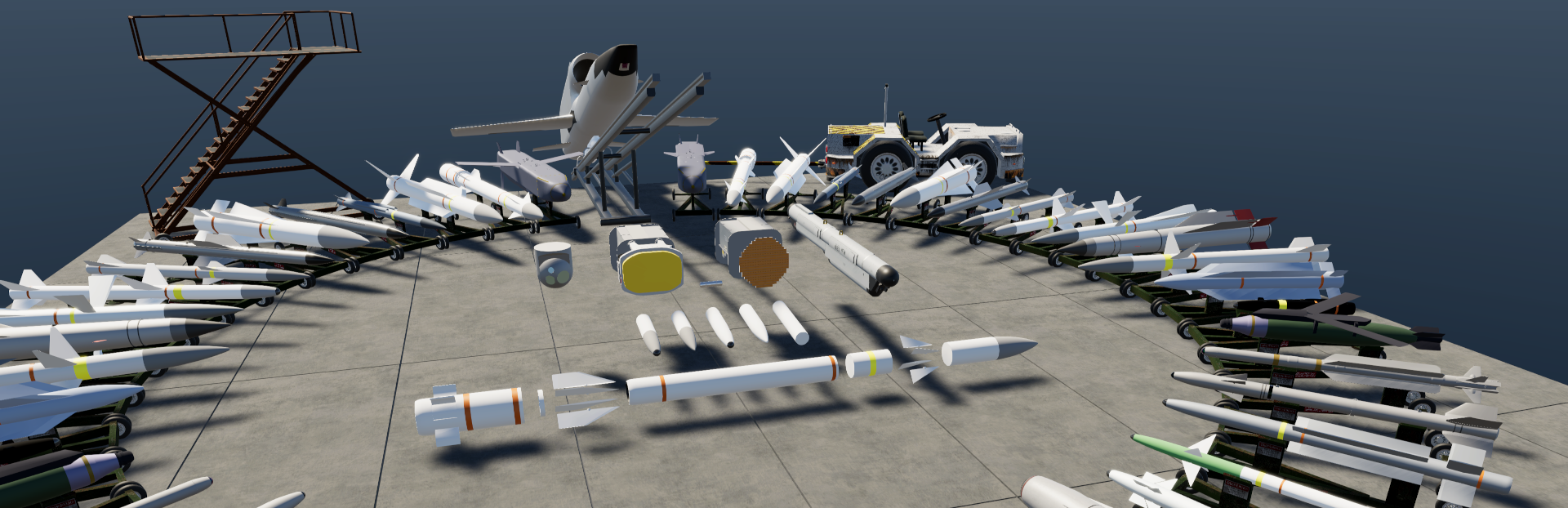
After a brief testing period, we are proud to present the Munitions Update 0.2322 which brings the procedural weapons to Flyout! This update is fairly significant and adds some highly requested features, new parts, and many bug fixes!
New and Improved Parts
Functional sensors: FLIR, RADAR, IRST
Functional Jammer
Solid Rocket Motor
Stage Separator
Explosive Warhead
Missile Core (Seeker) - Can be configured as IR, ARH/SARH, ARM, Laser, directly controlled or simply unguided
Procedural Missile Fins
Steam post image New parts can also be combined with fuselages, fuel tanks and engines to create unique and advanced weapons, also an important note: To have your missile control the throttle of the engine, delete the throttle response in the editor!
Steam post image If you've been following the preview posts, you'll recognize this image featuring the incredible variety of munitions possible in the new update!
New Editor Features and "Missile Flight Replay"
With the new parts comes new options to tweak and change, RADARs come in a variety of types (Mechanically Scanned, PESA, AESA) and can be configured to fit the needs of your aircraft with several tweakable options. The "Warhead" part can display a preview function that shows the effective radius, the fusing distance, and the fragmentation pattern of your munition. Additionally, the missile will remember its most recent flight and will be able to replay it upon returning to the editor, this can give the creator useful information on the performance of their weapon!
Steam post image The warhead part preview allows for visualization of the fuse, fragmentation, and explosive radii
Steam post imageOn the new Rocket Motor part you will be able to edit the thrust curve to really fine-tune the performance of your missile
Steam post image The Missile Flight History screen will display the most recent flight of the munition
New Enemy Spawn Options
A very highly requested feature, the ability to select the distance and direction of enemy spawn has been added. A new SAM Radar enemy has also been added for testing of Anti-Radiation Missiles, and enemies are now able to be spawned in the water to simulate ship targets!
Steam post image Some amazing creations from the members of the Flyout Discord: https://discord.gg/flyout
Change Log for Flyout 0.2322
Added
New "SAM Radar" Enemy for early detection
Distance/Direction inputs for spawning enemies
9 new Procedural Munitions parts
Functionality to RWR, IRST and Countermeasures
Ability to drag missile info panel
ASL Field to missile info panel during flight
Trim+Flares keybind to cycle countermeasure modes
Label to "Own Craft" when cycling view with F1
Distance to Camera in F1 view
Kinematic energy is now accounted for explosions on missiles
Jammer and Radar get ability to be hidden
Ability to use Radars on launched munitions as companion drones
Toggle for random vs. manual enemy spawning
Rocket Motor Class Rating in editor and flight
Rocket Motor ISP in info panel during the flight
Custom fuels for Solid Rocket Motors
CEP for missiles in Advanced settings (1m by default)
Gain for missiles in Advanced settings
Initial Coords for missiles when both Remember Position and Lock On After Launch are enabled. When selected and has coordinates - will fly there like with Coords guidance while trying to find a target
Submunitions now get instant lock when fired if they share same seeker type
Tab keybind to open Thrust Curve Editor
Trim+Flares keybind to cycle countermeasure modes
Sounds for Soft Locking/Unlocking an enemy during the flight
Changes
Custom Fuel location moved to AppData/Mods/Fuels
Button "Release" on hardpoints renamed to "Jettison"
F1 to cycle camera targets, most recently fired missile will be first in cycle, Alt-F1 to cycle back
Destroyed Targets and "dead" missiles no longer in F1 cycle
Scrollbar in editor increased 5x speed
Fuel in Turbine and Piston test run now uses actual craft fuel
Radar weight now scales with size
Easier locking with laser/coord
Field "Radar Power" renamed to "Average Power"
Cannot cycle Radar modes when radars have no power (shows popup)
Diameter/Length fields on Procedural Munitions now go to bounds instead of rolling back
Updated Stock Crafts
Fixed
Target Drones should be less prone to fly into mountains or water
Enemies no longer spawn underwater
SAM missiles exploding on firing
SAM not seeing player
SAM sending missiles straight up into space
Missiles going underground
Explosion following missile after stage separation
Black screen when placing joints on missiles
Chaff inside landing gear breaking physics
Chaff not affecting SAM's ability to see player
Hardpoint Separation Force
Missiles not firing when attached to a hardpoint
Hardpoints only jettisoning a single part attached to it
Cycling of rocket pods
Hole Material affecting RCS
Dropped fuel tanks still being drained (No more bluetooth fuel)
Engines working with all fuel tanks closed
Piston and Ramjet black screen error
Ramjet reverse thrust bug
Deleted turbine throttle input reappearing in editor
missing custom fuels not loading the craft or causing previous craft to be loaded instead
camera in editor rolling during lag spikes
being unable to click under F4 panel
F4 panel obstructing UI elements
Control bindings not working while under "F2 flight mode"
Popup not decaying while paused
HUD being visible in editor
Static Wick spelling
Warhead preview not showing button first time
Warhead preview not showing targets
Radar settings not being accessible
Rocket flame getting inverted at extremely low pressures
IRST panel settings
PRH missiles not finding targets
Direction in Spawn Menu not aligning with compass
Default settings on Stage #1 being wrong
Small missiles having absurd weights
Not being able to type decimal numbers in Direction field
Not being able to type decimal numbers in Loft Cut Advanced Guidance setting field
Lofting guidance
Missile behavior on extremely long ranges
"To Target" staging option triggering when no target was present
Manual Guidance option showing not related fields
Submunitions name not shown when fired
Laser missile being guided by FLIR placed on it
Fuel Dumps not working
Radar searching while no energy present
Radar model having flipped text
Increased missile stability (wobbling) at lower physics FPS
Increased Procedural Fin lift at low AoA
Missile trail weird behavior
An issue with missile and Target Drone sound effects
Piston Engine with 0 idle throttle breaking craft physics
New Keybinds
X - Trim, but also modifier for weapons systems
F1 - Cycle camera forward
Alt+F1 - Cycle camera backwards
Tab - Cycle missile types (Rename the "Missile Core" to separate missile groups)
F - Fire Missile
T - toggle Soft-Lock of the target
T+X - force Soft Lock of the target
Y - Cycle RADAR modes
Y+X Cycle RADAR modes backwards
H - Select Laser / Coordinate location
X+H - Toggle Air to Ground mode / Air to Air mode for RADAR
R - Fire Countermeasures
R+X - cycle countermeasure modes
F8 - "Microwave" rotation in craft editor
Source
Changelog.gg summarizes and formats this update. How we read updates.