What changed
0 fixes0 additions3 changes0 removals
changed② Doesn't both 1P and 2P operate? (Can't fire?) → Reconnect the controller that does not work (turn the power on again) (If you just can't fire, make sure that Input (Fire 1, 2) corresponds to the button of the controller)
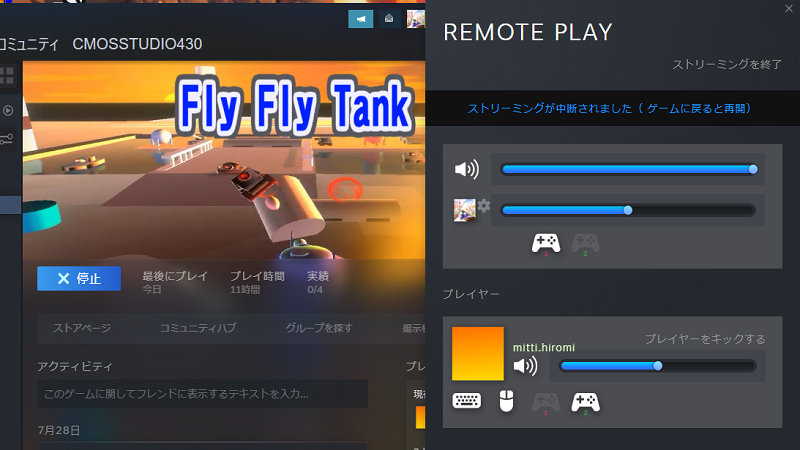
changed③ Only 2P does not work? (Can't fire?) → If 2P screen does not move, communication is not possible or extremely slow → On the Steam/Settings/General controller settings/Controller settings screen, make sure that the target controller setting support is checked. →Check if the 2P controller is displayed on the Remote Play Together screen, and if it does not work, reconnect the 2P controller (turn the power on again). (If you just can't fire, make sure that Input(Fire2) corresponds to the button on the controller.) → If the 1P side plays with the mouse, make sure that the controller is not connected to the 1P side and that the 1P controller is displayed on the client side on the Remote Play Together screen.
changed④ Isn't the two-player co-op play displayed? →Co-op play will be available from stage 6 onwards
Fly Fly Tank changes
changed② Doesn't both 1P and 2P operate? (Can't fire?) → Reconnect the controller that does not work (turn the power on again) (If you just can't fire, make sure that Input (Fire 1, 2) corresponds to the button of the controller)
changed③ Only 2P does not work? (Can't fire?) → If 2P screen does not move, communication is not possible or extremely slow → On the Steam/Settings/General controller settings/Controller settings screen, make sure that the target controller setting support is checked. →Check if the 2P controller is displayed on the Remote Play Together screen, and if it does not work, reconnect the 2P controller (turn the power on again). (If you just can't fire, make sure that Input(Fire2) corresponds to the button on the controller.) → If the 1P side plays with the mouse, make sure that the controller is not connected to the 1P side and that the 1P controller is displayed on the client side on the Remote Play Together screen.
changed④ Isn't the two-player co-op play displayed? →Co-op play will be available from stage 6 onwards
① Does move the same in 1P and 2P? →The host side attaches two controllers, launches the game, then removes the second one and starts "Remote Play Together"
② Doesn't both 1P and 2P operate? (Can't fire?) → Reconnect the controller that does not work (turn the power on again) (If you just can't fire, make sure that Input (Fire 1, 2) corresponds to the button of the controller)
③ Only 2P does not work? (Can't fire?) → If 2P screen does not move, communication is not possible or extremely slow → On the Steam/Settings/General controller settings/Controller settings screen, make sure that the target controller setting support is checked. →Check if the 2P controller is displayed on the Remote Play Together screen, and if it does not work, reconnect the 2P controller (turn the power on again). (If you just can't fire, make sure that Input(Fire2) corresponds to the button on the controller.) → If the 1P side plays with the mouse, make sure that the controller is not connected to the 1P side and that the 1P controller is displayed on the client side on the Remote Play Together screen.
④ Isn't the two-player co-op play displayed? →Co-op play will be available from stage 6 onwards
※Input format of "XInput" is recommended