
HomeGamesUpdatesPricingMethodology
Steam News14 November 20187y ago

Update 1.1.1 Now Available!

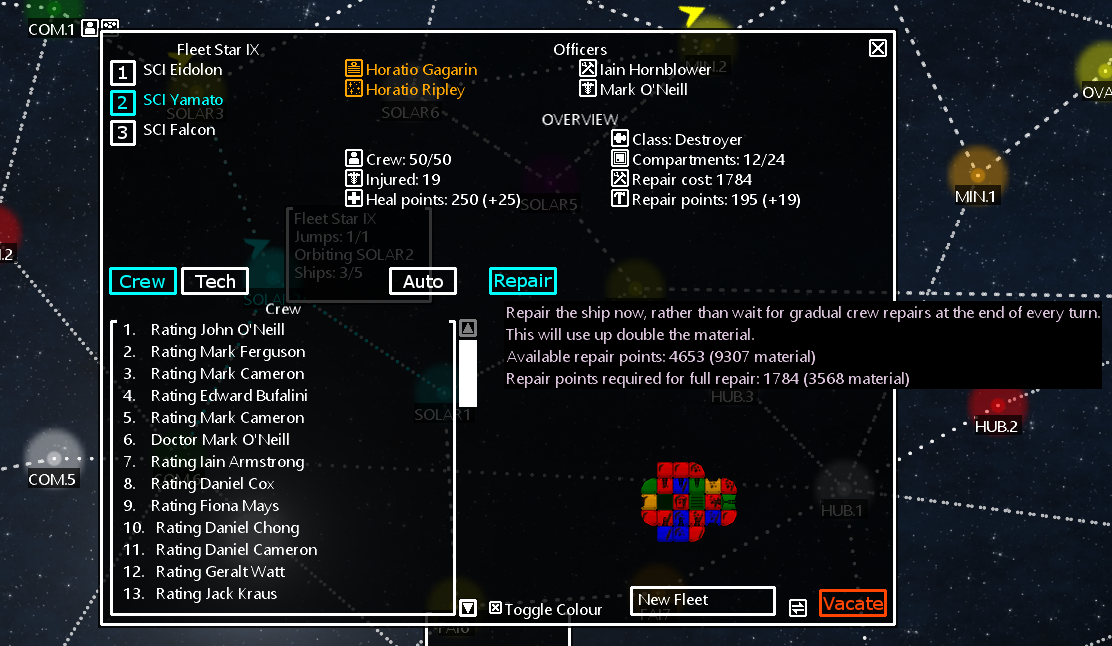
Major Can now repair ships manually, rather than waiting for ship to be repaired gradually at end of each turn. Be carful as this will use up double the material! Look for the [REPAIR] button on the ship report!

Full notes

Full Fleet Star V update

Read the full published notes in a cleaner layout. The original post stays linked below.

What changed

0 fixes1 addition3 changes0 removals
  • UI and audio
  • Gameplay
addedCan now repair ships manually, rather than waiting for ship to be repaired gradually at end of each turn. Be carful as this will use up double the material! Look for the [REPAIR] button on the ship report!
changedSettings file will now be automatically copied over to your 'C:\Users\USER\Documents\Fleet Star V' directory. This will be copied from the BaseSettings.xml file in the game directory.
changedCampaign screen - stops notification behind close report button from being clicked when closing report.
changedTooltip writing colour modified from white to 'thistle'. This makes the tooltips easier to read against a backdrop of white text.

Fleet Star V changes

addedCan now repair ships manually, rather than waiting for ship to be repaired gradually at end of each turn. Be carful as this will use up double the material! Look for the [REPAIR] button on the ship report!
changedSettings file will now be automatically copied over to your 'C:\Users\USER\Documents\Fleet Star V' directory. This will be copied from the BaseSettings.xml file in the game directory.
changedCampaign screen - stops notification behind close report button from being clicked when closing report.
changedTooltip writing colour modified from white to 'thistle'. This makes the tooltips easier to read against a backdrop of white text.

Major

  • Can now repair ships manually, rather than waiting for ship to be repaired gradually at end of each turn. Be carful as this will use up double the material! Look for the [REPAIR] button on the ship report!

Minor

  • Settings file will now be automatically copied over to your 'C:\Users\USER\Documents\Fleet Star V' directory. This will be copied from the BaseSettings.xml file in the game directory.

  • Campaign screen - stops notification behind close report button from being clicked when closing report.

  • Tooltip writing colour modified from white to 'thistle'. This makes the tooltips easier to read against a backdrop of white text.

Source

Steam News / 14 November 2018

Open original post

Changelog.gg summarizes and formats this update. How we read updates.