
In this update13
Full notes
Full Firefighting Simulator: Ignite update
Read the full published notes in a cleaner layout. The original post stays linked below.
What changed
- Gameplay
- UI and audio
- Store
- Fixes
- Performance
Firefighting Simulator: Ignite changes
Attention, Firefighters!
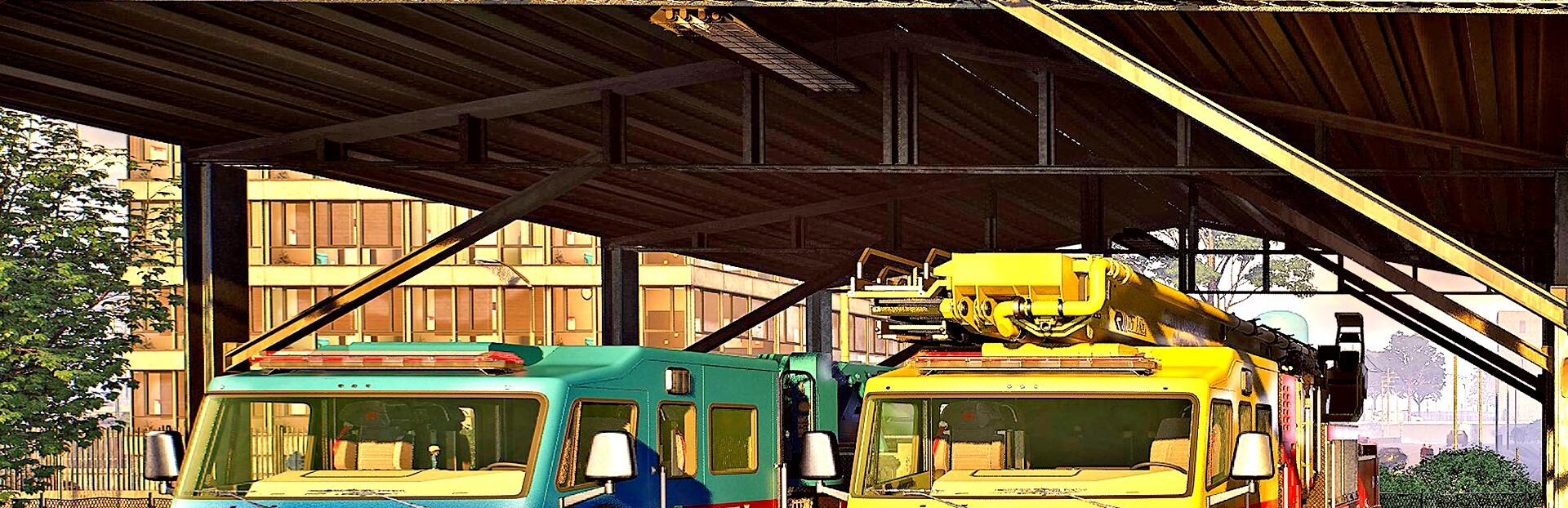
Get down to the vehicle hall, the Oakridge City Fire Department is proud to announce that you can now customize your emergency fleet!
Watch the Vehicle Customization Update Trailer:
🎨 Customize your fleet
Make your department stand out with new color options:
Select from multiple color presets
Or choose individual colors for a more personal touch
🚨 Fine-tune your sirens and lightbar patterns
Switch lightbar patterns above the cabin and adjust the siren sound for Wail and Yelp and choose from three different options: 2x electric and 1x mechanical pattern.
🧑🚒 Out now as a free Update
The Vehicle Customization Update is now available for free on all platforms.
Full Changelog
New Feature: Vehicle Customization
While poking around the apparatus bay, we stumbled upon a few forgotten paint buckets and spare parts. Naturally, we put them to good use and just like that, vehicle customization is officially here!
Visit the apparatus bay to customize all your vehicles with individual color schemes, sirens, and light patterns. All vehicles come with a variety of preset color patterns for you to choose from, but of course you can create and store your own custom patterns. You can also customize the vehicle’s siren sounds by choosing between individual options for the wail and yelp. Lastly the emergency lights section allows you to select a new custom pattern for the emergency lights of each vehicle. Each vehicle can be customized individually and presets can be stored and shared between them.
Owners of the Blackout Truck Edition Skins DLC (to be released tomorrow) will also have access to additional coloring options.
Changelog
General
[ADDED] Separate inputs for emergency lights and siren (wail) – they can now be toggled independently.
[FIXED] Several graphical issues
[IMPROVED] Several performance and stability improvements
Missions
[FIXED] “Not keeping it Cool” - Increased amount of attack locations behind the building for the Squad AI
[FIXED] “My friend Kyle” - Fixed some ladder issues
[FIXED] “Black Friday” - Fixed an issue that could lead to players getting stuck behind doors
[FIXED] “Trapped in an Episode” - Adjusted the navigation during approach
[FIXED] “Cabin in the Whoops” - Fixed navigation issue that prevented the Squad AI from accessing one of the hydrants
[FIXED] “Climbing Flames” - Fixed an issue with a door that couldn’t be opened from outside
[FIXED] Several issues with mod templates
UI & Localization
[CHANGED] Removed “Abandoned Victims” from in-game statistics
[FIXED] “Play Voice” button wasn’t hidden correctly in Create/Edit Profile screen
[FIXED] Aerial exit indicator is no longer always visible for Multiplayer clients
- [FIXED] Simplified inputsthe “tap” indicator is correctly shown as “hold” again during interactions when the “Simplified inputs” settings is activated
[FIXED] Fixed an issue that could lead to multiple mission markers appearing on the minimap
[FIXED] Too long mission titles which can’t be wrapped are now scrolling automatically
[FIXED] Required missions are shown again for the “Black Friday” mission in the map menu
[FIXED] Several interaction tooltips (e.g. opening windows from a cage)
[FIXED] Several localization issues
AI
[CHANGED] When discovering objectives in a room, a fully- or partially-autonomous Squad AI will now pursue them directly, if not told otherwise
[FIXED] Squad AI will no longer play “Fire Extinguished” voice lines if no valid attack location can be found, to reduce spam and wrong feedback for players
[FIXED] Several minor bugfixes and improvements
Sound
[CHANGED] Added or changed several UI sounds
[FIXED] Siren and station alarm is now suspended when Pause is active
[FIXED] Fixed an issue where the voice type selection in the profile selection did not work
🎙️ Join the Community!
Follow us on social media for the latest news, behind-the-scenes content, and more updates from Oakridge City. Share your firefighting adventures and connect with fellow fans!
Follow us here:
Facebook Instagram Threads TikTok Discord Website
Stay safe out there, Firefighters. We’ll see you on the scene.
Your Firefighting Simulator Team 🧑🚒
Source
Changelog.gg summarizes and formats this update. How we read updates.