
In this update4
Full notes
Full Fate Trigger update
Read the full published notes in a cleaner layout. The original post stays linked below.
Repeated intro
Hello Awakeners!
What changed
- Gameplay
- Performance
- Maps
- UI and audio
- Server
Fate Trigger changes
Welcome to the Fate Trigger Steam Next Fest Playtest, the playtest is starting on Feb 20, 3AM (EST).
To help everyone join the test smoothly, we have compiled the latest FAQ below.
1. Playtest Access & Download Guide
Q1: Do I need an activation code? How can I get access?
A: This is an unlimited playtest with data wipe, no activation code is required. To participate, please simply head to the Steam Store and search for Fate Trigger. Once you download and install the Demo client, you can enter the game directly when the test begins on Feb 20, 3 AM (EST).
Q2: I have the client from a previous test; do I need to redownload it?
A: Yes. You must completely uninstall the old client and delete the local configuration files located at: [c]FateTrigger\\S1Game\\Saved[/c].
- NoteDue to significant performance optimizations, the old game files are incompatible and cannot be updated. Please ensure a fresh installation of the new client to avoid technical issues.
Q3: Is there new content in this playtest?
A: New content, including new Awakeners, is currently under intensive development and will not be available during this specific test. We appreciate your patience and support. For more details, please refer to View on Steam
Q4: Which regions are eligible to participate?
A: This test is open to Awakeners worldwide. See the full list in View on Steam However, please be aware that access is temporarily restricted in certain regions due to local policies and distribution agreements. We apologize for the inconvenience and thank you for your understanding.
Q5: Is there an age restriction for this test?
A: This test is strictly limited to Adult Users (Based on your local laws and regulations). When registering your account for the first time in this playtest, please ensure you select your age accurately based on your actual circumstances. Please note that once your age information is confirmed, it cannot be modified or reset. If an account is identified as belonging to a minor, access to this test on Steam will be automatically restricted.
2. PC System Requirements
Q1: If I see a device not supported notice when launching, what should I do?
A: Performance optimization for all configuration types is not yet fully complete in this playtest. There may be rare cases where PC devices meeting the basic spec requirements are unable to enter the game. If you experience this issue, please join our Official Discord to submit a bug report. We will follow up and fix it promptly. We deeply apologize for any inconvenience it may cause.
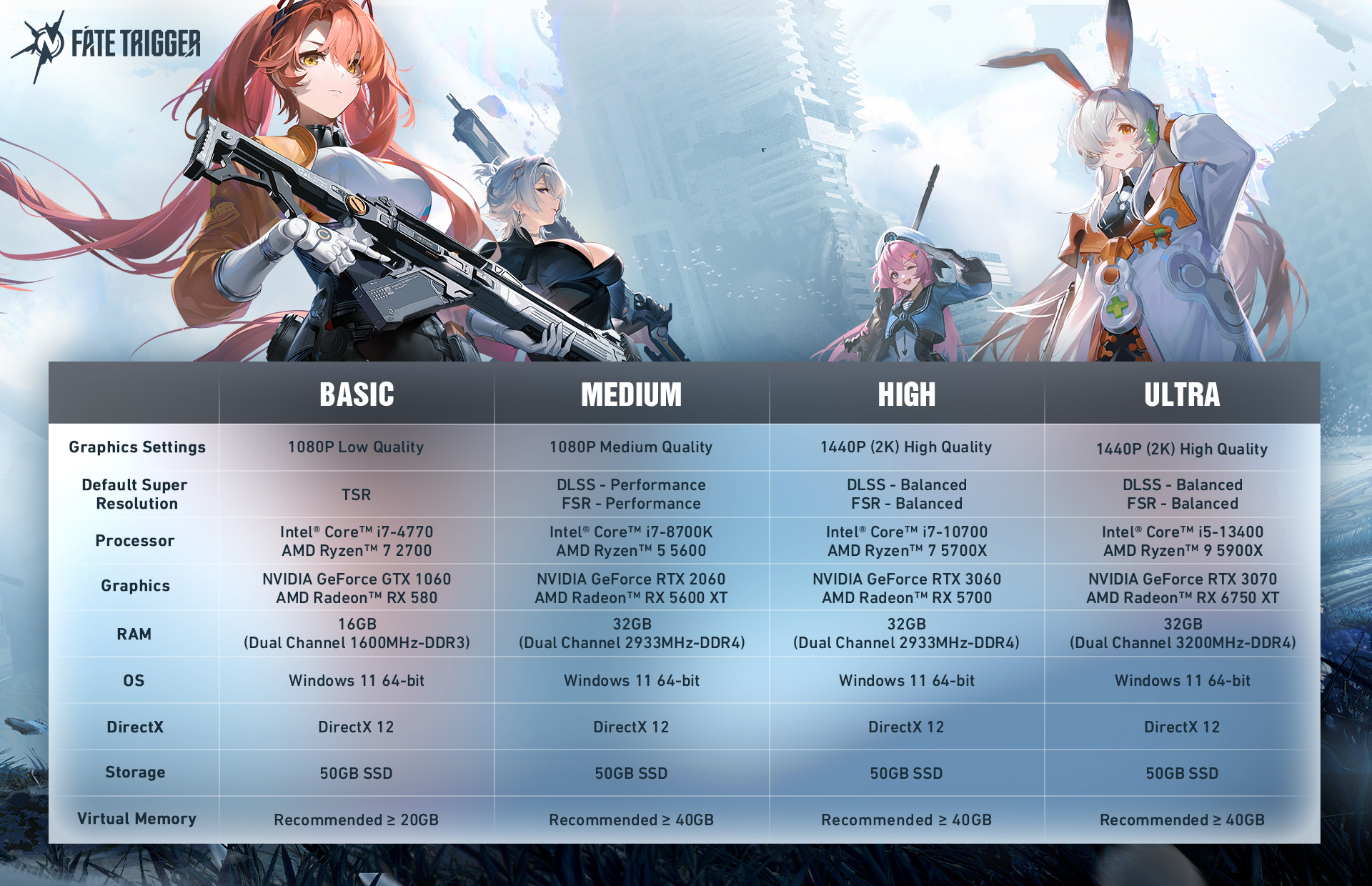
Q2: What are the PC system requirements for this playtest?
A: This is the test version and does not represent the PC System Requirements for the official launch.
3. Technical Support & Performance
Q1: What should I do if the game crashes or has an Out of Video Memory error? (For Intel 13th/14th Gen CPU users)
A: This is caused by instability in specific hardware running at high frequencies. If you are using an Intel 13th/14th Gen CPU (e.g., i9-13900K, i7-14700K), you may experience crashes or errors during gameplay. Please install Intel Extreme Tuning Utility and try lowering the CPU's maximum frequency or voltage. If the issue persists after adjustment, please report it in #bug-report on our official Discord.
Q2: The game visuals look blurry, and I can't see distant enemies clearly?
A:Please check your"Super Resolution"settings. This is usually related to DLSS or FSR settings. We recommend going to [Settings > Graphics Quality] and adjusting the DLSS/FSR mode to"Quality."Alternatively, you can directly turn off the"Anti-Aliasing and Super Resolution"option (visuals will become sharper, but frame rates may drop).
Q3: What should I do if I encounter a white screen or screen artifacts?
A: This is usually a graphics driver issue. Please visit the official NVIDIA or AMD website to update your graphics driver to the latest version.
Q4: What should I do if the game crashes with a GPU-related error like "GPU crashed or D3D device removed"?
A: We recommend updating drivers and closing conflicting software:
Please visit your graphics card's official website to update drivers to the latest version (Note: NVIDIA users should try to avoid version 576.52).
We recommend closing third-party monitoring software, as they may cause low-level conflicts.
Q5: How do I deal with the notice "Please upgrade your DirectX 12 and Graphics driver to the latest version" when launching the game?
A: To ensure the best experience, please try the following adjustments:
Update your DirectX version to DirectX 12.
Visit the official NVIDIA or AMD website to download and update your drivers to the latest version.
Upgrade your Windows version to Windows 10 (Build 19045) or higher.
Q6: What should I do if I get stuck in the map and can't move?
A:There are two ways to get yourself unstuck:
Manual Unstuck: Press Esc to open the menu and click the [Unstuck] button.
Automatic Unstuck: If you cannot use the menu, please stay still and wait for 3 minutes. The system will detect the anomaly and automatically reset you to a safe location.
Q7: What should I do if the client crashes? (Virtual Memory Guide)
A: Please try adjusting your Virtual Memory. If you have lower physical RAM (16GB or less), we recommend manually increasing your system's virtual memory size to help prevent stuttering or crashes caused by high memory usage. (👉 Virtual Memory Setup Tutorial: View on Steam
Q8: What should I do if I encounter error code [1067104] "Login failed" or [3507001] "Failed to launch game process" at startup?
A: these errors are typically caused by network connection. Please fully close both the game and the launcher, then attempt to restart the game directly from your Steam Library.
Q9: There are other bugs I want to report.
A:The game is still in an early development version. If you encounter any bugs during the playtest, please visit the #bug-report channel on our official Discord to provide feedback. Detailed screenshots and descriptions will help us fix issues faster.
4. Lag & Frame Drop Issues
Q1: What should I do if the game feels laggy, loads slowly, or models fail to render?
A: Aside from checking your hardware specifications, please check your:
Storage: Ensure the game is installed on an SSD (Solid State Drive). Mechanical hard drives (HDDs) will cause severe texture loading delays and stuttering.
Memory: We recommend using dual-channel RAM.
Background Processes: We recommend closing unnecessary background processes.
Q2: My PC meets the requirements, but I'm still experiencing severe frame drops?
A: We recommend adjusting your graphics or display mode.
Display Mode: Try switching from [Fullscreen] to [Borderless Window]. This can significantly improve frame rate stability on some systems.
Path: Settings ➡ Graphics ➡ Display Mode ➡ Borderless Window
Graphics: Try gradually lowering the In-Match Frame Rate Limit, Screen Resolution, and Graphics Quality.
Path: Settings ➡ Graphics
Q3: What should I do if the game stutters or lags on a device with 16GB of RAM?
A: In the current test version, some devices with 16GB of RAM may experience performance issues due to insufficient physical memory. If you encounter this, we recommend closing unnecessary background software via Task Manager to ensure a smoother gaming experience.
Please note: This is a test currently under development. The game content, graphics quality, and items do not represent the final quality of the game.
Thank you for your understanding and support. See you at the Steam Next Fest Playtest!
Welcome everyone to join our official community to discuss the game and get the latest news!
Source
Changelog.gg summarizes and formats this update. How we read updates.