
Full notes
Full Fate/Samurai Remnant update
Read the full published notes in a cleaner layout. The original post stays linked below.
What changed
- Store
Fate/Samurai Remnant changes
■Opening movie and other cutscenes being skipped automatically. (Steam®) Please install the VP9 codec by installing the "VP9 Video Extensions" from the Microsoft Store available at the following web page: https://apps.microsoft.com/store/detail/vp9-video-extensions/9N4D0MSMP0PT
If the measure above does not improve the situation, please refer to the following support page: https://support.koeitecmo.info/hc/en-us/articles/23603078799513
■Cannot save/load. (Steam®) Please refer to the following support page: https://support.koeitecmo.info/hc/en-us/articles/23580170503193
Q: The game will be in Japanese if launched from desktop shortcut. (Steam®) A: The region can be permanently set when launching the desktop shortcut.
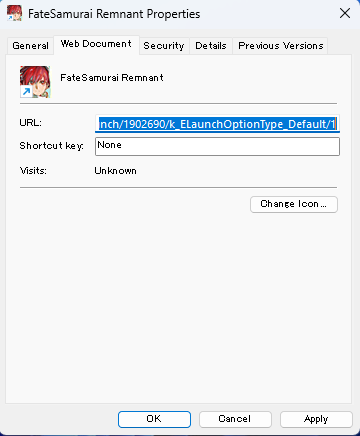
In either Windows 10 or Windows 11, right-click the desktop shortcut > Properties > Web Document, and enter the following text in the "URL(U):" box, then click OK and double-click the desktop shortcut.
For English, input the following: steam://launch/1902690/k_ELaunchOptionType_Default/1 For Simplified Chinese, Traditional Chinese, or Korean, input: steam://launch/1902690/k_ELaunchOptionType_Default/2 For Japanese, input: steam://launch/1902690/k_ELaunchOptionType_Default/0
Source
Changelog.gg summarizes and formats this update. How we read updates.