Updates and Fixes #41: Improved Crafting UI part 2, Translation to Spanish.
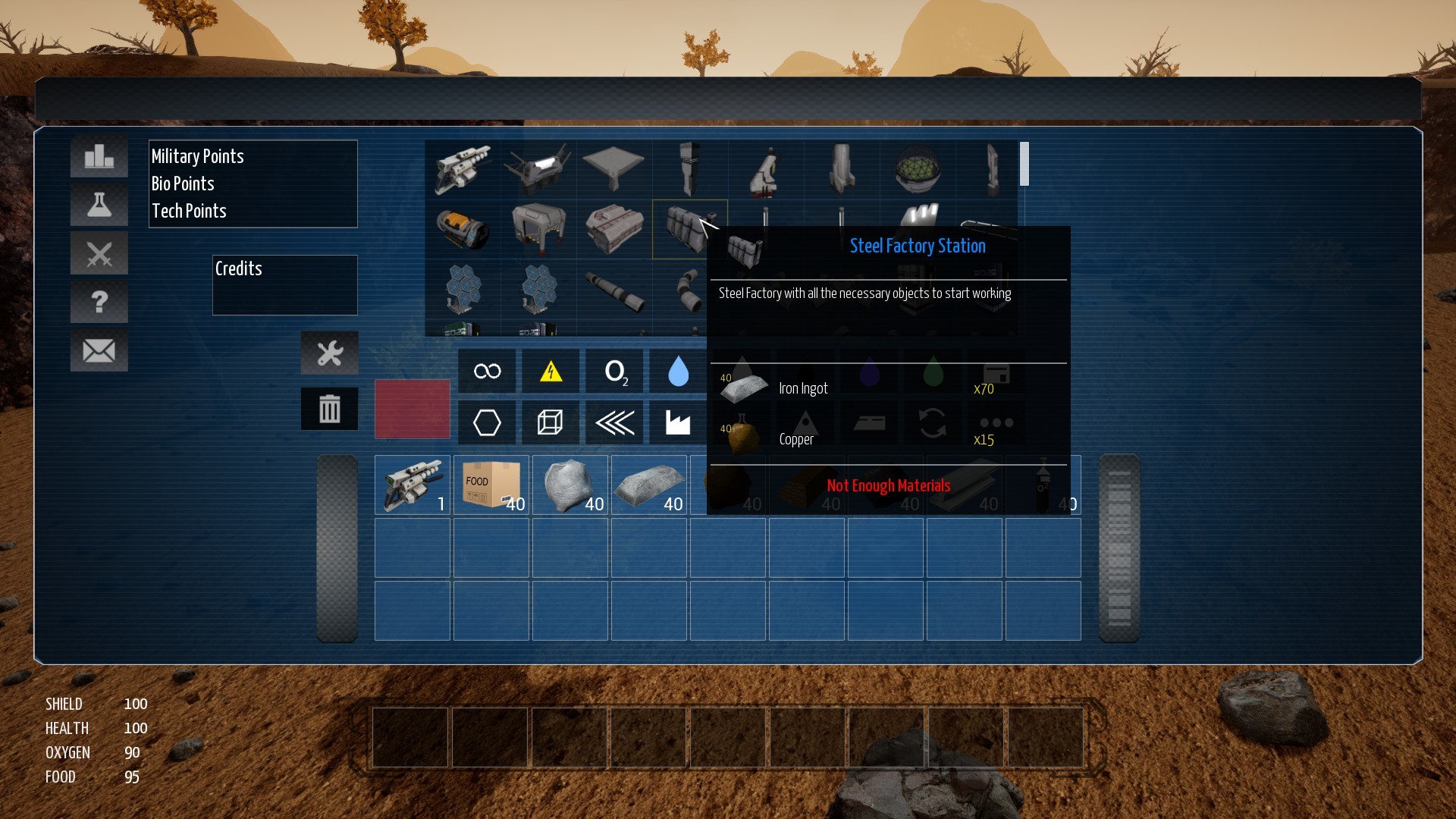
Improved Crafting UI part 2 Hi, in this new update I totally reworked the crafting UI. I removed the Build button, simplified the filters buttons and removed the info square in the middle of the crafting menu.
Full notes
Full Farlight Explorers update
Read the full published notes in a cleaner layout. The original post stays linked below.
What changed
0 fixes4 additions2 changes0 removals
UI and audio
Gameplay
addedImproved Crafting UI part 2Hi, in this new update I totally reworked the crafting UI. I removed the Build button, simplified the filters buttons and removed the info square in the middle of the crafting menu. I made the crafting mechanic really easy to use. Now the player only has to find an object and all the info will be shown. With only 1-2 clicks you could build any object. I hope this can help in order to improve the experience of the player with the UI. Please share your ideas and suggestions about the UI.
addedGame ready to translate to any languageAfter a very long work, I finally finished to add the translations to the game. I added the Spanish language in order to test that all the system is working well and for now is going well. Inside the game folder, FalrightExplorers/Content/LanguageContent there are the differents text files with the translation.
changedList of fixes:Improved Crafting UI part 2.
addedList of fixes:Added Spanish language.
addedList of fixes:Added blur backgorund effect to main and tutorial menu.
changedWhat Next:I would like to increase the bright during the night and add a bed to avoid night. I would like to finish the machine that will protect the planet of asteroids and I will continue fixing bugs and adding more little features.
Farlight Explorers changes
addedHi, in this new update I totally reworked the crafting UI. I removed the Build button, simplified the filters buttons and removed the info square in the middle of the crafting menu. I made the crafting mechanic really easy to use. Now the player only has to find an object and all the info will be shown. With only 1-2 clicks you could build any object. I hope this can help in order to improve the experience of the player with the UI. Please share your ideas and suggestions about the UI.
addedAfter a very long work, I finally finished to add the translations to the game. I added the Spanish language in order to test that all the system is working well and for now is going well. Inside the game folder, FalrightExplorers/Content/LanguageContent there are the differents text files with the translation.
changedImproved Crafting UI part 2.
addedAdded Spanish language.
addedAdded blur backgorund effect to main and tutorial menu.
Improved Crafting UI part 2
Hi, in this new update I totally reworked the crafting UI. I removed the Build button, simplified the filters buttons and removed the info square in the middle of the crafting menu. I made the crafting mechanic really easy to use. Now the player only has to find an object and all the info will be shown. With only 1-2 clicks you could build any object. I hope this can help in order to improve the experience of the player with the UI. Please share your ideas and suggestions about the UI.
Game ready to translate to any language
After a very long work, I finally finished to add the translations to the game. I added the Spanish language in order to test that all the system is working well and for now is going well. Inside the game folder, FalrightExplorers/Content/LanguageContent there are the differents text files with the translation.
List of fixes:
Improved Crafting UI part 2.
Added Spanish language.
Added blur backgorund effect to main and tutorial menu.
What Next:
I would like to increase the bright during the night and add a bed to avoid night. I would like to finish the machine that will protect the planet of asteroids and I will continue fixing bugs and adding more little features.