
HomeGamesUpdatesPricingMethodology
Steam News27 February 20206y ago

New Version (1.3.4) of ElectricVLab Released

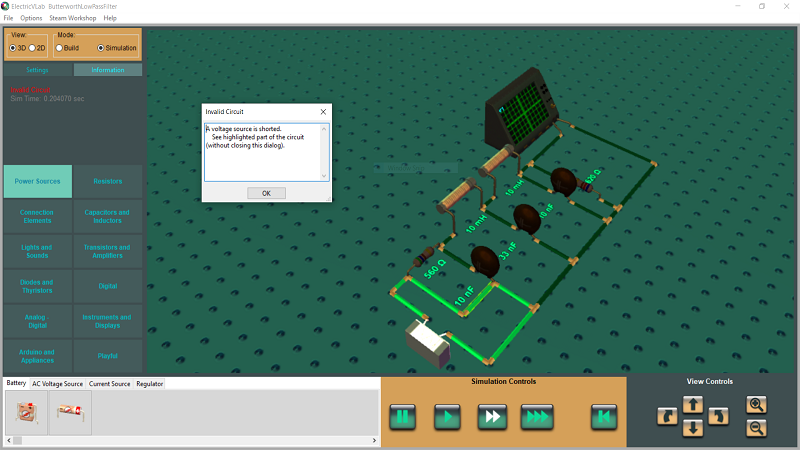
A new version (1.3.4) of ElectricVLab has been released. Main updates in this version are: Highlighting invalid part of a circuit. Earlier, if the circuit created by the user happens to be invalid (e.g.

Full notes

Full ElectricVLab update

Read the full published notes in a cleaner layout. The original post stays linked below.

What changed

0 fixes3 additions1 change0 removals
  • Gameplay
  • UI and audio
  • Compatibility
addedA new version (1.3.4) of ElectricVLab has been released.
addedAdded ability to change the color of multiple wires simultaneously. While using object tool, in the pop-up menu that comes up after dragging a rectangular region, a new option titled "Set wire color" is now available.
addedDuring simulation, one can now change the resistance of rheostat by holding down the left mouse button and dragging the scroller handle. Earlier, the resistance value of rheostat could be changed only by bringing up the parameter dialog. The newly added way allows the resistance to be changed during simulation in a more natural and convenient way.
changedImproved support for high resolution monitors.

ElectricVLab changes

addedA new version (1.3.4) of ElectricVLab has been released.
addedAdded ability to change the color of multiple wires simultaneously. While using object tool, in the pop-up menu that comes up after dragging a rectangular region, a new option titled "Set wire color" is now available.
addedDuring simulation, one can now change the resistance of rheostat by holding down the left mouse button and dragging the scroller handle. Earlier, the resistance value of rheostat could be changed only by bringing up the parameter dialog. The newly added way allows the resistance to be changed during simulation in a more natural and convenient way.
changedImproved support for high resolution monitors.

A new version (1.3.4) of ElectricVLab has been released.

Main updates in this version are:

  • Highlighting invalid part of a circuit. Earlier, if the circuit created by the user happens to be invalid (e.g., a battery is shorted), only an error message saying "Invalid Circuit" was getting displayed. Now, in addition to displaying the error message, the part of the circuit that happens to be invalid gets highlighted to make it easier to identify the error.

  • Added ability to change the color of multiple wires simultaneously. While using object tool, in the pop-up menu that comes up after dragging a rectangular region, a new option titled "Set wire color" is now available.

  • During simulation, one can now change the resistance of rheostat by holding down the left mouse button and dragging the scroller handle. Earlier, the resistance value of rheostat could be changed only by bringing up the parameter dialog. The newly added way allows the resistance to be changed during simulation in a more natural and convenient way.

  • Improved support for high resolution monitors.

Source

Steam News / 27 February 2020

Open original post

Changelog.gg summarizes and formats this update. How we read updates.