
Full notes
Full Educational Games for Kids update
Read the full published notes in a cleaner layout. The original post stays linked below.
What changed
- UI and audio
Educational Games for Kids changes
1.2.0 Major Update * 4K@120FPS* / 4K@60FPS
* Added Gamepad & TouchScreen support[1] (Xbox & Playstation GamePads). * Added 3 languages: Japanese, Dutch, Flemish. * Major game engine update. * Bugs fixed in Geography. * Other bugs fixed.
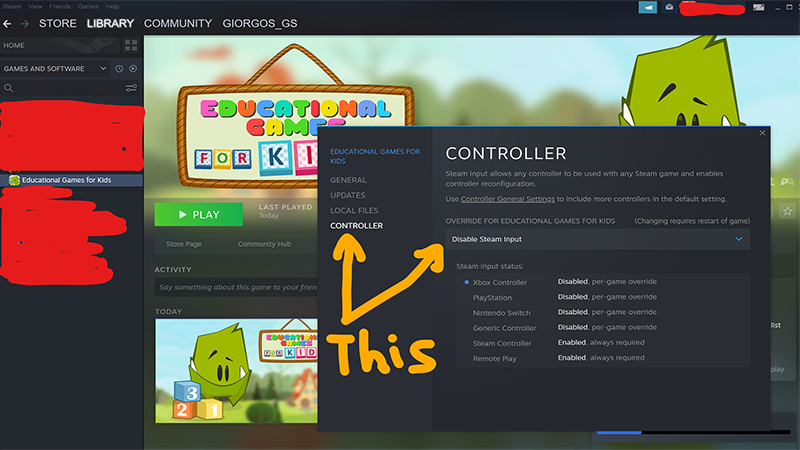
[1] GAMEPAD SUPPORT: For the Xbox or PS4 gamepads to work it must be detected at the game loading screen (Game dragon Screen). To do this you must disable Steam Input. 1) Go to Steam Library, find the game. 2) Right click the game and click 'properties'. 3) Select 'Controller' and then Disable Steam Input. 4) Click ok. 5) Start the game. In the main dragons screen you should see an option to select 'keyboard' or 'gamepad'. Select gamepad. Thats it. See the main image for help.
Source
Changelog.gg summarizes and formats this update. How we read updates.