
HomeGamesUpdatesPricingMethodology
Steam News15 October 20223y ago

Dungeon Maker Update 13

Heyo, It's been a while but another update is finally here. In this update I've added a blueprint maker for encounter maps, made it so in multiplayer more dice rolls display, fixed some bugs, and made the scrollbars loo

Full notes

Full Dungeon Maker update

Read the full published notes in a cleaner layout. The original post stays linked below.

What changed

1 fix2 additions6 changes0 removals
  • Server
  • Maps
  • Gameplay
fixedIt's been a while but another update is finally here. In this update I've added a blueprint maker for encounter maps, made it so in multiplayer more dice rolls display, fixed some bugs, and made the scrollbars look better.
changedBug Fixes: - When going into testing mode in the map maker the player spawns on the same layer as the starting location now instead of always on the ground layer. - NPC and enemy frames now appear on the correct layer when placed in the map maker
addedNew Features
addedSo the big new feature this update is map blueprints . A new button has been added to the main menu that allows you to create blueprint files. Going into a blueprint opens up the map editor in blueprint mode, which allows you to place up to 500 objects in the same way as the map maker.
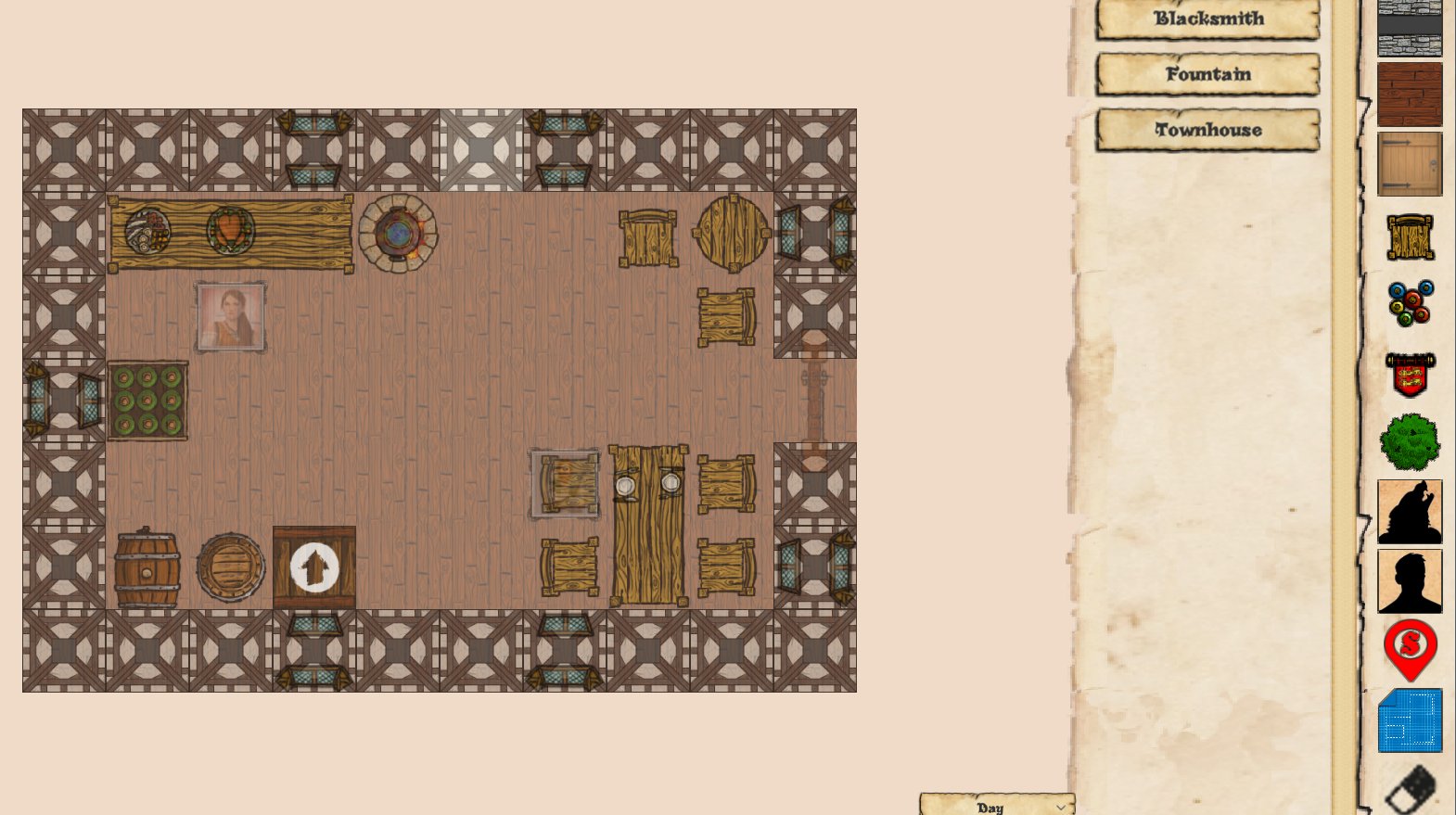
changedIn the map maker you'll now find a blueprint icon just above the eraser, which will bring up the list of your blueprints. Selecting a blueprint will create a placer for each object, allowing you to move the whole thing around and even change layers to place the blueprint wherever you like.
changedBlueprints can also be rotated before placing them by pressing the r key. Any notes, enemies, and NPCs in the blueprint will have their data correctly placed into the scene. Blueprints can also occupy multiple levels, but any levels placed above the upper limit of 6 will not spawn.

Dungeon Maker changes

fixedIt's been a while but another update is finally here. In this update I've added a blueprint maker for encounter maps, made it so in multiplayer more dice rolls display, fixed some bugs, and made the scrollbars look better.
changedBug Fixes: - When going into testing mode in the map maker the player spawns on the same layer as the starting location now instead of always on the ground layer. - NPC and enemy frames now appear on the correct layer when placed in the map maker
addedNew Features
addedSo the big new feature this update is map blueprints . A new button has been added to the main menu that allows you to create blueprint files. Going into a blueprint opens up the map editor in blueprint mode, which allows you to place up to 500 objects in the same way as the map maker.
changedIn the map maker you'll now find a blueprint icon just above the eraser, which will bring up the list of your blueprints. Selecting a blueprint will create a placer for each object, allowing you to move the whole thing around and even change layers to place the blueprint wherever you like.

Heyo,

It's been a while but another update is finally here. In this update I've added a blueprint maker for encounter maps, made it so in multiplayer more dice rolls display, fixed some bugs, and made the scrollbars look better.

Bug Fixes: - When going into testing mode in the map maker the player spawns on the same layer as the starting location now instead of always on the ground layer. - NPC and enemy frames now appear on the correct layer when placed in the map maker

New Features

So the big new feature this update is map blueprints. A new button has been added to the main menu that allows you to create blueprint files. Going into a blueprint opens up the map editor in blueprint mode, which allows you to place up to 500 objects in the same way as the map maker.

In the map maker you'll now find a blueprint icon just above the eraser, which will bring up the list of your blueprints. Selecting a blueprint will create a placer for each object, allowing you to move the whole thing around and even change layers to place the blueprint wherever you like.

Blueprints can also be rotated before placing them by pressing the r key. Any notes, enemies, and NPCs in the blueprint will have their data correctly placed into the scene. Blueprints can also occupy multiple levels, but any levels placed above the upper limit of 6 will not spawn.

The next major change to the game is an update to the games scrollbars with new art that looks cleaner than the old version. As well, the sub-menus in the map maker now feature scrollbars instead of the scroll buttons the game had been previously using.

Minor Changes

Another change to the game is in relation to the multiplayer dice rolls. Now more dice rolls are displayed, showing both the type of dice rolled, and the result in the bottom right corner. This should make it more transparent exactly what dice were rolled for different attacks, spells, and checks, as well as showing the results.

As well dice rolls and actions affected by advantage and disadvantage are now highlighted when either is selected to make it clear which of the actions those toggles actually affect.

Finally, the escape key now cancels the placer object on the map maker, so you can get rid of it without selecting a different menu.

Cheers

Brian

Source

Steam News / 15 October 2022

Open original post

Changelog.gg summarizes and formats this update. How we read updates.