
In this update15
Full notes
Full Drive Beyond Horizons update
Read the full published notes in a cleaner layout. The original post stays linked below.
What changed
- Gameplay
- Balance
- UI and audio
- Maps
- Compatibility
- Performance
Drive Beyond Horizons changes
New Vehicles Available
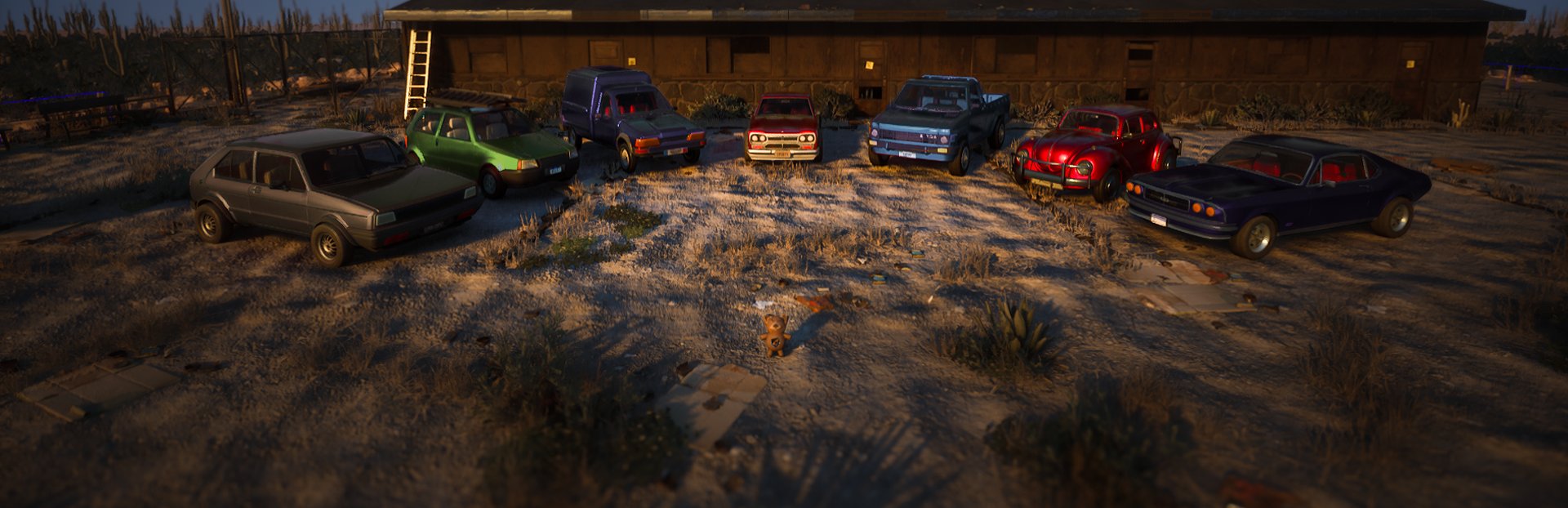
We're happy to announce that 7 new vehicles are now available in Drive Beyond Horizons!
Five of them may look familiar at first glance, but these are brand-new vehicles with their own sets of parts to discover and collect. You can learn more about them in our Under The Hood #4.
The two remaining vehicles are completely new additions, so please give a warm welcome to the Speedle and the Escada!
From left to right: Loft, Escada, P-51, Kage, Peak, Speedle, and Tomahawk.
Steering Wheel Support
We added Steering Wheel Support with this new patch. At this moment, it is not considered to be fully supported. We are missing a lot of feedback from the community: we need you! If you have a steering wheel, please test it and give us some feedback on Discord!
How do we create a new vehicle?
To celebrate their arrival, we thought it would be a good opportunity to give you a quick look behind the scenes and show what goes into creating a new vehicle for Drive Beyond Horizons.
Step 1 - Choosing the Vehicle
Everything starts with an idea. Before a vehicle is selected, we ask ourselves a lot of questions. What role will it fill? Does it focus on speed, storage capacity, convenience, durability, or something else entirely? Does it bring something new to the current lineup?
Community suggestions are an important part of this process, but they're not the only factor. We also look at the vehicles already present in the game, automotive history, iconic designs, current trends, and our own internal needs.
Once a candidate is chosen, we begin adapting it to fit the world of Drive Beyond Horizons. Some compromises are often necessary. Components may need to be relocated, storage spaces adjusted, or certain design elements modified to work with the game's mechanics and modular vehicle systems.
A lot of planning happens before any actual production begins.
Step 2 - Concept Art
The next step is defining the vehicle's identity. Artists gather references for both the interior and exterior, study the design language of the manufacturer, and explore different visual directions.
This stage also includes brainstorming names that help reinforce the vehicle's personality and make it memorable.
Concepts can be created as sketches or early 3D mockups. The goal isn't technical accuracy yet. It's about finding the right mood, proportions, and overall feel before moving forward.
Step 3 - 3D Modeling
Using the approved concept and a large collection of references, artists begin building the final game-ready model. Every detail must be carefully recreated, from the body panels and dashboard to the suspension and mechanical components.
A huge amount of research goes into this stage. Artists study photographs, videos, restoration projects, and technical references to understand how every part fits together and functions.
Since players can dismantle vehicles piece by piece, every component must exist as an individual object. Even areas that are rarely seen in other games need to be fully modeled. In Drive Beyond Horizons, players can remove almost everything, so every visible surface matters.
Step 4 - Texturing
Once the modeling is complete, it's time to give the vehicle its materials and surfaces.
This process defines what every part looks like. Metals, plastics, leather, fabrics, paint, rubber, glass, and more all require their own material setup.
Vehicles in Drive Beyond Horizons also have multiple visual states. A vehicle can be clean, dirty or even rusty. Since players can clean and restore vehicles themselves, every part needs to support these transitions properly.
Each component is checked individually to ensure it reacts correctly to all visual systems and looks good from every angle.
Step 5 - Unreal Integration
Once the model and textures are finished, the vehicle is integrated into Unreal Engine. This is much more than simply importing a model.
In average, a vehicle in Drive Beyond Horizons is made up of 60 individual removable parts. Every component must be prepared, configured, and positioned correctly so players can assemble, dismantle, repair, and restore the vehicle.
Each part also requires its own settings that define how it behaves, where it can be installed, and how it interacts with the game's systems.
Once everything has been assembled, extensive in-game testing begins to ensure the vehicle can be completely disassembled and rebuilt without issues.
Step 6 - Materials, Lights and Item Systems
Materials need to be assigned and tested on every single part. Paint colors, metallic effects, rust, wear, damage, and polish all need to work correctly across the entire vehicle.
The lighting setup is also built during this stage. Headlights, high beams, brake lights, tail lights, reverse lights, and turn signals all require individual configurations and testing.
On top of that, every vehicle component must be registered in the game's item systems.
Each part receives its own name, description, icon, compatibility data, and integration with systems such as the Shop Computer, Item Scanner, Part Sniffer, Lockers, and more. Considering a vehicle can contain around 60 individual parts, this quickly becomes a substantial amount of work. Remember, we are a small team!
Step 7 - Blueprints and Vehicle Setup
Now comes one of the longest and most technical parts of the process. Blueprints are created to make the vehicle function correctly in-game. Every component must be connected to the appropriate systems and configured individually.
Vehicle-specific settings are established here, including transmission ratios, friction values, suspension behavior, steering characteristics, and many other gameplay-related parameters. This stage is where the vehicle truly comes to life.
Step 8 - Sound Design
A single engine can require multiple audio layers, including engine sounds, exhaust sounds, and intake sounds. These layers are then blended across idle, acceleration, and deceleration states.
Each layer reacts dynamically to several parameters, such as RPM, throttle position, speed, and gear changes. Creating the initial sound setup can take anywhere from a few hours to several days depending on the vehicle.
After that comes extensive in-game testing, tweaking volumes, transitions, blending, filtering, and countless other parameters until the vehicle feels right while driving.
Step 9 - Physics and Handling
Even after all previous steps are complete, the vehicle still needs to drive properly, and on that part, everyone has an opinion. The correct physical components must be configured, pivots positioned accurately, and the center of gravity adjusted.
Handling is then carefully tuned to ensure the vehicle behaves naturally on different surfaces. Grip, steering response, weight transfer, stability, acceleration, and braking all need to feel appropriate for the type of vehicle being created. We must admit, we are pretty limited on that part by our plugin.
And yes, some vehicles are definitely better at taking corners than others. Slow down a little, crazy driver.
Step 10 - QA and Alpha Testing
Before release, the vehicle goes through multiple rounds of testing. Our QA spends time testing everything from normal gameplay scenarios to unusual edge cases and occasionally completely ridiculous situations. The goal is simple: find problems before players do.
After QA testing, our Alpha Testers join the process and continue pushing the vehicle and its systems even further. Their mission is straightforward: break the game.
The more issues found before release, the better the final experience for everyone. Even after the vehicle model itself is complete, all of these systems still need to function together correctly.
Parts, materials, lights, sounds, item systems, physics, and gameplay interactions must all work as intended before a vehicle is ready for release.
One important thing to keep in mind: every part must also work when installed on a different vehicle model. That's one of the biggest challenges in Drive Beyond Horizons.
When we add 7 new vehicles, we're not just adding 7 vehicles. We're also creating hundreds of new compatibility combinations. Every compatible part needs to fit and function correctly on every vehicle, which quickly adds up to around 800 combinations to test and validate.
Step 11 - Final Look
Once every part, material, light, interaction, and gameplay system has been configured, this is what a fully set-up vehicle looks like inside Unreal Engine.
Every visible component represents an element that has been individually placed, connected, configured, and tested to make the vehicle function properly in-game.
That concludes this little behind-the-scenes tour.
We hope you've learned a bit more about what goes into creating a vehicle for Drive Beyond Horizons. We'll dive even deeper into some of these topics in a future Under The Hood, let us know if you're interested!
Fixes and Adjustments
Polished the Item Scanner UI for better visual clarity.
Fixed a critical issue that could randomly corrupt save files and cause POIs to disappear.
While driving, the player's position could occasionally be reported as (0,0,0) instead of the vehicle's actual location. Since the game periodically removes saved chunks located more than 50 km away from the player, this incorrect position could cause valid world data to be treated as distant chunks and permanently deleted.
If this occurred during a save operation, it could also partially corrupt the save file, leading to missing POIs and other world inconsistencies.
The player's position is now correctly resolved while driving, preventing incorrect chunk cleanup and save corruption.
Fixed an issue where money and goldbar were not displayed correctly in backpack slots when using DirectX 12.
Known Issues
Vehicle Part Compatibility
Some non-original vehicle parts may not fit correctly or may appear slightly misplaced when installed on the new vehicles. This issue only affects non-original parts and does not impact the vehicles' intended components.
Attachment points are currently being reviewed and adjusted individually for each vehicle. Compatibility will continue to improve through future fixes and updates.
Vehicle Lighting
Some vehicle lights may currently not look exactly as intended. This is a known issue and visual improvements will be made in a future update.
English Translation
As we added new vehicles, you can expect some issues with the new models' translation. We will work on it in the next few days with the help of our community.
Please, read this
The game is still in Early Access. You may encounter performance issues, bugs, or crashes. This is a normal part of development, and your feedback plays a key role in helping us improve the experience.
That said, some early technical decisions led to challenges we hadn’t fully anticipated.
As a reminder, part of the team is still actively supporting the current public and beta versions of the game, bringing updates, content, and optimizations, while another part is working in parallel on rebuilding core systems.
This includes developing a new version of the game from scratch using Unreal Engine 5.7 (or a later version). We’ll transition to this new version once it meets our quality standards. We’ll share more details about this in a dedicated update.
How to report a bug
If you encounter any issue, please submit a bug report with as much detail as possible (steps to reproduce, screenshots/videos, logs if available). Please submit one report per issue.
👉 https://app.betahub.io/invitations/bc124c9efcc67871
Thank you to everyone who continued reporting issues and sharing feedback over the past weeks.
You might also want to check out:
Our previous patch: PATCH NOTE: OPTIMIZATION & FIXES UPDATE
Our official Drive Beyond Horizons 2026 Roadmap (Updated) ↗
Source
Changelog.gg summarizes and formats this update. How we read updates.