
HomeGamesUpdatesPricingMethodology
Steam News18 August 20223y ago

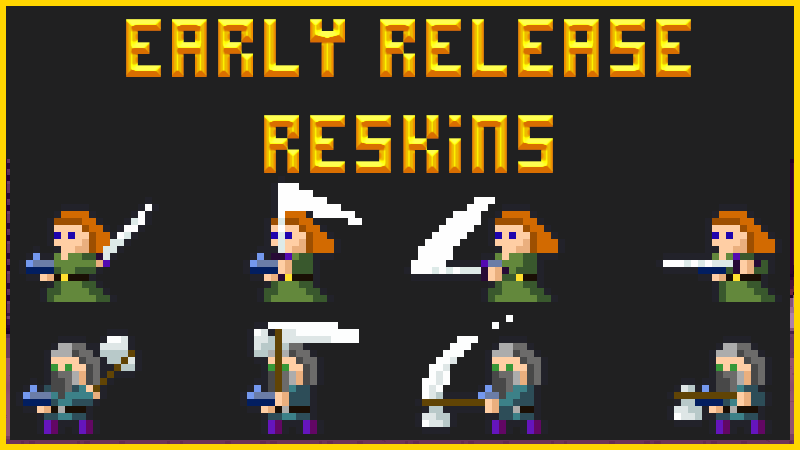
Early Release Reskins for your Player (male and female)

Creating art assets, for the current state of this game, is the most time consuming job. Despite their pixel simplicity, every character needs to be animated and every new asset has to match the others.

Full notes

Full Desktopia: A Desktop Village Simulator update

Read the full published notes in a cleaner layout. The original post stays linked below.

What changed

0 fixes2 additions1 change0 removals
  • Gameplay
  • Store
addedCreating art assets, for the current state of this game, is the most time consuming job. Despite their pixel simplicity, every character needs to be animated and every new asset has to match the others. So while we wait for the Tyranny assets to be created we have created a new female character who you can play, with three colour options, and two new colour options for the male character.
changedHOW TO:Rename the file to %player-1
addedHOW TO:That's it, you should now have a new skin for your character!

Desktopia: A Desktop Village Simulator changes

addedCreating art assets, for the current state of this game, is the most time consuming job. Despite their pixel simplicity, every character needs to be animated and every new asset has to match the others. So while we wait for the Tyranny assets to be created we have created a new female character who you can play, with three colour options, and two new colour options for the male character.
changedRename the file to %player-1
addedThat's it, you should now have a new skin for your character!

Creating art assets, for the current state of this game, is the most time consuming job. Despite their pixel simplicity, every character needs to be animated and every new asset has to match the others. So while we wait for the Tyranny assets to be created we have created a new female character who you can play, with three colour options, and two new colour options for the male character.

We haven't been able to put them into the game yet, but if you're after a old-school reskin, and don't mind copying some files, you can get your hands on them early!

HOW TO:

  1. From the images at the end of this post, choose your favourite, right click and 'save to desktop'.

  2. Rename the file to %player-1

  3. In Steam right click Desktopia and 'browse local files'

  4. Navigate from the Desktopia folder to Desktopia/www/img/characters.

  5. Copy your renamed file into this folder, making sure to overwrite when asked.

That's it, you should now have a new skin for your character!

Source

Steam News / 18 August 2022

Open original post

Changelog.gg summarizes and formats this update. How we read updates.