UPDATE 0.84 - Enchancements for the Level Creator!
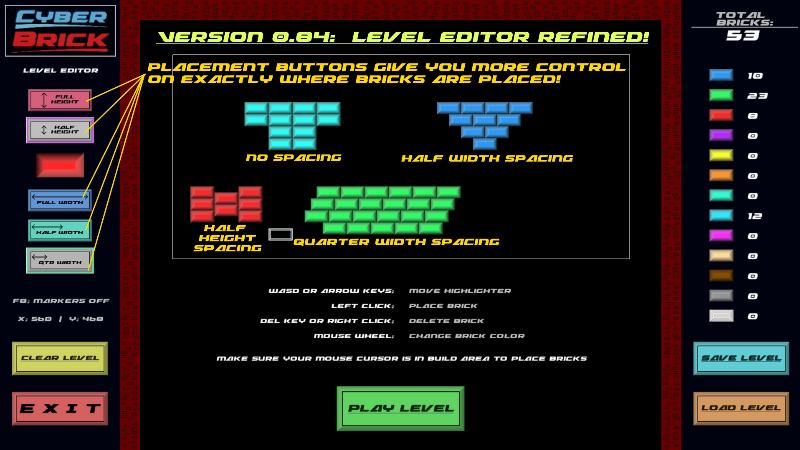
Hello Brick Breakers! With this update, I added 5 new buttons to give you much more precise control on exactly where your bricks are placed in the levels you design!
Full notes
Full CyberBrick update
Read the full published notes in a cleaner layout. The original post stays linked below.
Repeated intro
Hello Brick Breakers!
What changed
0 fixes3 additions1 change0 removals
Gameplay
changedWith this update, I added 5 new buttons to give you much more precise control on exactly where your bricks are placed in the levels you design! Full Width, Half Width, Quarter Width, Full Height, and Half Height will now do exactly as they say, move your brick tool at those exact portions of the brick dimensions.
addedI also added the ability to press the F8 key while in the level editor to turn on and off some section lines on the borders of the build area to better help you keep your bricks lined up where you want them.
addedI look forward to seeing what you players design as playable levels for this game! Soon, I will add the ability for you to play all of your levels in a regular game rather than only being allowed to test your creations in the level editor! ..Remember that you can also submit your levels to me for consideration on adding them to the game for everyone to play! With that, you also get to have your user name, Twitch name, Youtube name etc shown on the screen when your level loads up on any players game! So if you are a Twitch streamer named "Koty@TTV" for example, any player who played your level would see "Level created by Koty@TTV" fade in and out as the level loads up!
addedContinue to grind that in game money as well because I assure you that I will be adding lots of ways to use it in the game soon!
CyberBrick changes
changedWith this update, I added 5 new buttons to give you much more precise control on exactly where your bricks are placed in the levels you design! Full Width, Half Width, Quarter Width, Full Height, and Half Height will now do exactly as they say, move your brick tool at those exact portions of the brick dimensions.
addedI also added the ability to press the F8 key while in the level editor to turn on and off some section lines on the borders of the build area to better help you keep your bricks lined up where you want them.
addedI look forward to seeing what you players design as playable levels for this game! Soon, I will add the ability for you to play all of your levels in a regular game rather than only being allowed to test your creations in the level editor! ..Remember that you can also submit your levels to me for consideration on adding them to the game for everyone to play! With that, you also get to have your user name, Twitch name, Youtube name etc shown on the screen when your level loads up on any players game! So if you are a Twitch streamer named "Koty@TTV" for example, any player who played your level would see "Level created by Koty@TTV" fade in and out as the level loads up!
addedContinue to grind that in game money as well because I assure you that I will be adding lots of ways to use it in the game soon!
With this update, I added 5 new buttons to give you much more precise control on exactly where your bricks are placed in the levels you design! Full Width, Half Width, Quarter Width, Full Height, and Half Height will now do exactly as they say, move your brick tool at those exact portions of the brick dimensions.
I also added the ability to press the F8 key while in the level editor to turn on and off some section lines on the borders of the build area to better help you keep your bricks lined up where you want them.
Before this update, the only way to change the brick color you were placing was with the mouse wheel. Now, you can also simply click on the brick color you want to use on the right side of the screen.
I look forward to seeing what you players design as playable levels for this game! Soon, I will add the ability for you to play all of your levels in a regular game rather than only being allowed to test your creations in the level editor! ..Remember that you can also submit your levels to me for consideration on adding them to the game for everyone to play! With that, you also get to have your user name, Twitch name, Youtube name etc shown on the screen when your level loads up on any players game! So if you are a Twitch streamer named "Koty@TTV" for example, any player who played your level would see "Level created by Koty@TTV" fade in and out as the level loads up!
Continue to grind that in game money as well because I assure you that I will be adding lots of ways to use it in the game soon!