Craftica Update: Major Improvements and Optimizations
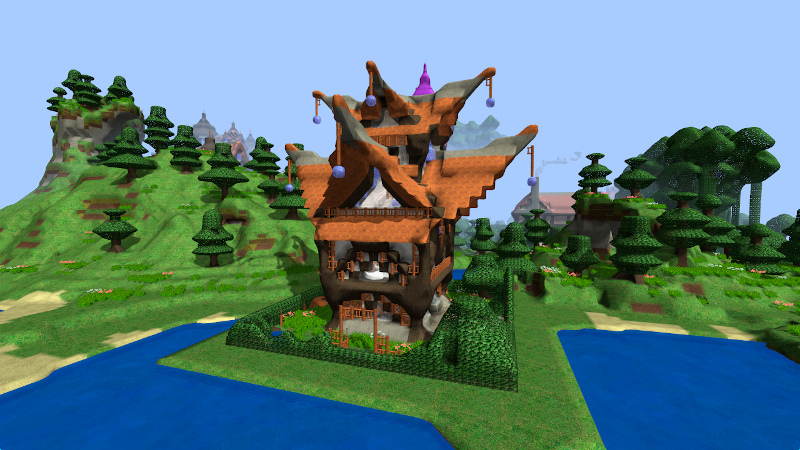
This major update mainly brings some big technical improvements. With this update, Craftica will have much better looking sceneries and run much smoother than before.
In this update5
Full notes
Full Craftica update
Read the full published notes in a cleaner layout. The original post stays linked below.
What changed
0 fixes2 additions4 changes0 removals
Gameplay
Maps
Performance
changedThis major update mainly brings some big technical improvements. With this update, Craftica will have much better looking sceneries and run much smoother than before.
addedAdditional Mesh SmoothingLast year, mesh smoothing was supported to smooth Craftica terrain and objects. Now a new additional smoothing technique is implemented, which greatly improves the smoothing effect, to the point that the terrain objects show little hint that they are block based, especially when block roundness is set to maximum for most blocks.
addedMore Importing SupportThis update also added support for importing MagicaVoxel .vox format and various 3D model formats. However, now instead of importing models directly, one must list them in a text file in the following format:
changedMore Importing SupportCurrently this support is still not convenient to use, this will improved in the future to allow players to conveniently importing models during games.
changedOptimizationsSeveral optimizations have been implemented to reduce memory usage, in particular the memory use for mesh smoothing has been reduced drastically, up to 40% reduction in some cases. Now mesh building and block-based model smoothing are also improved to use less memory. Also more computation has been moved to threads, making the game runs more smoothly than before.
changedOther Minor ImprovementsThere are also many other minor improvements and fixings. The most worth mentioning is the simplification on block size selection. Now building and mining block size is dependent on view modes. In the first/mixed/third person view mode, block size will be set to U4/U2/U1 (or U8/U4/U2 when crafting) respectively when entering making or mining mode. However, this is effective only when the player is holding a material block and clicked on a terrain block, otherwise, the block size will be automatically chosen according to the hand item or the target chunk.
Craftica changes
changedThis major update mainly brings some big technical improvements. With this update, Craftica will have much better looking sceneries and run much smoother than before.
addedLast year, mesh smoothing was supported to smooth Craftica terrain and objects. Now a new additional smoothing technique is implemented, which greatly improves the smoothing effect, to the point that the terrain objects show little hint that they are block based, especially when block roundness is set to maximum for most blocks.
addedThis update also added support for importing MagicaVoxel .vox format and various 3D model formats. However, now instead of importing models directly, one must list them in a text file in the following format:
changedCurrently this support is still not convenient to use, this will improved in the future to allow players to conveniently importing models during games.
changedSeveral optimizations have been implemented to reduce memory usage, in particular the memory use for mesh smoothing has been reduced drastically, up to 40% reduction in some cases. Now mesh building and block-based model smoothing are also improved to use less memory. Also more computation has been moved to threads, making the game runs more smoothly than before.
This major update mainly brings some big technical improvements. With this update, Craftica will have much better looking sceneries and run much smoother than before.
Additional Mesh Smoothing
Last year, mesh smoothing was supported to smooth Craftica terrain and objects. Now a new additional smoothing technique is implemented, which greatly improves the smoothing effect, to the point that the terrain objects show little hint that they are block based, especially when block roundness is set to maximum for most blocks.
More Importing Support
This update also added support for importing MagicaVoxel .vox format and various 3D model formats. However, now instead of importing models directly, one must list them in a text file in the following format:
Currently this support is still not convenient to use, this will improved in the future to allow players to conveniently importing models during games.
Optimizations
Several optimizations have been implemented to reduce memory usage, in particular the memory use for mesh smoothing has been reduced drastically, up to 40% reduction in some cases. Now mesh building and block-based model smoothing are also improved to use less memory. Also more computation has been moved to threads, making the game runs more smoothly than before.
Other Minor Improvements
There are also many other minor improvements and fixings. The most worth mentioning is the simplification on block size selection. Now building and mining block size is dependent on view modes. In the first/mixed/third person view mode, block size will be set to U4/U2/U1 (or U8/U4/U2 when crafting) respectively when entering making or mining mode. However, this is effective only when the player is holding a material block and clicked on a terrain block, otherwise, the block size will be automatically chosen according to the hand item or the target chunk.
Experimental Development
There are also some experimental developments, two of the major ones are spherical world and web support (works in Firefox and Chrome, not yet in Safari). However these are not available yet, as they are still work in progress.