
In this update5
Full notes
Full Containcorp update
Read the full published notes in a cleaner layout. The original post stays linked below.
What changed
- Gameplay
- UI and audio
- Fixes
Containcorp changes
This update comes after a few days of silence. Definitely a departure from my normal schedule. However, I am hoping to get the pace back. On that note, there are some background changes with the development team that will improve the pace of updates, which I will get into below.
New Science Modules
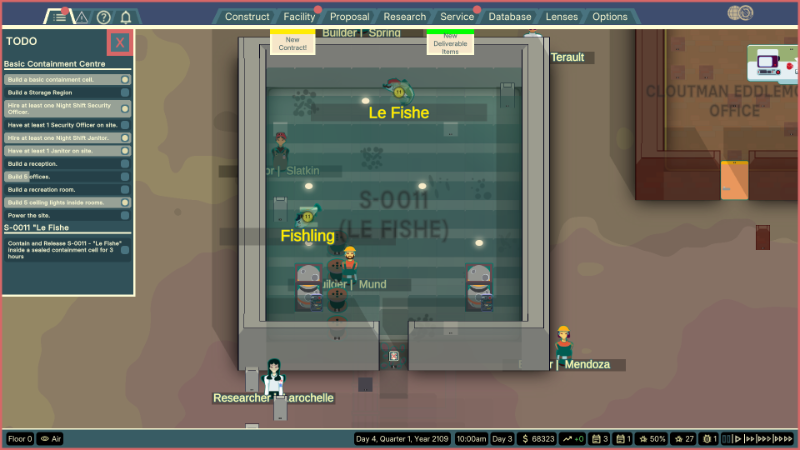
I finally got the new science modules into the game! Steam post image
Theres currently only two in the game but I hope to add the rest in, in the next few patches. Not much else to say about this, But if you want to see how they work, check out the next section.
What's Next?
Improving Player Onboarding
Improving player onboarding has become an acute focus in recent days as we have been communicating with investors and the like. But generally, the onboarding process for the game is fundamentally flawed. Well, effectively non-existent really. The campaign failed to succeed as an onboarding and was way too complicated for its own good. Sure, a story is good, but this game doesn't need a fully featured campaign with some crazy story just to teach the mechanics. At least not now. Probably never.
In light of terrible onboarding, I made a tutorial video covering how the game works, in a nutshell. Take a look if you are confused!
[dynamiclink href="https://www.youtube.com/watch?v=IPXeuLf9XX8"]Maybe I should like this video in the game itself! Might drive some traffic to the YouTube page. Who knows. Things are pretty slow regarding public attention, but hopefully that changes...
Campaign Restructuring
To fix the onboarding, the campaign is going to be restructured. In fact, it's not even going to be called a campaign anymore. It will be renamed to "training". And will be reframed as a training manual for new facility directors. "Missions" will be renamed to "courses", and completing each course will yield you badges that are displayed on the main menu. Each course will be structured in a very clear and guided way using a TELL, SHOW, DO, APPLY approach to teaching.
Below is an example of how one of the courses could look.
Containment tutorial Example
Cutscene
The facility manager tells you that you will be doing onsite training and building a cell for an anomaly. The manager tells you what anomalies are and why they are important to the corporation
Part 1
Tell - Boxxy tells you to first look up the anomaly and see what it needs.
Show - game shows you how to do that
Do - You do it, with the handbook present for further questions, and the game waits
Part 2
Tell - Boxxy tells you how to build, and what rooms and regions are
Show - game shows you how to open the construction menu and select objects, and build stuff. Also shows you how to place regions and what rooms are
Do - You build a room with handbook assistance
Part 3
Tell - Boxxy tells you to bring the anomaly to the site and how to do.
Show - game shows you how to do it
Do - You do it...
Part 4
Tell - Boxxy tells you to assign an anomaly to a containment cell and tells you the various ways to do that, and what ATD's are, etc
Show - game shows this...
Do - you do it...
Part 5
Tell - Boxxy tells you about ATD releasing in the containment cell and waiting for janitors to haul
Show - game shows you how to release atd and what happens when that happens
Do - you do it....
Cutscene
The facility manager applauds you and tells you another anomaly is inbound, unprecedented, and the player has to build a containment cell for it quickly.
Apply
You are given a checklist of things to do and have to build a containment cell to contain the anomaly
Cutscene
The facility manager applauds you and gives some interesting lore about the world, etc.
What is "Showing" actually going to do
When parts of a course show you how to do something, what I mean is that the game will create a pop-up window with a slideshow of images. You would be able to flick through these images, one by one, and they would guide you through the process of doing whatever the action is, with further prompting. This is inspired, quite serendipitously, through a website that teaches you how to use Jira, which is a developer organisational tool.
https://www.storylane.io/tutorials/how-to-create-labels-in-jira
You can check it out here. Storylane is a general website for making interactive tutorials, and it's quite effective. Perfectly suiting our needs for this game.
Fixing Bugs & Polishing
Our focus as the release of the game gets closer is polishing the game up to a standard that is "good enough" for early access. Our biggest pain points are the user interface and optimisation in general. But we are definitely trending towards improvements!
Development Speed Ups
We have started organising development as a team properly again, using something called Jira. I mentioned earlier in regards to the Storylane thing. But if you are interested (it really isn't that interesting), it's pretty much just a long list of tasks in a bucket that you can define and work on, and you split up those periods of emptying the bucket into "sprints". Sprints are typically 2 weeks, and so are ours.
It should speed up development as every member of our team will know what to do and when to do it, and ideally, we can maximise our work throughput with minimal communication overhead.
Case Closed
I am feeling really lazy with this one, so I'll keep it short:
Bye.
Changelog
Added science modules
Fixed bug with CTRL scroll tile brush selection offset not resetting properly
Floors automatically snap to wall columns
Fixed bug where actions on object extension logic would not show up in Inspector
Fixed bug where closing the inspector would not remove tile range selections
Source
Changelog.gg summarizes and formats this update. How we read updates.