
Full notes
Full City-Racing update
Read the full published notes in a cleaner layout. The original post stays linked below.
What changed
- Gameplay
City-Racing changes
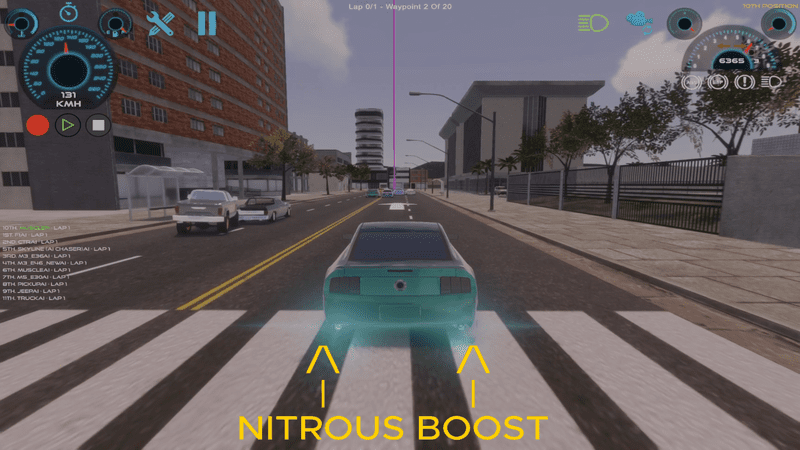
Looking at the current implementation, awareness has two problems that cause clumping:
The "in-path" test is too wide — a 35° forward cone within 35 m means any traffic car roughly in front (even one or two lanes over) triggers a slow-down. So, when a pack of city cars is around, the AI brakes for cars it could just drive past.
The cap fires even when there's a clearly open overtake lane — so the AI matches the slow car's speed (~36 km/h) instead of swinging into the free lane and blasting past.
Fix: tighten the geometry to "in my lane" only, and don't apply the speed cap if an adjacent lane is open (let the lane-selection logic do the dodging instead). I'll also raise the default headroom, so the AI keeps enough momentum to actually pass.
Now we rewrite ScanForTrafficCars to (1) only consider cars in our actual lane (lateral check), and (2) skip the speed cap if there's a free adjacent lane. Also we tighten IsCarAhead's TrafficCar add-on so it doesn't over-trigger every frame.
Now we also needed to tighten the IsCarAhead traffic-car add-on so it only triggers when the car is genuinely close-in-lane (not a 60° cone for any TrafficCar within 0.6 * laneWidth of the lane center which over-fires):
What was wrong
1.The old "in path" test was a 35° forward cone within 35 m, so the AI saw traffic cars one or two lanes over and treated them as obstacles → constant brake.
2.Even when a clear overtake lane existed, the speed cap still fired (otherSpeedKmh + 6 km/h), so the AI matched the slow city car's speed (~36 km/h) instead of swinging around → the clumping you described.
IsCarAhead 's TrafficCar add-on also used a 60° cone, so every lane-selection tick the AI thought it had a car ahead.
Fix (in CRAILearningSystem.cs)
ScanForTrafficCars was rewritten with two key rules:
· Lane-tight geometry: a traffic car only counts as "in my lane" if its lateral offset (using Vector3.Dot(myRight, toOther)) is within ±laneWidth/2 AND forward distance is within trafficFollowDistance (now 9 m, was 18 m). Anything else is in an adjacent lane.
· Free-lane bypass: while scanning, the AI also classifies every nearby traffic car into left-adjacent / right-adjacent buckets. If either adjacent lane is clear within trafficFollowDistance + overtakeFreeLaneMargin, the speed cap is skipped entirely — AdvancedLaneSelection is allowed to swing around at full pace. The cap only kicks in when the AI is actually boxed in.
Tuning defaults raised so even a worst-case follow keeps overtake momentum:
· trafficFollowHeadroom: 6 → 20 km/h (closes faster, retains energy for the next opening)
· trafficHazardSpeedCap: 12 → 25 km/h (no more crawling behind a stopped car when traffic clears)
· trafficFollowDistance: 18 → 9 m (commit to the overtake instead of pre-braking)
·New overtakeFreeLaneMargin (6 m) controls how far ahead an adjacent lane must be clear to count as a free overtake.
·Removed the now-redundant trafficForwardConeAngle — the lateral lane check is more accurate.
IsCarAhead also tightened: TrafficCar detection now requires forward + lateral checks against the lane's axes, not a wide cone, so lane selection only flips to overtake mode when there really is a car in that lane within follow distance.
Result
·✅ AI keeps full speed when traffic is in other lanes
·✅ AI lane-changes around slow city cars (and other AI cars, via the existing logic) instead of slowing down
·✅ AI only brakes when boxed in with no overtake lane available — and even then keeps +20 km/h headroom so it can pounce as soon as a gap opens
·✅ Same toggle: leave enableTrafficCarAwareness checked for the dodging behavior we originally wanted; uncheck it to fall back to pure waypoint-following
If we still see brake-happy behavior after testing in-game, the two knobs to tweak first in the inspector are trafficFollowDistance (lower = brake even later) and overtakeFreeLaneMargin (higher = AI declares lanes "free" more aggressively).
Developed By: Anton Opic & Copilot – Claude Opus 4.7 Copyright 2026,5,13
Source
Changelog.gg summarizes and formats this update. How we read updates.