
Full notes
Full CAT & ONION update
Read the full published notes in a cleaner layout. The original post stays linked below.
What changed
0 fixes0 additions3 changes0 removals
- Compatibility
- UI and audio
- Performance
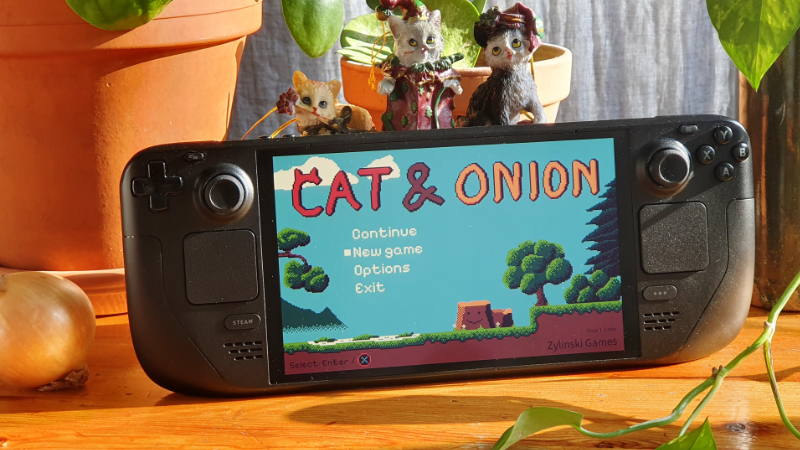
changedYou can play CAT & ONION on Steam Deck (and Linux)
changedThe game runs smoothly and shows the correct button icons
changedWARNING: The only issue is that the native Steam Deck/Linux version has very occasional crashes. I am looking into this, but you can work around this by using the "Proton 9.0 (Beta)" compatibility tool. Enable it by going into the properties of game on Steam, go to the "Compatibility" tab and then check "Force the use of a specific Steam Play compatibility tool". In the drop down select "Proton 9.0 (Beta)"
CAT & ONION changes
changedYou can play CAT & ONION on Steam Deck (and Linux)
changedThe game runs smoothly and shows the correct button icons
changedWARNING: The only issue is that the native Steam Deck/Linux version has very occasional crashes. I am looking into this, but you can work around this by using the "Proton 9.0 (Beta)" compatibility tool. Enable it by going into the properties of game on Steam, go to the "Compatibility" tab and then check "Force the use of a specific Steam Play compatibility tool". In the drop down select "Proton 9.0 (Beta)"
You can play CAT & ONION on Steam Deck (and Linux)
The game runs smoothly and shows the correct button icons
WARNING: The only issue is that the native Steam Deck/Linux version has very occasional crashes. I am looking into this, but you can work around this by using the "Proton 9.0 (Beta)" compatibility tool. Enable it by going into the properties of game on Steam, go to the "Compatibility" tab and then check "Force the use of a specific Steam Play compatibility tool". In the drop down select "Proton 9.0 (Beta)"
Have a nice day! /Karl
Source
Changelog.gg summarizes and formats this update. How we read updates.