
Full notes
Full Bonaparte's Bluff update
Read the full published notes in a cleaner layout. The original post stays linked below.
Repeated intro
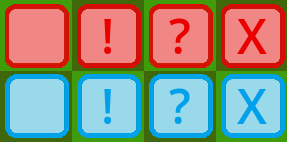
Greetings, bluffers! Update v1.1.0 has come to Bonaparte's Bluff! The changes are as follows: New Feature - Marking Pieces: You may now right-click on opposing pieces to mark them!
What changed
- Gameplay
- Performance
- Fixes
- UI and audio
Bonaparte's Bluff changes
Right-clicking on an unmarked piece will mark it with a "!" symbol. Further right-clicks will change the mark to a "?", then an "X", and finally remove the mark entirely, in that order. Your piece markings are visible only to you, not your opponent.
This is intended to help reduce the need to track pieces mentally.
Bug Fixes: Some bug fixes that were released in previous patches have also been persisted to v1.1.0:
Fixed a bug that sometimes caused a player to lose by timeout even in an untimed game. (Fixed since v1.0.1)
Fixed a bug that occasionally caused the game to freeze during the transition between music tracks. (Fixed since v1.0.1.1)
Fixed a bug that caused ranked results to fail to verify if the game lasted too long. (Fixed since v1.0.2)
Fixed a bug that prevented players from deselecting pieces. (Fixed since v1.0.3)
IMPORTANT: You MUST be running the most recent version of the game (v1.1.0) in order for ranked results to verify. If you are running a previous version of the game (the main menu displays what version you are running), you can force the game to update by selecting Bonaparte's Bluff in your Steam library, selecting "Properties", then selecting "Installed Files" and clicking the "Verify integrity of game files" button. Until next time! -BoltFromTheGreen
Source
Changelog.gg summarizes and formats this update. How we read updates.