
Full notes
Full Block States update
Read the full published notes in a cleaner layout. The original post stays linked below.
What changed
- UI and audio
- Gameplay
- Performance
Block States changes
This update is mostly about how BlockStates looks and feels — a full retro / DOS pass on the UI, plus a pile of small polish items.
A NEW LOOK — DOS MODE
The entire UI has been rebuilt in a retro DOS / CRT terminal style:
Fake boot screen — every launch now starts with a short BLKSTATE/OS boot sequence before dropping you into the main menu.
DepartureMono font across every menu, HUD, chat, leaderboard and pause screen.
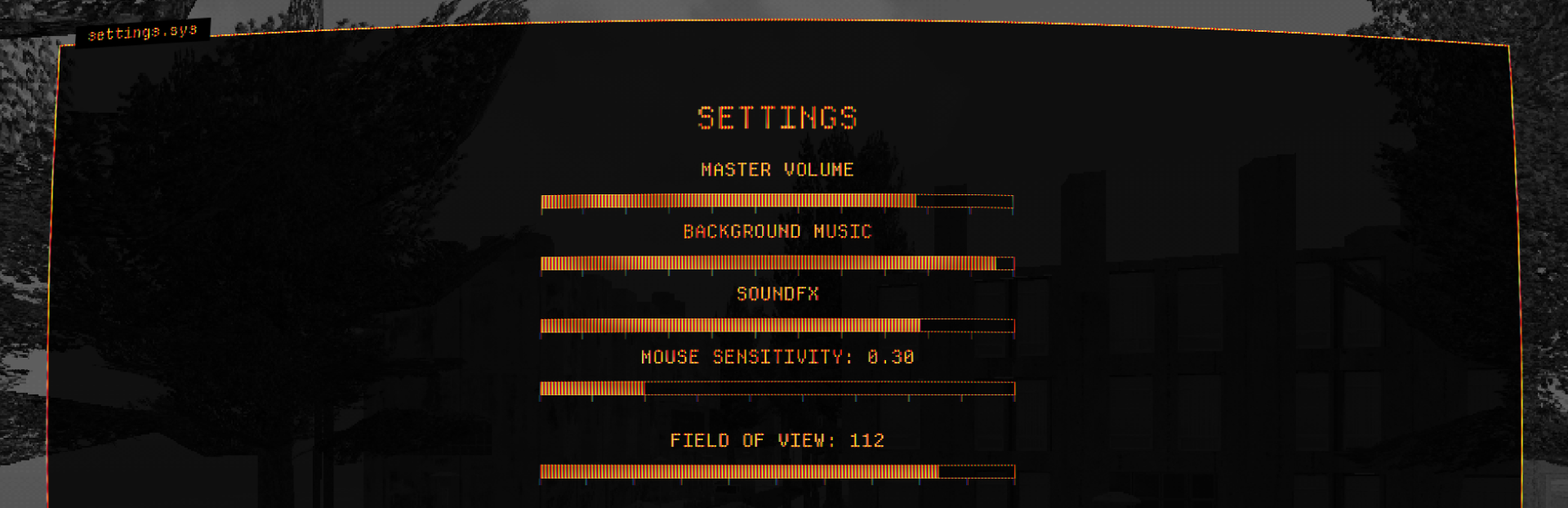
CRT scanlines layered over the UI for that old-monitor glow. Can be turned OFF in Settings if you prefer a flat look.
UI tint picker in Settings: AMBER, PHOSPHOR (green), or CLASSIC (white). Your choice is saved.
New logo on the main menu and full-width layout for multiplayer screens.
LIVE SPLITS HUD
A real-time splits panel now lives in-game so you can see your stage-by-stage progress at a glance during a run. Stable across the whole map, including the bug that used to freeze the HUD on Stage 9 (now fixed).
SETTINGS — CLEARER, MORE OPTIONS
FOV slider (70–120°) — adjust your field of view live in-game.
CRT toggle — disable scanlines if you want.
AUTO RESET ON PORTAL toggle — now OFF by default. When OFF, the timer stops at the portal but you keep playing; when ON, the player is reset on portal hit like before.
Brighter, bigger toggle pills — the OFF state was nearly invisible against the dark menu. Toggle icons are now full UI-tint brightness and a bit larger so the OFF/ON state reads at a glance.
PAUSE MENU CLEANUP
Tutorial removed from the in-game ESC menu — it lives in the main menu where it belongs.
Game world dims and desaturates when paused so the menu reads cleanly on top.
ESC handling tightened up to feel snappier.
BUG FIXES
Splits HUD no longer freezes when entering Stage 9.
Settings file consolidated into a single user_settings.cfg (preset + audio + controls + gameplay in one place).
COMING SOON
More performance polish and a couple of new levels are in the oven. As always — feedback in the Discussions or Discord is gold. Thanks for playing!
Source
Changelog.gg summarizes and formats this update. How we read updates.