
Full notes
Full Aven Colony update
Read the full published notes in a cleaner layout. The original post stays linked below.
What changed
- Gameplay
- UI and audio
- Maps
Aven Colony changes
Content drop 2: The Expedition Update is a free content update for Aven Colony now available on Steam / PC and coming to console very soon. We've made a new video available to explain the new features; please check it out here! https://www.youtube.com/watch?v=iMM_iOPJiho Here's a more detailed breakdown of all the new features. For those of you playing on console, rest assured that content drop 1 is coming to console this month followed by content drop 2 not long after that! See the video above for more information.
The Overworld Map
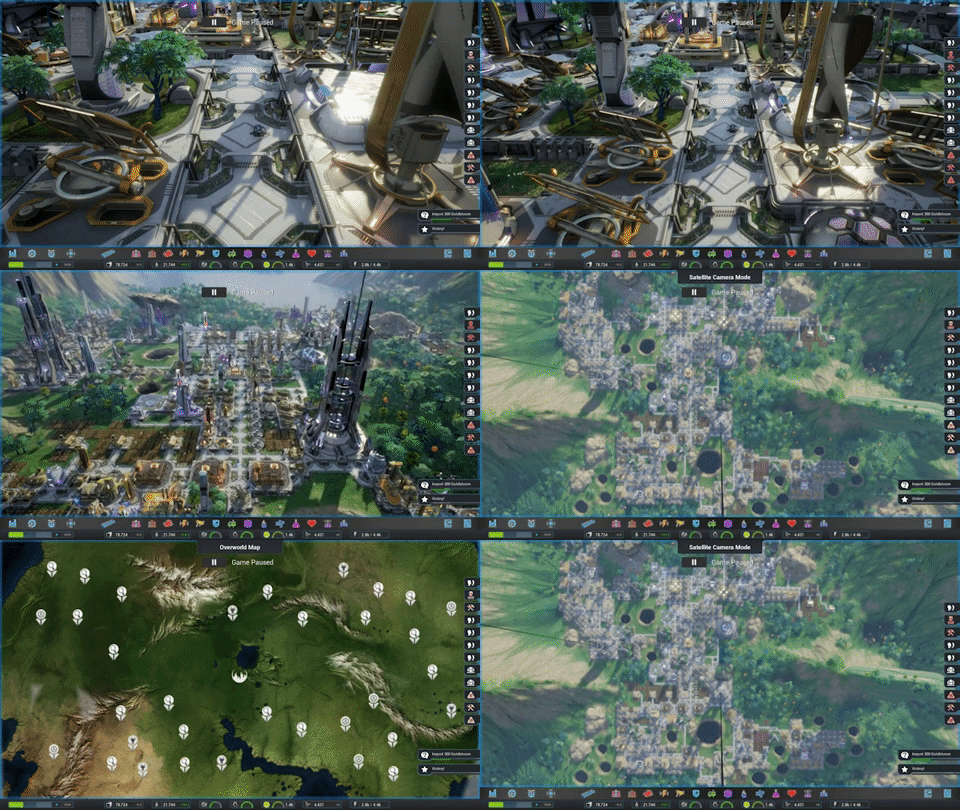
First, we’ve made huge changes to the expedition interface. The expedition UI is now a first-class game mode. And that means that you can now:
change the game speed inside the expedition interface;
view your food and water and other indicators at the bottom while in this mode;
use in-game UI elements like notifications, mission objectives, and the colony control panel.
We’ve also renamed this to “the overworld map” since it’s now MUCH more tightly integrated into the game. Other major changes include:
You can also now see threats like creep spores and plague spores approaching your colony on the overworld map before they actually arrive
You can also now issue commands to your ships simply by right-clicking
Redesigned and improved a lot of the expedition UI, such as redesigning and enlarging the panel that appears when you click on a point of interest
Expedition POIs will gradually respawn over time once you clear enough of them, allowing you to attain up to 99 commendations
You can now build remote installations on the overworld map -- these are described below
You can now click and drag the vessel list to move it out of the way
Revised Camera System
We also overhauled the camera system to allow you to smoothly zoom in or out. If you’re in the normal game view, you can use the mouse wheel or a key shortcut to zoom out to a new top-down view we’re calling “Satellite Camera Mode.” And from there, you can zoom out again to go straight to the overworld map. You can also zoom right in to the surveillance camera. Just zoom in the mouse wheel and it will go right in to the nearest surveillance camera.
So there are 4 levels of the camera system, and you can switch smoothly back and forthn between all of them with the mouse wheel or key shortcuts.
Remote Installations
We’re also now supporting a feature to let you actually extend your civilization out beyond the borders of your colony and build remote installations on the overworld map. There are 4 different kinds of installations:
Settlements are essentially like micro-colonies outside your main colony, and over time, you can set up custom trade contracts with them. This is a great way to get more food and minerals late in the game, and we’ll discuss custom trade contracts a bit later in the video.
Missile Launchers defend your colony from threats approaching on the overworld map, which gives you a way of destroying creep spores and plague spores and other threats before they even reach you.
Solar Arrays collect huge amounts of solar power and beam it back to your colony. You can collect that power with a special Transceiver building discussed below.
Deep Core Mines continuously collect minerals from deep underground and give them to the
Source
Changelog.gg summarizes and formats this update. How we read updates.