
In this update15
Full notes
Full Automated Ranch Simulator update
Read the full published notes in a cleaner layout. The original post stays linked below.
Repeated intro
Hello Ranchers,
What changed
- Gameplay
- Store
- UI and audio
- Fixes
- Performance
- Maps
Automated Ranch Simulator changes
Thank you for all the support, feedback, and time you have given to Automated Ranch Simulator after trying the demo and the influencer early access version. We have been collecting reports, suggestions, and impressions from both the Steam community and content creators who streamed the game on their channels.
This is our first devlog for the game, and we want to use it to share the updates we have been processing based on that feedback. Some of these changes can already be experienced in the demo, while some others are currently available only in the early access build that is still limited to selected influencers for testing purposes.
For this week, we have focused on several updates related to cage production flow, machine readability, tutorial support, employee tasks, and logistics improvements. We will continue reviewing feedback step by step and prioritize updates based on feasibility and overall impact on the game.
Main Update
1. Cage Livestock Process Update
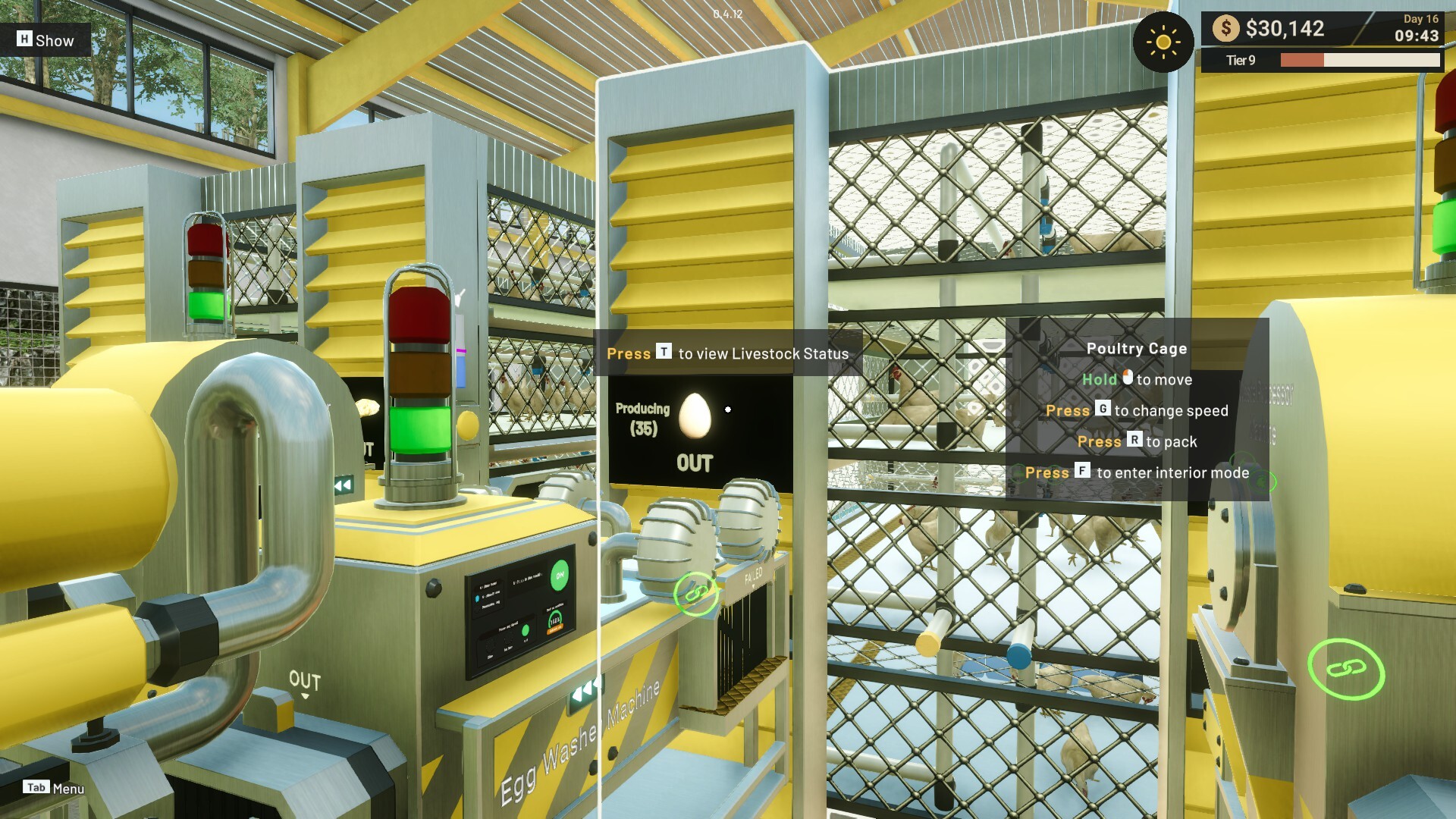
We have made several changes to the livestock cage process to make production feel clearer and more engaging.
Egg production now appears more gradually, so the process feels more visible instead of appearing too suddenly.
The egg output area now shows production progress and also displays how many chickens are currently in the process of laying eggs.
The maximum feed and water requirement inside a cage now follows the number of animals in that cage. For example, if there are 12 animals in the cage, then the maximum feed and water need will be 12 instead of 48.
Feed and Water calculation has also been adjusted to x10, so 1 Feed or Water item will now fill 10 units in the supplier.
[carousel autoadvance="true"]
[/carousel]
2. New Tutorial Support
We have improved how tutorial information is delivered so new content is easier to follow.
Added a Tutorial Menu so tutorial information can be accessed more clearly.
Tutorial information will now appear more regularly when you level up and unlock new content.
[carousel autoadvance="true"]
[/carousel]
Improved the early tutorial flow by highlighting the items that need to be purchased.
[carousel autoadvance="true"]
[/carousel]
3. Production Line and Logistics Update
Several changes this week focus on helping item flow and delivery feel cleaner and more manageable.
Added a new Splitter Machine that can split one line into up to three directions. This machine works by alternating item flow between available paths, as long as the next conveyor connection exists on that route.
Updated the truck loading process so excess loaded items are now returned as a new box placed beside the truck. This allows the remaining items to be brought back to storage and reused for the next project.
[carousel autoadvance="true"][/carousel]
Waste that has already been packed into boxes can now be moved by employees to Waste Storage through the Warehouse Handler task. Waste boxes stored into storage will now immediately remove the box, so there is no longer a situation where the player is left holding an empty box.
4. Catalog and Product Flow Information
To make production planning easier, machine flow information is now available outside project requirements.
Added a new Catalog menu on the Tablet that displays the machine flow for each product. This means machine flow is no longer shown only through Projects, and can now be checked at any time.
The visual presentation of this flow information has also been improved so it is easier to read and understand.
[carousel autoadvance="true"][/carousel]
Improvements
1. Machine Information and Readability
We have made a number of improvements to machine information so players can understand production requirements more easily.
Added packaging progress information for the Egg Loader Machine and Boiled Egg Loader Machine, since these machines require at least 12 items before producing a new packaged output.
Updated packaging information so the machine no longer displays only an empty state, but instead shows the packaging type with x0, making the requirement clearer.
Machine purchase information now shows which packaging type is needed, so players can prepare the correct supply more easily.
Added a special filter in the machine purchase menu to show machines used for the current target product production line.
Removed speed control from machines that do not actually support speed adjustment.
Added direction markers to the base of the Feed Supplier and Water Supplier.
Adjusted item positions on several machines so items are less likely to look stuck during processing.
2. UI and Interaction Improvements
We also improved several interface and interaction elements to reduce confusion during play.
Improved floating warning icons when Fuel, Feed, or Water runs out for Cage-related needs, so players can monitor shortages more clearly.
Improved Hold and Press interaction prompts by using different colors, helping reduce mistakes when performing actions.
Updated Generator fuel handling at the end of the day so it follows the same interaction rule as other supply objects such as Feed and Water Supplier.
Bug Fixes
1. Employee Loading Visual Fix
Fixed an issue where employees appeared to load boxes, but the boxes did not visually enter the truck.
2. Tutorial Blinking Fix
Fixed tutorial blinking issues when tutorial progress was updated.
3. Feed and Water Full Notification Fix
Fixed the notification on Feed and Water machines so a full machine now properly indicates that it is full, instead of only saying the item cannot be inserted.
4. Overflow Input Handling Fix
Adjusted overflow behavior for Feed, Water, and Gasoline so extra input is tolerated and no longer disappears unnecessarily. If the value has already reached or exceeded the maximum limit, it still cannot be filled because it is already full.
5. Chicken Production Fix
Fixed certain conditions that caused chickens to stop producing eggs.
6. Controller Speed Adjustment Fix
Fixed an issue where machine speed could not be changed when using a game controller.
7. Production Line Loop Crash Fix
Fixed a crash that could happen when a production line was built in a looping setup.
8. Employee Restock Position Fix
Fixed employee restock positioning on certain machines that had reversed facing direction.
Thank you again for all the feedback and support you have shared with us during this early stage of development. Your reports and suggestions help us identify which parts of the game need more clarity, better flow, and stronger automation support.
If you encounter any bugs or unexpected behavior, please feel free to submit a report through the in-game report feature or post it in the Steam Discussion page. Suggestions and improvement ideas are also very welcome, because they help us continue shaping Automated Ranch Simulator into a better experience.
We will keep sharing future improvements through the next devlogs. See you in the next update!
[dynamiclink href="https://store.steampowered.com/app/3714170/Automated_Ranch_Simulator/"]
Source
Changelog.gg summarizes and formats this update. How we read updates.