
Full notes
Full Another Map Simulator update
Read the full published notes in a cleaner layout. The original post stays linked below.
Repeated intro
Hello there!
What changed
- Maps
- UI and audio
Another Map Simulator changes
In my last devlog, I took a deep dive into the custom Designer Hubs. Today, I want to look at the literal foundation of Another Map Simulator: how procedural worlds are born, and how you can completely rewrite their geography.
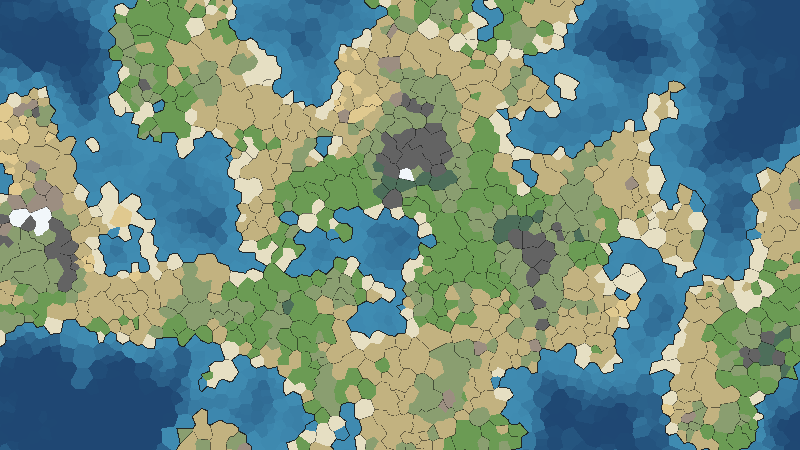
I am trying to build a simulation engine that honors actual geography and geology. When you hit generate, the game doesn't just randomly place green and brown pixels. My pipeline starts entirely with water, applies a "Crunching tectonic plates..." pass, dynamically raises the landmasses, and runs mathematical checks to distribute natural biomes based on Elevation and Moisture.
Sculpting Your Starting World
When you click "Start Game", you are immediately greeted by my Map Generation Menu.
Here, you can choose from various geographical presets depending on the macro-history you want to simulate:
Continents / Pangea for massive, sweeping land wars.
Archipelagos / Islands (Japan or Great Britain Style) for isolated, naval-focused empires.
All Land / All Sea for custom extreme-environment testing.
If you don’t want to leave it entirely up to a blind seed, you can roll the dice to view an instant preview map. You can tweak sliders for the global water level, adjust the overall climate, or determine exactly how many starting nations spawn.
Want to build your custom empires entirely by hand on a pristine canvas? Just toggle the Start Empty (No Provinces) switch. This forces the engine into a "Geo-Only Mode" where no nations are spawned, leaving the world completely empty for you to paint later.
By squeezing the moisture thresholds, I've made true deserts and arctic tundra rare, punishing zones, while expanding habitable grasslands to act as the massive, resource-rich core for your expanding empires.
Once these Voronoi biome cells are set, my code wraps them into a larger layer: Provinces. For a standard map, the engine creates roughly 1,500 Land, 200 Coastal, and 40 Deep Ocean provinces. This layer is crucial: Provinces are the foundation for all politics. If an area has no structural province cell, nations cannot exist there.
If you choose to spawn nations, the game filters them by my custom spawn rules and scatters them across the map. It then loads your custom data structures (like [c]steamaria.tres[/c] or [c]frost-gard.tres[/c]) and uses a Frontier Expansion algorithm to paint the map with initial borders, crowns the monarchs, establishes local religions, and delivers starting war chests.
Terraforming & Political Painting
While my generator does the initial heavy lifting, Another Map Simulator is a playground for active intervention. I am currently working on the live map-painting suites, split into two primary modes:
Terraforming Tools: Manually toggle Height Mode or Biome Mode. Want to isolate an empire? You can paint a deep ocean trench around them or choke out their resource access by turning their fertile fields into a rocky desert with the brush tool.
Political & Cultural Painting: Take total control of the demographic borders. Manually painting wilderness, adjusting cultural zones, or selecting localized religious vectors allows you to orchestrate the exact geo-political powder keg you want to watch explode.
These editing suites are currently functional but basic. I am showing them to you in their unfinished state because I want your input! As a solo developer, I am actively restructuring these UI tools to make painting massive mountain ranges or re-allocating political provinces feel smooth, intuitive, and highly responsive before the demo drops. P.S. I will try to add more tools as well so at least the demo will be a very easy to use map making tool. Thank you so much for wishlisting the game and being patient. Stay tuned for the next devlog where I will show how the simulation works and what can you expect from the in-game AI and what kind of influence the player has over the world it has built.
Source
Changelog.gg summarizes and formats this update. How we read updates.