
HomeGamesUpdatesPricingMethodology
Steam News29 September 20205y ago

2.3.4 - for streamers

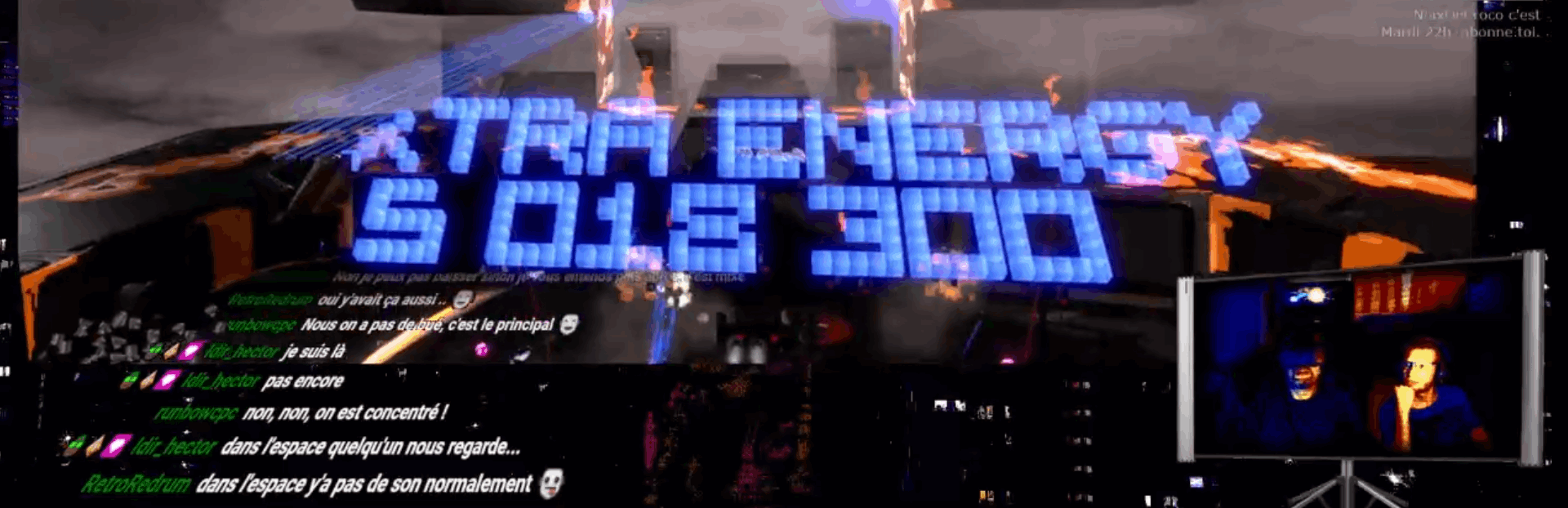
Hi, For streamers, now you can display a chat overlay, in order to stay connected to your viewers. How to ? In the folder /AncederRift_Data/StreamingAssets/chatoverlay.txt, paste the URL of your chat.

Full notes

Full Anceder update

Read the full published notes in a cleaner layout. The original post stays linked below.

What changed

1 fix0 additions1 change0 removals
  • UI and audio
  • Fixes
changedAt this point you can do 2 things WHILE PLAYING : 1 - you can freeze/unFreeze the game without making a pause : press the LB button (xbox Gamepad like). This is to let you time to read what you want. 2 - you can show/hide the chat with the X button (xbox gamepad like).
fixedOther things added : - Possibility to change the screen resolution and full screen option - Fixed : the DPAD was doing Down+Left instead of Left only. - Fixed : Camera looking upward in the SAS when not in VR.

Anceder changes

changedAt this point you can do 2 things WHILE PLAYING : 1 - you can freeze/unFreeze the game without making a pause : press the LB button (xbox Gamepad like). This is to let you time to read what you want. 2 - you can show/hide the chat with the X button (xbox gamepad like).
fixedOther things added : - Possibility to change the screen resolution and full screen option - Fixed : the DPAD was doing Down+Left instead of Left only. - Fixed : Camera looking upward in the SAS when not in VR.

Hi, For streamers, now you can display a chat overlay, in order to stay connected to your viewers. How to ? In the folder /AncederRift_Data/StreamingAssets/chatoverlay.txt, paste the URL of your chat. Then run the game and in OPTIONS, activate "Chat Overlay". Then write something in your chat. More instructions in the chatoverlay.txt file.

At this point you can do 2 things WHILE PLAYING : 1 - you can freeze/unFreeze the game without making a pause : press the LB button (xbox Gamepad like). This is to let you time to read what you want. 2 - you can show/hide the chat with the X button (xbox gamepad like).

Other things added : - Possibility to change the screen resolution and full screen option - Fixed : the DPAD was doing Down+Left instead of Left only. - Fixed : Camera looking upward in the SAS when not in VR.

If you want to stream, choose a non-full screen resolution, and if you use a mirroring (oculus), you can use the lowest resolution as it won't be streamed. Or simply unplug your VR headset if you wan't to play in non-VR (easier to watch for viewers, harder to play for the player).

Source

Steam News / 29 September 2020

Open original post

Changelog.gg summarizes and formats this update. How we read updates.