
In this update1
Full notes
Full Alan's Automaton Workshop update
Read the full published notes in a cleaner layout. The original post stays linked below.
Repeated intro
Hello fellow engineers!
What changed
- UI and audio
- Gameplay
- Fixes
Alan's Automaton Workshop changes
Sorry about the delayed update.
The Steam Cloud sync issue on Mac took us more time than our expected. Currently the issue was solved under Steam Team's help. For engineers play AAW on Mac cross-platform-ly, please remember to back up your save files at ~/Library/Application Support/com.LaputaLabs.AlansAutomatonWorkshop to prevent unwanted save file overwrite.
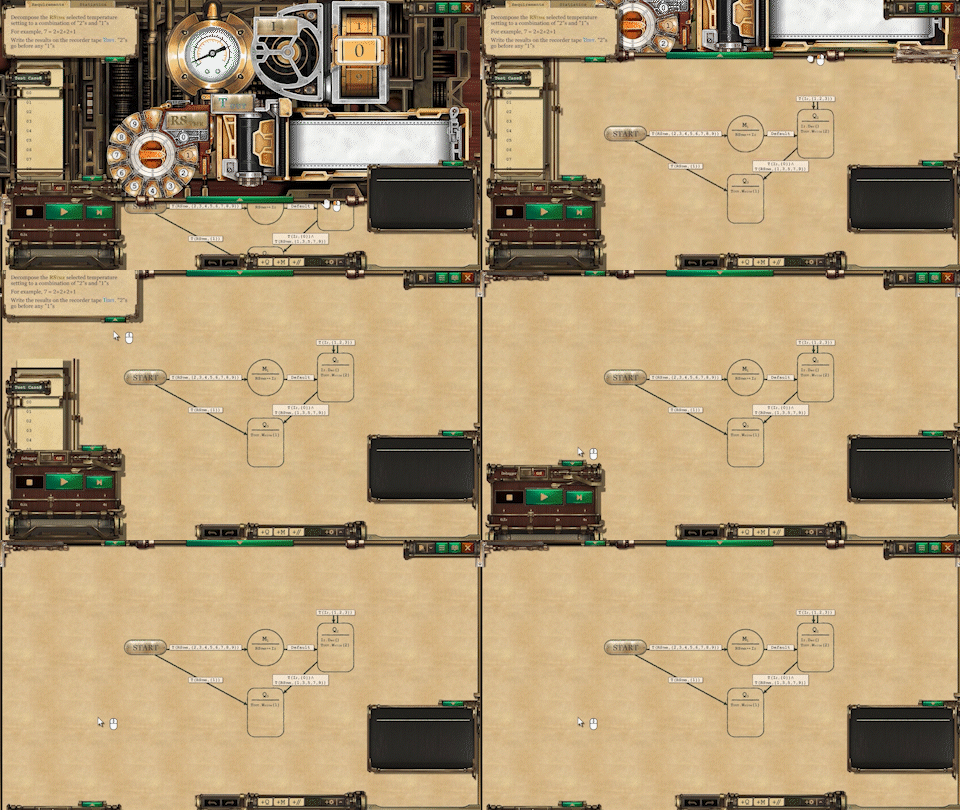
This is a small update focusing on UI improvements. Engineers can now manually drag the edge of Diagram Panel to adjust the size of the editing area. Additionally, you can enable the "Use full-frame Diagram" option to expand the Diagram to full screen by default. The Execution Panel can also be minimized as needed, to provide players with a better editing view.
Next stop, the Sandbox mode! We will do our best to catch up the schedule and release it as soon as possible. Once again, thank you for your kindly support and patience. 🙏
Release Notes
Master build 40307
Improvements:
Player can now adjust the size of Diagram Panel manually, by dragging the edge of it.
- “Use full-frame Diagram” OptionIf the feature is enabled, the Diagram Panel will scratch to the top of the screen automatically when clicking on the Expand button.
Player can minimize Execution Panel to the button left of screen now.
All the cinematics (opening, ending, and trailer in demo) are skippable by pressing Esc key while playing.
A "Restore Defaults" button was added to the Option window.
Bugfixes:
Fixed an issue that cause Steam Cloud not synchronizing save files on Mac.
Fixed an issue that cause BGM muted after watching trailer vid in demo.
Fixed a typo in the intro of 2-4. (Thanks to Roxor128 for reporting it)
Source
Changelog.gg summarizes and formats this update. How we read updates.