
In this update3
Full notes
Full Aimcademy update
Read the full published notes in a cleaner layout. The original post stays linked below.
What changed
- Compatibility
- Gameplay
- Events
- UI and audio
- Server
Aimcademy changes
We´ve created our first version of the Editor, where you can change what you want in the task. 🙌
Create, Share, Compete
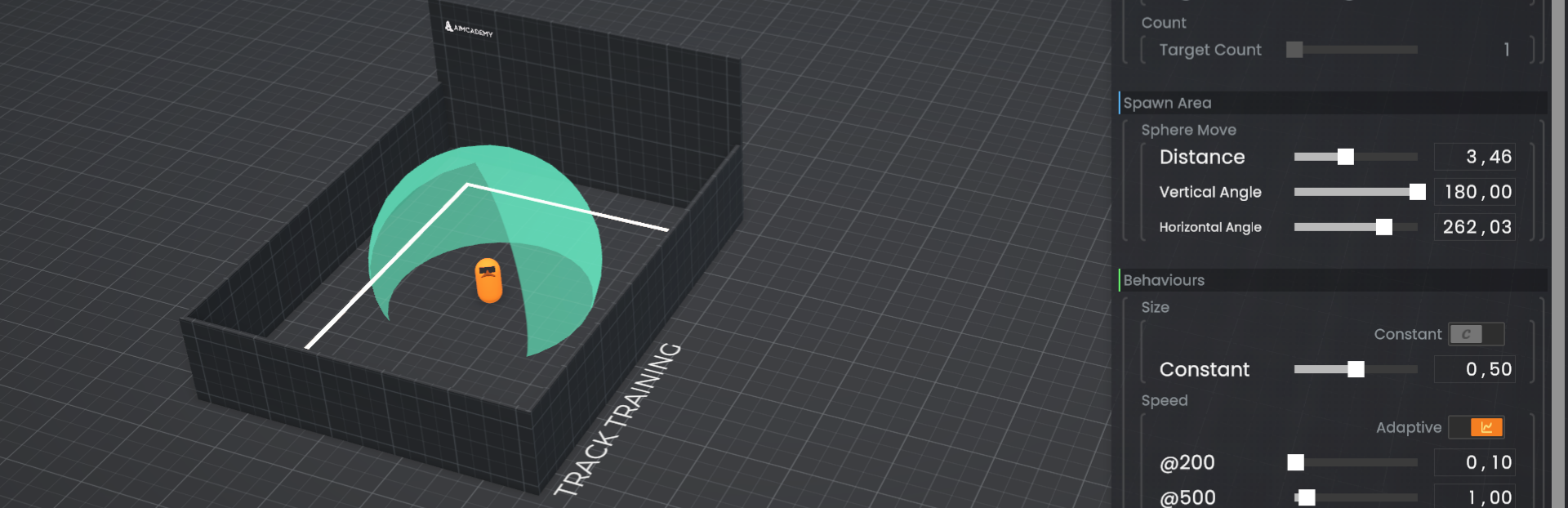
TASK EDITOR (BETA) Steam post image📊Options to adjust:
Constant/ adaptive: Enabling this option makes the task adaptive to the user based on the player´s performance. The recommended approach is that the better the player performs, the harder the task becomes. For example, level 500 should be more difficult than level 200. e.g at level 200 the target is large and slow, while at level 500 the target is small and fast. Create what you like!
Mode: click or track the target
Targets: Health of targets and target amount
Spawn Area
Behaviours:
Size: constant/ adaptive
Speed: constant/ adaptive
Adaption process
Time pressure: How much additional time does the player have to click or switch between targets? error rate: How many errors is a player allowed to make? A Error rate of 60% means 60% hits on the target and 40% misses.
Recommended
between 15% and 30% error rate for better motivation and progress.
Duration of the task
Play and test the task afterwards and as soon as you are happy with it, you can"Publish"the task in Aimcademy and share it with your friends or on our Discord Community Channel . In this beta version of the editor, it is possible to create non-functioning tasks, so please make sure to test them on different difficulty levels before releasing.
Community Trainings menu
Steam post imageIn the NEW menu you can find the tasks that are filtered. Mark them as your favourite and send them to your friends. 🌐
⚒ Other Additions:
Dropdown borders are now highlighted on interaction
Added new initial loading screen to better synchronize with online services
Added missing translations Changed
Increased size of bottom center alerts to allow longer texts
Updated changelog menu appearance
Updated button appearance in bottom right corner of main menu
Large numbers are now shown in a compact format in the statistics menu
Updated design of toggles in options menu Fixed
Fixed bottom center alerts from overlapping with bottom center buttons
We’ve put a lot of work into this update, but there’s still plenty more to do. If you have any special ideas or suggestions, feel free to let us know.💡
If you like the update, we’d really appreciate your feedback and a review on Steam . If you’d like to support us further, you can find the link on our discord server . Much appreciated!☕🙏
Source
Changelog.gg summarizes and formats this update. How we read updates.