
Full notes
Full AI Drone Simulator update
Read the full published notes in a cleaner layout. The original post stays linked below.
What changed
- Maps
- Workshop
AI Drone Simulator changes
AiDroneSim is now officially the most customizable FPV sim ever : import your images and 3D meshes in the in-game editor, and even import whole unreal engine maps !
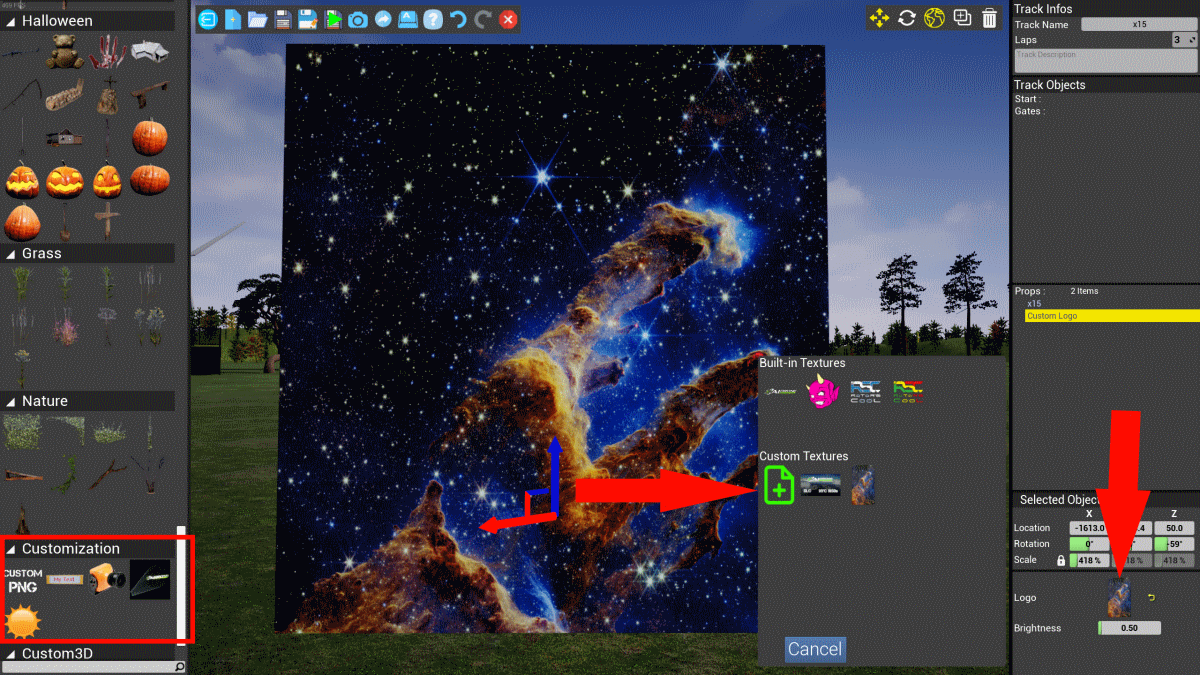
PNG Import In Editor
The custom Logo projector and the simple Custom Logo item now allow direct importing of PNG Files : Import your Logo, or any PNG image, from the properties of the item :
For more information, see the guide
3D Objects Import
Direct import of 3d objects in editor from files. As with user PNGs, the files are saved as a copy, and will automatically be shared when you share a track or scenery including them. This also import the textures when possible.
Supported formats : OBJ and FBX (binary, embedded textures).
For more information, see the guide
Unreal Engine map import
You can now fly any unreal engine map in AiDroneSim. This is an advanced feature, intended for power users. There is, for now, no in-game/steam workshop integrated way to share your map, but you can always send the zipped folder to friends.
Here how to package your map for AiDroneSim in less than 10 minutes :
Don't forget to get the JSON metadata file template See the complete guide
Other
Some minor fixes. - Freestyle contest results will be announced soon.
Source
Changelog.gg summarizes and formats this update. How we read updates.