
Full notes
Full A Chamber of Stars update
Read the full published notes in a cleaner layout. The original post stays linked below.
What changed
0 fixes0 additions4 changes0 removals
- UI and audio
- Gameplay
changedI've completed testing of A Chamber of Stars on a Steam Deck. The game runs smooth on the Steam Deck, plus the game looks and sounds great.
changedA face button to E key or left click
changedB face button to Q key
changedThe controls can be changed in both the Steam Deck settings as well as the pop-up menu while launching the game.
A Chamber of Stars changes
changedI've completed testing of A Chamber of Stars on a Steam Deck. The game runs smooth on the Steam Deck, plus the game looks and sounds great.
changedA face button to E key or left click
changedB face button to Q key
changedThe controls can be changed in both the Steam Deck settings as well as the pop-up menu while launching the game.
I've completed testing of A Chamber of Stars on a Steam Deck. The game runs smooth on the Steam Deck, plus the game looks and sounds great.
(Image credit: Steam)
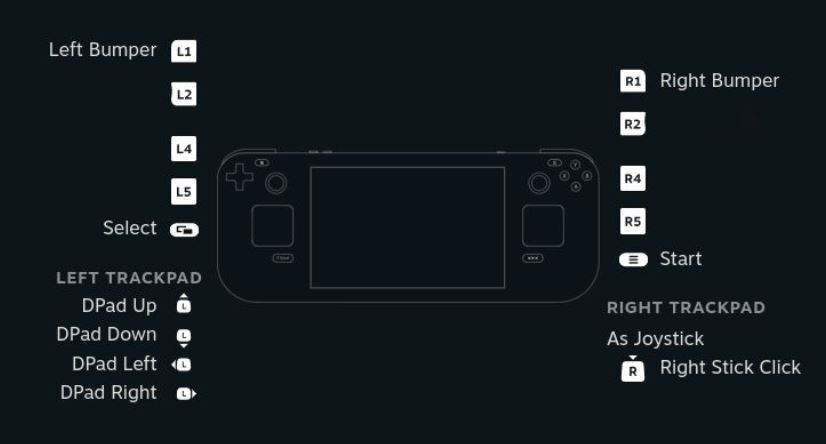
It is recommended to set the Steam Deck buttons to the following controls:
R2/L2 to Space bar
A face button to E key or left click
B face button to Q key
D pad to W/A/S/D
Start to Esc key
With these settings both the exploration and rhythm game sections will be playable.
The controls can be changed in both the Steam Deck settings as well as the pop-up menu while launching the game.
Source
Changelog.gg summarizes and formats this update. How we read updates.