
In this update4
Full notes
Full 小闹花园 update
Read the full published notes in a cleaner layout. The original post stays linked below.
What changed
- Gameplay
- UI and audio
- Maps
小闹花园 changes
Hi everyone!
It has been about a month since our last demo playtest, and during this time, we finally finished developing something we have been really excited about: Decoration Mode!
Now, besides planting flowers, harvesting them, and watching your little garden grow on your desktop, you can also decorate your space more freely than ever. We cannot wait for you to try it out!
New Decoration Mode
The biggest addition in this update is the brand-new Decoration Mode.
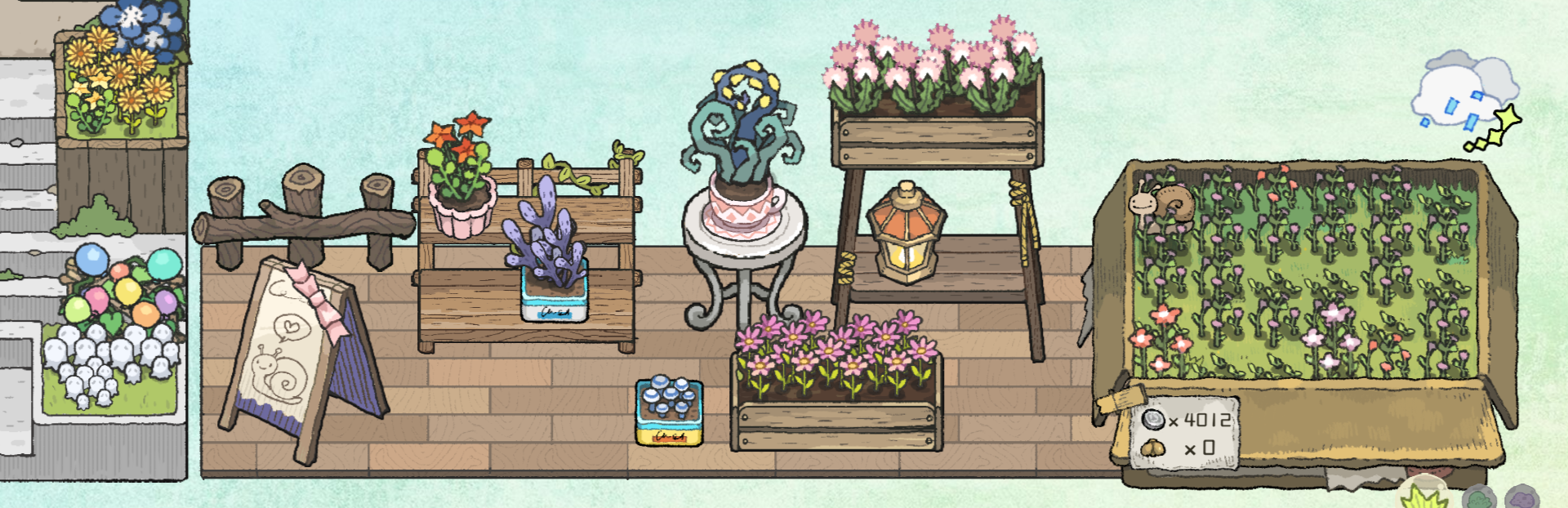
In Decoration Mode, you can place desktop decorations anywhere on the screen, including floors, flower stands, and more. You can also take the flowers you worked hard to grow and place them back into pots as decorations, so they can stay with you on your desktop.
To give everyone more freedom while keeping things from getting too messy, we added zoom controls for the overall decoration canvas, as well as several size options for individual decorations. Unlike plants in the regular gardening area, flowers in Decoration Mode are not limited by planting grids, so you can arrange them more freely and place them much closer together.
In other words: it is time to seriously decorate your garden!
Flower DJ Mode
Some players told us they wanted to see the flowers dance, so we added a small extra feature for flowers placed in Decoration Mode: DJ Mode!
When enabled, your flowers will sway along with the music playing on your system. They can keep you company while you work, study, or just listen to music. Of course, you can turn this feature on or off at any time with one click.
From now on, your desktop garden can groove a little too.
Storage Improvements
We also made a few improvements to flower storage.
Harvested flowers can now be marked as favorites, and we added a one-click sell-all option to make it easier to keep the flowers you like and quickly sell the extras.
We will continue to evaluate player feedback and decide whether more detailed options, such as choosing specific quantities, should be added in future updates.
New Pot Looks
This update also adds new pot designs for the Forest and Swamp terrains.
Our artist has been working extremely hard, so that is all we could add for now... but there will be more in the future! _. (:з)∠) _
Other Quality-of-Life Improvements
We also made several small usability improvements, including:
Right-clicking on empty space now closes the current panel;
Some sprinkler interactions have been adjusted to feel smoother;
Various small fixes and detail improvements have been made.
There are a few more small changes here and there, but we will not list every single one this time.
What Comes Next
This demo version will remain available for the long term and will serve as an important way for us to collect player feedback.
Next, we will continue improving the tutorial, UI interactions, bug fixes, and the overall experience based on your feedback.
At the same time, we are also working on the final two maps for the full version. Once our launch plans are ready, we will rush over to share the release date with you!
Thank you so much for your continued support. We hope Decoration Mode helps make your little garden feel even more like your own.
Please enjoy the demo, and feel free to share your feedback with us!
Source
Changelog.gg summarizes and formats this update. How we read updates.