
Update log
Full World of Warships update
The complete published notes, normalized for clean reading and source attribution.
Extracted changes
- Gameplay
- Events
Commanders!
The way in which Twitch Drops work has changed, so in Update 0.10.1 you can expect things to look a little bit different than what you've been used to. The most important thing is that you'll still be able to collect free loot—including the valuable Italian Tokens that are used to unlock Early Access Regia Marina battleships—just for watching World of Warships on livestreams!
Don't forget: you need to link your Twitch account to World of Warships in order to receive Twitch Drops. It's easy! Just follow the instructions here.
| What changed? ● Twitch rewards ● Where and How |
|---|
What changed?
Three new features will affect you as a viewer on Twitch:
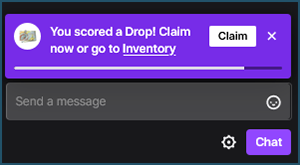
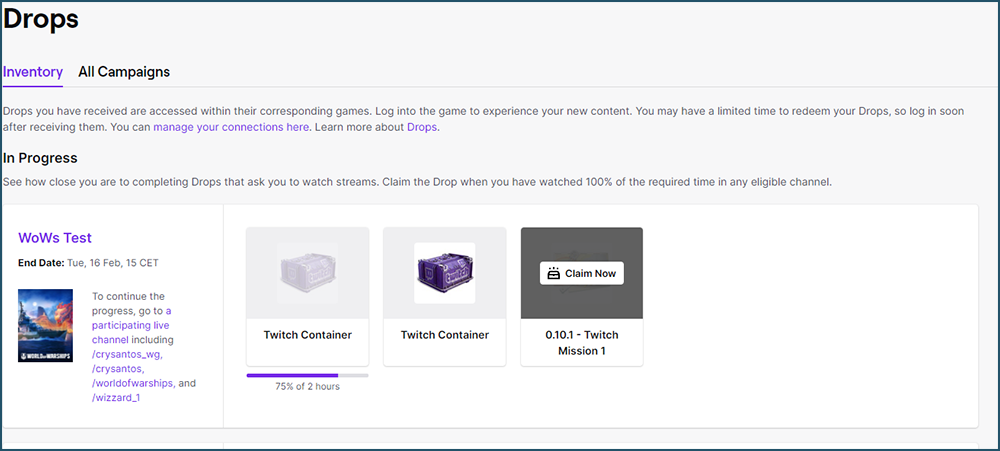
User Interface update — the main feature of the changes implemented by Twitch to the Drops system is the implementation of a new sleek, comfortable, and informative UI. Now, you'll be able to track just how long you need to watch a stream for in order to get the next drop, thanks to a handy progress bar that will dynamically fill up as time passes. Once the bar is filled, you will get a notification right in your browser with a button to claim the reward *.
Sequential Drops — it will now be possible to have rewards drop in a specific order, e.g. in order to start progressing towards receiving reward Y, you must first have watched for long enough to receive reward X.
Removal of random-chance drops — with the new update, it is no longer possible to facilitate rewards that have random chances of dropping for viewers. Since this mechanic was the basis for our Twitch Epic Drops, these types of rewards will no longer be available in their past form for the time being.
As far as in-game changes go, there are another two points to keep in mind:
Log in to claim rewards — unlike in the previous system, where your Drops were credited instantly to your account if you had the game running in the background, it will now be necessary to log in to the game for the loot to hit your Port. If you receive a drop while you're logged in to World of Warships, you'll need to log out and log back in, or to restart the game.
In-game confirmation of rewards — if you want to make sure that you've received your Twitch Drop after logging in to World of Warships, you can click the “Info” button on the bottom-right of your Port screen, where the goodies will be displayed.
As this is only the first update with the new system, you can look forward to further changes and improvements in the months to come. Join us on-stream and let us know what you think!
* Due to the Twitch overhaul, all Drops—not just for World of Warships—must now actively be claimed on your Twitch account either by clicking the button on the pop-up notification in the stream interface or in your personal Twitch inventory. If you take no action, the reward will disappear 24 hours after the end of each campaign. Each Update will have 2 campaigns, each lasting 2 weeks. For more information, consult the All Campaigns tab in the Twitch interface.
Twitch rewards
There are three types of Twitch Drops for World of Warships. All, except for the Official Channel Drops, can be obtained by watching any streamer on Twitch who is playing World of Warships and has Drops
Source