
In this update4
Full notes
Full Universe Sandbox update
Read the full published notes in a cleaner layout. The original post stays linked below.
What changed
- Performance
- Balance
- Gameplay
- UI and audio
Universe Sandbox changes
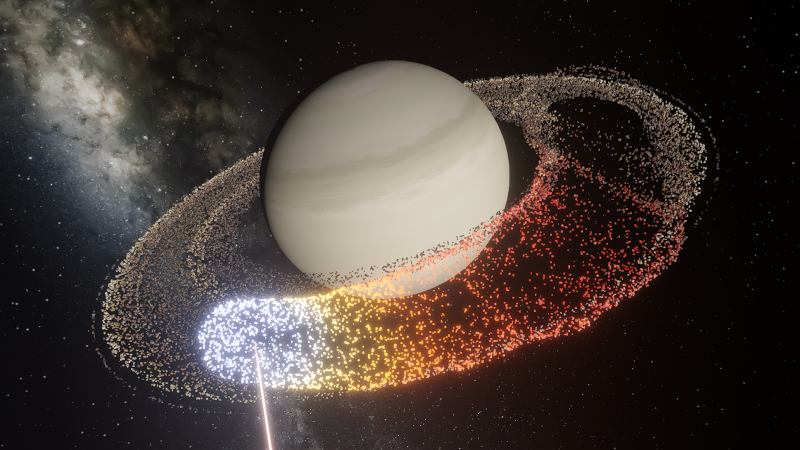
Blast apart rings with lasers, deform moons as they become tidally locked, vaporize meteors, and more! We’ve reconstructed the physics simulation architecture of Universe Sandbox to provide a new base for improving performance, finding and fixing issues faster, and more easily adding new physics features.
“To me, it underscores our responsibility to deal more kindly with one another, and to preserve and cherish the pale blue dot, the only home we've ever known.” - Carl Sagan, Pale Blue Dot, 1994
New Simulation Framework
We’ve overhauled the physics architecture of Universe Sandbox to utilize the Data-Oriented Technology Stack (DOTS) from Unity, the game engine we use to build Universe Sandbox, to
Improve performance now and in the future.
Add new physics simulation, like stretched objects and atmospheric drag to simulate meteors.
Make our game code easier to maintain and build on.
Provide a foundation for future big features, such as building and flying spacecraft and constructing (and destroying) megastructures like Dyson spheres.
Improved Lasers!
Blast multiple objects at once (instead of just one object at a time) with the updated laser! You can even push objects around by increasing light’s radiative pressure. Steam post image
Atmospheric Fireballs
Objects now burn up as they travel through planet atmospheres with our new atmospheric drag force to simulate meteors. Trails are created as volatile material, like water, is burned off the object. Check it out in our new Meteor Shower from Earth’s Surface simulation.
More Highlights
Objects Stretching & Squishing Simulate the stretching and flattening of objects in real life due to gravity or fast rotation. However, collisions and surface simulation will continue to simulate as perfect spheres even on stretched objects until this is improved in a future update Steam post image
Customize Heat Glow & Luminosity Want to make a whale glow with the brightness of the Sun? Now you can make any object emit any color light at any brightness, regardless of its temperature. Steam post image
Tidal Locking Gravitational interactions that change an orbiting object’s rotational period until the same side of one object always faces the other, as the Earth has done to the Moon, are now simulated. Visualize tidal locking by turning on Tidal Lag in the View panel to see the difference between the object’s orbital and rotational periods. Steam post image
Lagrange Points Mark the location of Lagrange points, points where the gravitational forces between all objects in the system are equal, with the press of a button. There’s even a handy Place Object at Lagrange Point option
Predicted paths See the path an object will follow as we project its motion into the future. Checking for collisions along the way, this path will turn from yellow to red, showing the amount of predicted overlap. Turn on predicted paths under View > Overlays > Predicted Paths
Non-spherical Gravitational Fields Similar to flattening objects, we’re now fully simulating how an object’s gravitational field changes when it’s no longer a sphere by simulating its oblateness factor (also called J2). Previously, these factors, used to simulate the orbits of sun-synchronous satellites, had to be manually entered.
New Add Tool Views Automatically turn on orbits, the simulation grid, or show the habitable zone with the Add Tool View options as you add objects to your simulation.
New Overlays Use the new overlay options to easily see the predicted path an object will take, the orientation of its axes in the simulation, and more.
New Save File Structure Simulation and object save files are now more versatile and capable. In the future, you’ll be able to save and share custom presets (like individual species of life). Previously saved simulations and objects will still open, but new saves will not work in old versions of Universe Sandbox.
Number Formatting Show large numbers with commas, periods, half-spaces, or without separators. The initial number format will correspond to the selected language and can be adjusted under Home > Settings > General > Number Formatting
Check out the full list of What's New in Update 36.
Please report any issues on our Steam forum, on Discord, or in-game via Home > Send Feedback.
Source
Changelog.gg summarizes and formats this update. How we read updates.