
Update log
Full Kotama and Academy Citadel update
The complete published notes, normalized for clean reading and source attribution.
Repeated intro
Hello everyone!
Extracted changes
- UI and audio
- Workshop
- Gameplay
- Fixes
- Performance
This is the Academy Citadel Engineering Club. Thank you for your support of Kotama and Academy Citadel; we have been closely monitoring the discussions among all students. First, we want to offer our sincerest apologies for the frustration you’ve experienced. This is our first Metroidvania game, and we are deeply aware of our shortcomings. Thank you, students, for voicing your concerns - this is the most important roadmap for us to move forward.
The following covers the issues you care about (Controller Remapping and Platform Jump Assist) as well as the specific details of this update:
Regarding Controller and Keybinding Configurations
To ensure your current experience remains as smooth as possible, our Engineering Club has already developed a modification plan. It is currently in urgent development. Because controller remapping involves multiple functional modules such as character control, button prompts, and UI interaction, we are unable to include it in today's patch. We sincerely apologize that our lack of experience has led to a poor experience for you; we hope for your understanding. These specific adjustments will be pushed as soon as testing is complete.
Current Temporary Solution:
Operating Guide: Right-click the game in your Steam Library -> Select [Properties] -> In the [Controller] tab, select [Enable Steam Input], and click [Controller Configurator] to open the settings interface. Once the window is open, click [Edit Layout] to enter the detailed keybinding menu. You can then adjust the keybindings to best suit your personal preferences. Steam post image
Additionally, we have noticed feedback regarding RT-type triggers encountering double-mapping or response anomalies after customization. We suggest following the adaptation process below:
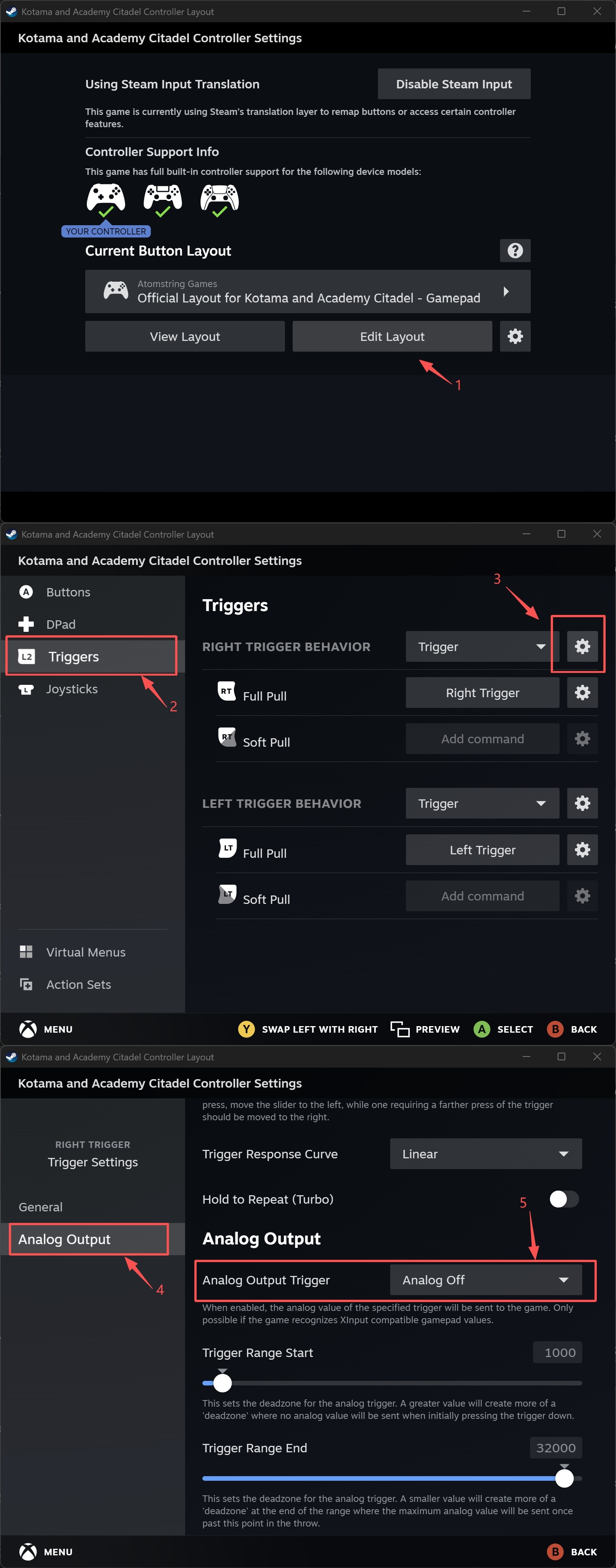
Regarding Platform Jump Assist and Optimization
We have added clearer prompts in the Central District and along other mandatory paths to ensure more players can easily find and use this tool. Additionally, we have now added the Platform Jump Assist feature to all difficulty levels.
Steam post imageSteam post imageSteam post image
Regarding Screen Whitening/Flickering Issues
If some students experience whitening or flickering on their screens, it may be because your PC has automatically enabled Auto HDR. This must be turned off manually.
Operating Guide: Open Windows Settings -> System -> Display -> HDR, and turn off the HDR function there.
Update Details:
New:
Platform Jump Assist can now be enabled in all modes.
Fixes:
Fixed a low-probability issue where the protagonist could get stuck in narrow passages when the dash has not yet been acquired.
Fixed a low-probability issue where the protagonist's HP bar UI would disappear after defeating a BOSS.
Fixed an issue in the Art Academy BOSS battle where the BOSS could clip out of the room, causing a logic lock.
Fixed an occasional issue where the protagonist's input would lock after the opening dialogue of the Biology Academy BOSS battle.
Fixed an occasional issue where the protagonist's input would lock during the opening dialogue of the Tower BOSS battle.
Fixed several other bugs affecting the combat experience.
Optimization:
Optimized the hit sound effect performance for the Art Academy BOSS.
To us, Kotama and Academy Citadel is more than just a project; it is a growing campus that we are building together with all of you. It is not perfect yet, but we will continue to optimize, fix, and add content. Thank you again for your passionate support, students. Please give us a little more time, and we will respond to every bit of your trust through our future updates.
If you encounter any bugs or issues during your playthrough, please let us know via the forms below. We will review every report carefully as we continue to optimize the game experience and content.
Additionally, we will be keeping a close eye on player comments across all our communities. You are also welcome to join our official groups to chat and share your thoughts: Discord:
Academy Citadel Engineering Club
Source