
Update log
Full GearBlocks update
The complete published notes, normalized for clean reading and source attribution.
Repeated intro
Hey everyone, it's update time!
Extracted changes
- Workshop
- UI and audio
- Gameplay
This one aims to catch up on a number of outstanding bug fixes and smaller feature requests. There's more in this release (new game settings, part behaviour options, Lua scripting API changes) than I'll discuss here, so as always please check out the release notes for the full list.
Linker Tool Improvements
In a previous update I made an attempt to save and restore links that were lost when moving a part selection. This partially worked, but there remained two cases when links were still being lost:-
Between multi-selected parts when moving them.
When moving or resizing a part that the linked parts are attached to.
Rather than trying to hack in further fixes, I decided to rethink the problem and implement a simpler and more robust solution.
Now, the game allows for links between parts that don't belong to the same construction to exist temporarily. Such links are invalid but will only get removed if they still exist when the construction is unfrozen.
This means that parts can be detached into separate constructions without immediately removing links between them.
It also allows for links to be created between parts before attaching them together, which may be more convenient when building dense creations.
Logic
Data Channel String Formatting
Logic data channels need to be formatted into strings to be shown on linked display screens (and also in the part UI overlay). However, this had a few problems which have now been addressed.
Formatted strings (particularly for Number data channels) would sometimes run off the end of display screens. To fix this, I implemented a custom float to string formatter that adjusts to fit within a maximum number of characters. It automatically reduces the number of decimal places shown, or falls back to a more compact exponential notation if necessary.
Many of the labels and units specified by part behaviours to format their data channels have now been tweaked to improve clarity.
However, sometimes you might want to customise how a data channel is formatted into a string. To achieve this, some new logic module parts have been added.
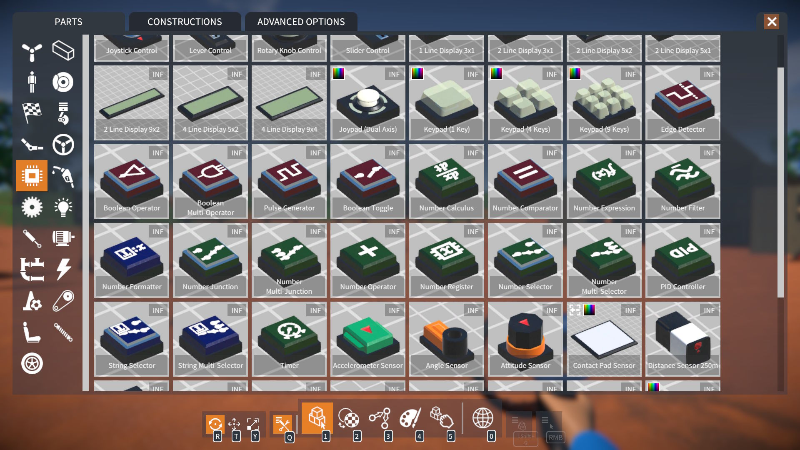
Number Formatter: Formats an input Number into an output String, with a tweakable prefix, suffix, and max num decimal places.

String Selector: Uses an input Boolean to choose between outputting one of two tweakable Strings.

String Multi-selector: Uses an input Number to choose between outputting one of several tweakable Strings.

Number Expression Logical Operators
Two new operators have been added to the number expression module.
Logical operators: &&, ||. If a is non-zero AND / OR b is non-zero, returns 1, else returns 0.
These can be combined with the comparison and conditional operators, for example:
if(x > 5 && x < 10, y, z * 10)
Logic Module Colour Coding
To help distinguish between logic module parts, they are now subtly colour coded by their output channel data type:-
Red: Boolean.
Green: Number.
Blue: String.
Advanced Part Resizing
Many of you like to build with more flexibility than the standard "unit" step part resizing allows.
To help make this easier, I have made some additions to the BuilderToolEx script mod:-
An option to override a part's default resize unit step.
A toggle to disable part size clamping.
New fields to directly type in a part's unit size.
These options allow you to circumvent normal part size limitations...
...and to resize in non-unit
Source