
Update log
Full Baldur's Gate 3 update
The complete published notes, normalized for clean reading and source attribution.
Repeated intro
Hello there, everyone! We hope you’re all good, wherever you are.
Extracted changes
- Gameplay
- Compatibility
We’ve been hard at work since our last major update, and Patch 8 is almost ready for primetime. We’re putting the finishing touches on it right now, and preparing a Panel from Hell to give it a full unveiling.
On to our feature presentation: Patch 8 is drawing near, and it’s going to be roughly 40GB (so make sure you have space free!), bringing the total install size for Baldur’s Gate 3 to approximately 104GB. As with our previous patches, and saves made on Patch 7 or prior will no longer be compatible when updated.
In addition, we’ll be using Patch 8 as the opportunity for a little bit of digital house-cleaning. Once it goes live, we’ll be removing the ability to download all but the 2 most recent Patches. In this case, Patches 6 and 7 will remain available for download, but we encourage all players to update to the most recent version of the game in order to get the latest fixes and content updates.
With that bit of housekeeping out of the way, let’s talk branching. We’ve got options if you want to continue saves from earlier patches, or if you want to make sure you’re staying current. Check out the below instructions for whichever method suits you best.
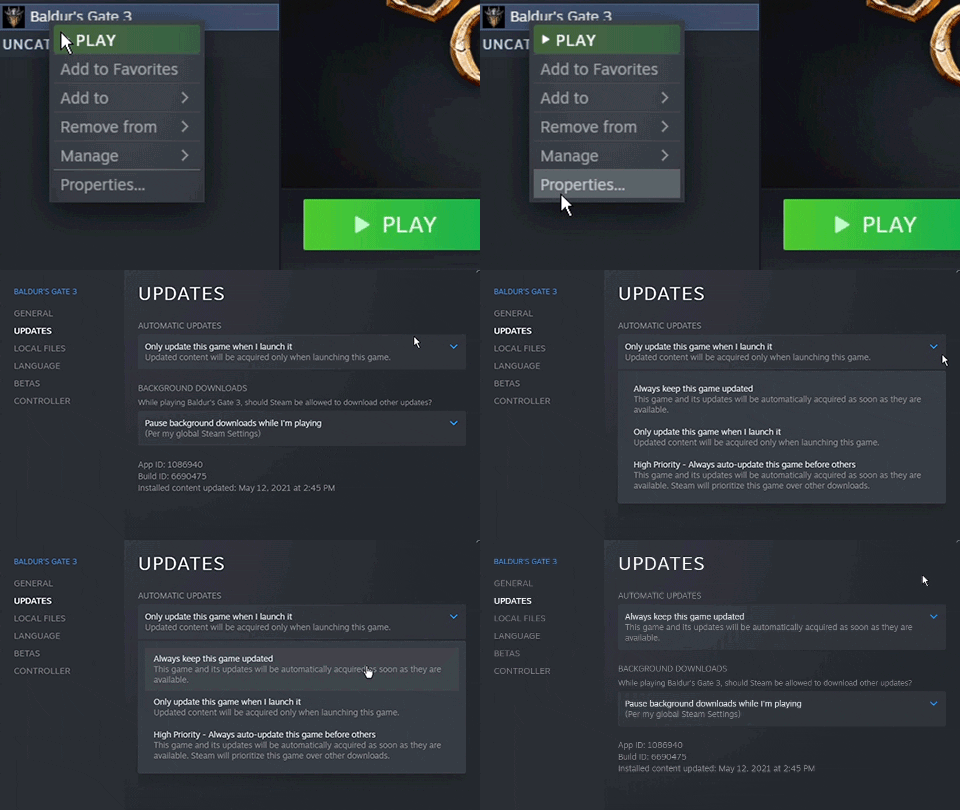
- How to Update Your Game to Patch 8If you want to play the most up to date version of the game and have never opted into any beta branches in the past, then good news: You don’t need to do anything! When the patch releases, you will receive the most updated version of the game as long as you have automatic updates enabled. To enable automatic updates, please follow the steps below:
Right click on the game in your Steam library
Select properties
Click the Updates tab
Select "Always keep this game updated" in the drop down menu
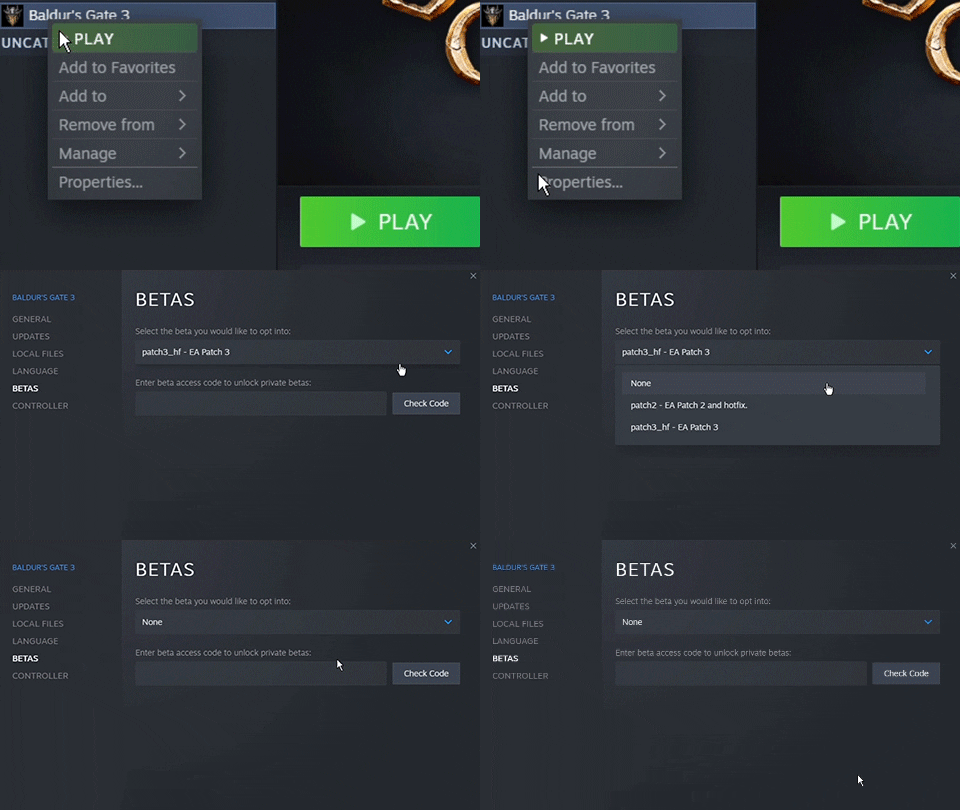
How to Update to Patch 8 If You’ve Opted into an Earlier Beta Branch: If you previously opted into any beta for Patch 6 or earlier and want to ensure you get the most up to date content when Patch 8 goes live, then please follow the steps below:
Right click on the game in your Steam library
Select properties
Click the Betas tab
Select "None" in the drop down menu
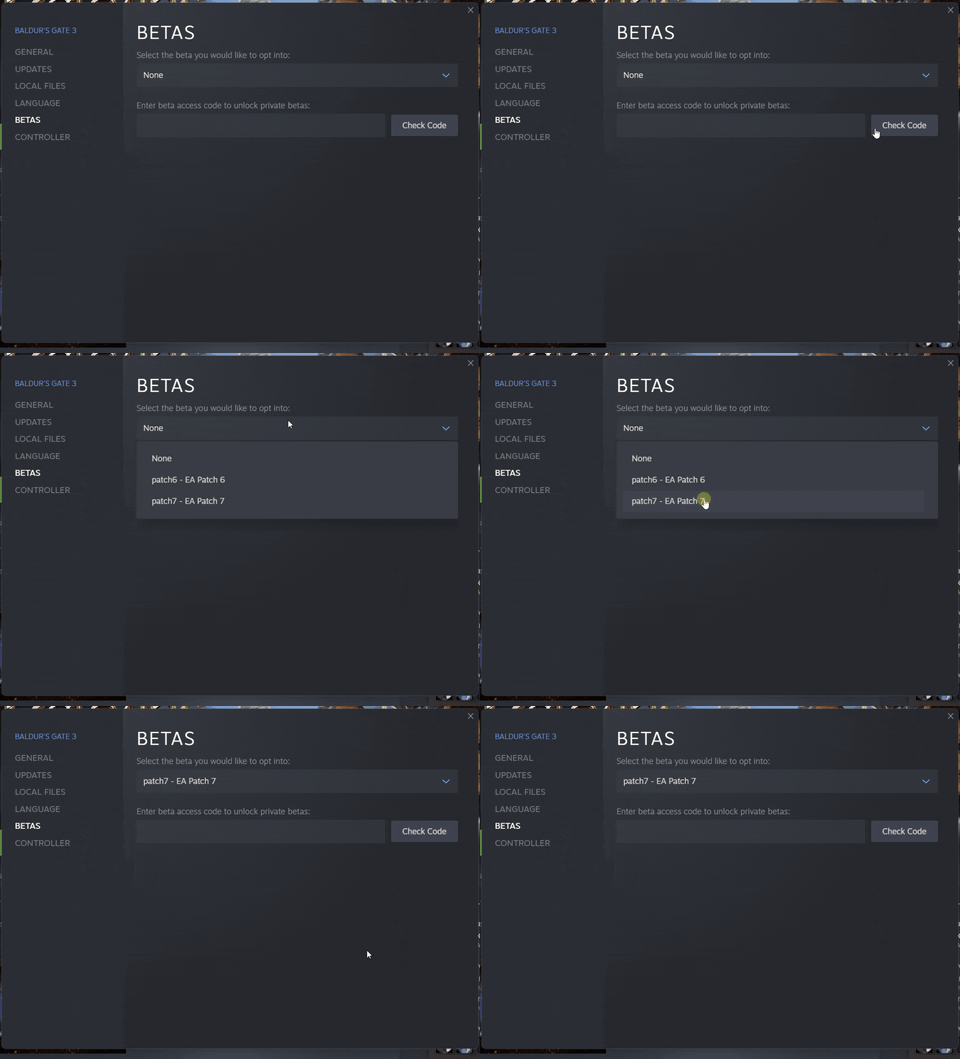
How to Continue Your Patch 7 Save: If you want to continue your progress from Patch 7, then take the following steps. Save files are not ‘deleted’ from your computer; they’ll remain in your folder, but you’ll only be able to load saves specific to their respective versions.
Right click on the game in your Steam library
Select properties
Click the BETAS tab
In the list under "Select the beta you would like to opt in to", select Patch 7
Close the properties menu
If you’d like to continue your save file on the current version, you can move to the Patch 7 beta branch now.
Important Note: If you want the option to go back to a previous patch, it’s best to make a new in-game profile and backup your local saves from the previous patch. You can do the following before or after you update to the latest version:
Before starting a new playthrough, create a new profile by clicking the profiles button on the top left of the main menu. All your progress in the new
Source